


|
|
| メニューの場所 |
|---|
| スケッチ → スケッチャージオメトリ → 制御点によるBスプライン |
| ワークベンチ |
| スケッチャー |
| デフォルトのショートカット |
| G B B |
| 導入バージョン |
| 0.17 |
| 参照 |
| スケッチャー・制御点による周期的Bスプライン |
概要
The  Sketcher CreateBSpline tool creates a B-spline curve from control points. introduced in 1.0: Or optionally from knot points.
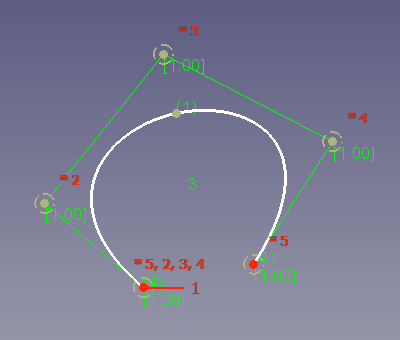
B-spline curve (white) defined by 5 control points.
The control polygon (green) connects the control points (marked with dark yellow weight circles).
The number 3 (green, without brackets) in the center refers to the degree of the B-spline.
The numbers (1) and (4) (green, in round brackets) refer to the multiplicity of the knot points.
The numbers [1.00] (green, in square brackets) refer to the weights of the control points.
使い方
See also: Drawing aids.
- There are several ways to invoke the tool:
- Press the B-Spline button.
- Select the Sketch → Geometries → B-Spline option from the menu.
- Right-click in the 3D View and select the B-Spline option from the context menu. introduced in 1.0
- Use the keyboard shortcut: G then B, then B.
- Press the
- The cursor changes to a cross with the tool icon.
- The B-Spline Parameters section (introduced in 1.0) is added at the top of the Sketcher Dialog.
- Optionally press the M key or select from the dropdown list in the parameters section to change the tool mode:
- From control points:
- Optionally change the Degree (also possible after points have been picked):
- Enter a number greater than zero.
- Press the U key to increase the degree.
- Press the J key to decrease the degree.
- Optionally change the Degree (also possible after points have been picked):
 From knots: introduced in 1.0
- B-splines from knots are always created with degree 3. But their degree can be changed later. See Notes.
- Optionally press the R key or check the Periodic checkbox to create a closed B-spline (also possible after points have been picked). introduced in 1.0
- Pick several points.
- Optionally press the F key before finishing to delete the last point. introduced in 1.0
- Right-click or press Esc to finish the input.
- The B-spline is created, including a set of internal geometry (weight circles and knot points).
- If the tool runs in continue mode:
- Optionally keep creating B-splines.
- To finish, right-click or press Esc, or start another geometry or constraint creation tool.
補足
- Elements of the internal geometry can be deleted. They can be recreated at any time with Sketcher RestoreInternalAlignmentGeometry.
- After a B-spline is created, it is possible to define the weight of the control points by changing the radii of the weight circles. The equality constraints on the circles need to be deleted first. The radius constraint is arbitrary, the weight of the control points will be defined by the relative radii of the circles. It works similar to gravity: the bigger a circle is in relation to the others, the more the curve will be attracted to that control point.
- The degree of a created B-spline can be increased or decreased, and the multiplicity of its knots can be increased or decreased as well.
- The visibility of the degree, the control polygon, the curvature comb, the knot multiplicity and the control point weight can be toggled on/off from the Visual Helpers toolbar.
制約事項
- Several constraints are not supported at this time.
- The defined knot multiplicity may not always be respected:
- For a periodic spline, the first knot (coincident with last) always has a multiplicity of 2.
- For a non-periodic spline, the first and last knots always have a multiplicity of 4.
- If the points just before and just after have multiplicities >=3, the piece between these two is fully continuous, and this (middle) point will only be constrained with point-on-object. If a knot is needed, consider using the insert knot tool.
このページは以下から取得されています https://wiki.freecad.org/Sketcher_CreateBSpline