


|
|
| Menu location |
|---|
| Sketch → Geometries → Elliptical Arc |
| Workbenches |
| Sketcher |
| Default shortcut |
| G E A |
| Introduced in version |
| 0.15 |
| See also |
| Sketcher CreateEllipseByCenter |
Description
The  Sketcher CreateArcOfEllipse tool creates an elliptical arc.
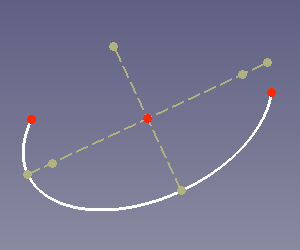
Arc of ellipse (white) with internal geometry (dark yellow)
Usage
See also: Drawing aids.
- There are several ways to invoke the tool:
- Press the Elliptical Arc button.
- Select the Sketch → Geometries → Elliptical Arc option from the menu.
- Use the keyboard shortcut: G then E, then A.
- Press the
- The cursor changes to a cross with the tool icon.
- Pick the center of the arc.
- Pick an endpoint of one of the axes of the arc, this also defines one of its radii.
- Pick the start point of the arc, this also defines the other radius of the arc.
- Pick the endpoint of the arc.
- The elliptical arc is created, including a set of internal geometry (major axis, minor axis and two foci).
- If the tool runs in continue mode:
- Optionally keep creating arcs.
- To finish, right-click or press Esc, or start another geometry or constraint creation tool.
Notes
- Elements of the internal geometry can be deleted. They can be recreated at any time with Sketcher RestoreInternalAlignmentGeometry.
- Once created, the major and minor axes of an elliptical arc are strict and cannot be swapped by resizing. This is a consequence of the solver parametrization and the same strict behavior of OpenCASCADE. An elliptical arc must be rotated to swap its axes.
This page is retrieved from https://wiki.freecad.org/Sketcher_CreateArcOfEllipse