


|
|
| Menu location |
|---|
| Sketch → B-Spline Tools → Geometry to B-Spline |
| Workbenches |
| Sketcher |
| Default shortcut |
| None |
| Introduced in version |
| 0.17 |
| See also |
| Sketcher CreateBSpline |
Description
The  Sketcher BSplineConvertToNURBS tool converts edges to B-splines.
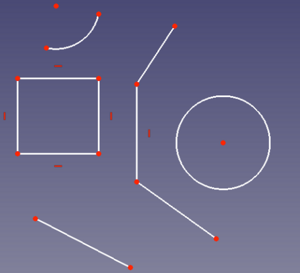
Various objects before conversion.
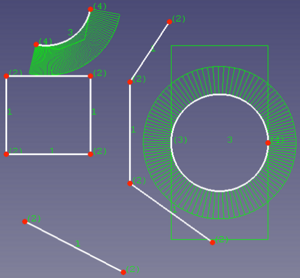
The same objects after conversion to B-splines.
Usage
- Select one or more edges.
- There are several ways to invoke the tool:
- Press the Geometry to B-Spline button.
- Select the Sketch → B-Spline Tools → Geometry to B-Spline option from the menu.
- Press the
- The edges are converted.
Notes
- Make sure to have the B-spline degree, polygon, comb, multiplicity and/or weight visible, otherwise nothing seems to happen.
- If you have converted straight lines you need to increase the degree of the created B-splines to make them "bendable".
- The tool does not remove the internal geometry of conics. This has to be deleted manually.
このページは以下から取得されています https://wiki.freecad.org/Sketcher_BSplineConvertToNURBS