


|
| Ubicación del menú |
|---|
| Arch → Rebar tools |
| Bancos de trabajo |
| Arquitectura |
| Acceso directo |
| None |
| Ver también |
| Estribo, Arch Rebar/es |
| Este comando es parte del Reinforcement AddOn, que puedes instalar a través del menú Tools → Addons Manager |

Descripción
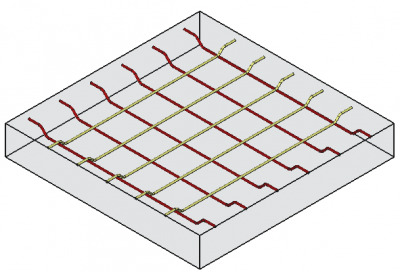
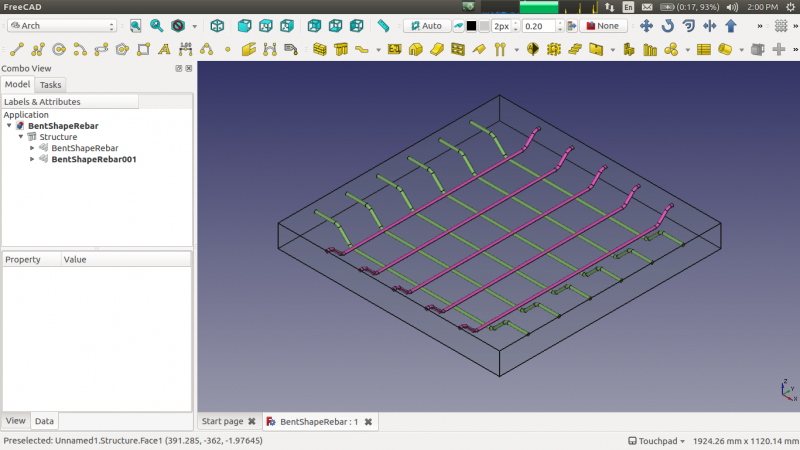
La herramienta  Bent Shape Rebar permite al usuario crear una barra de refuerzo de forma doblada en el elemento estructural.
This tool is part of the Reinforcement Workbench, an external workbench that can be installed with the  Addon Manager.
Como utilizar
- Crear un elemento structure
- Seleccione cualquier cara de la estructura
- Luego seleccione Bent Shape Rebar desde las herramientas de la barra de refuerzo
- Aparecerá un panel de tareas en el lado izquierdo de la pantalla como se muestra a continuación
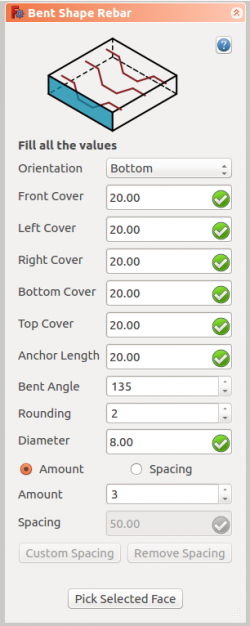
- Seleccione la orientación deseada
- Proporcione las entradas como cubierta frontal, cubierta izquierda, cubierta derecha, cubierta inferior, cubierta superior, longitud de anclaje, ángulo doblado, redondeado y diámetro de la barra de refuerzo
- Seleccione el modo de distribución, ya sea cantidad o espaciado
- Si se selecciona el espaciado, un usuario también puede optar por espaciado personalizado
- La selección de la cara seleccionada se usa para verificar o cambiar la cara de la distribución de barras de refuerzo
- Haga clic en OK o Apply para generar las barras de refuerzo
- Haga clic en Cancel para salir del panel de tareas
Task panel for the tool
Propiedades
- DATOS Orientation: Decide la orientación de la barra de refuerzo (como una parte inferior, superior, derecha e izquierda).
- DATOS Front Cover: la distancia entre la barra de refuerzo y la cara seleccionada.
- DATOS Left Cover: la distancia entre el extremo izquierdo de la barra de refuerzo a la cara izquierda de la estructura.
- DATOS Right Cover: la distancia entre el extremo derecho de la barra de refuerzo a la derecha de la estructura.
- DATOS Bottom Cover: la distancia entre las barras de refuerzo desde la cara inferior de la estructura.
- DATOS Top Cover: la distancia entre barras de refuerzo desde la cara superior de la estructura.
- DATOS Anchor Length: es la longitud del brazo de la barra de refuerzo de forma doblada.
- DATOS Bent Angle: Decide el ángulo en la barra de herramientas de forma doblada.
- DATOS Amount: la cantidad de barras de refuerzo.
- DATOS Spacing: la distancia entre los ejes de cada barra.
Programación
See also: Arch API, Reinforcement API and FreeCAD Scripting Basics.
La herramienta Bent Shape Rebar puede usarse en macros y desde la consola de python mediante la siguiente función:
Rebar = makeBentShapeRebar(f_cover, b_cover, l_cover, r_cover,
                           diameter, t_cover, bentLength, bentAngle, rounding, amount_spacing_check, amount_spacing_value, orientation="Bottom",
                           structure=None, facename=None)
- La barra de refuerzo doblada tiene cuatro orientaciones diferentes:
- Fondo
- Superior
- Izquierda
- Derecha
- Agrega un objeto de barra de refuerzo doblada al objeto estructural dado.
- Si no se proporciona Estructura y nombre de cara, tomará la cara seleccionada por el usuario como entrada.
- Aquí el argumento de CoverAlong es tener tipo tupla.
- Devuelve el nuevo objeto de refuerzo.
Example
import FreeCAD, Arch, BentShapeRebar

Structure = Arch.makeStructure(length=1000, width=1000, height=100)
Structure.ViewObject.Transparency = 80
FreeCAD.ActiveDocument.recompute()

Rebar = BentShapeRebar.makeBentShapeRebar(50, 20, 20, 20,
                                          8, 40, 100, 135, 2, True, 4, "Bottom", Structure, "Face4")
Rebar.ViewObject.ShapeColor = (0.9, 0.0, 0.0)

Rebar2 = BentShapeRebar.makeBentShapeRebar(50, 40, 20, 20,
                                           8, 20, 100, 135, 2, True, 4, "Bottom", Structure, "Face6")
Rebar2.ViewObject.ShapeColor = (0.0, 0.0, 0.9)
Edition of the rebar
You can change the properties of the rebar with the following function:
editBentShapeRebar(Rebar, f_cover, b_cover, l_cover, r_cover,
                   diameter, t_cover, bentLength, bentAngle, rounding, amount_spacing_check, amount_spacing_value, orientation,
                   structure=None, facename=None)
Rebaris a previously createdBentShapeRebarobject.- The other parameters are the same as required by the
makeBentShapeRebar()function. structureandfacenamemay be omitted so that the rebar stays in the original structure.
import BentShapeRebar

BentShapeRebar.editBentShapeRebar(Rebar, 50, 20, 20, 20,
                                  12, 20, 100, 155, 2, True, 6, "Top")

BentShapeRebar.editBentShapeRebar(Rebar2, 50, 35, 20, 20,
                                  12, 35, 100, 155, 2, True, 6, "Top")
Esta página ha sido recuperada de https://wiki.freecad.org/Reinforcement_BentShapeRebar