


|
|
| Menu location |
|---|
| Part → 2D Offset |
| Workbenches |
| Part |
| Default shortcut |
| None |
| Introduced in version |
| 0.17 |
| See also |
| Part Offset 3D, Part Thickness, Draft Offset |
Description
The  Part Offset2D command constructs a wire, parallel to the original wire, at a certain distance from it. Or enlarges/shrinks a planar face, similarly.
The wire/face must be planar. There can be multiple wires in one object, not necessarily coplanar.

Usage
- Select an object to offset.
- There are several ways to invoke the command:
- Press the 2D Offset button.
- Select the Part → 2D Offset option from the menu.
- Press the
- An Offset2D object is created and the Offset task panel opens.
- Adjust distance and parameters depending on the original object and the resulting objects validity.
- Press OK to close the task panel.
Notes
- App Link objects linked to the appropriate object types and App Part containers with the appropriate visible objects inside can also be used as source objects.
Known issues
- Most of non-default modes will only work with OCC 7.0.0 or later.
- Using the command can crash FreeCAD (see next point). On Windows, these crashes are converted to exceptions and don't generally cause FreeCAD to close; on other OS'es it is not the case, so it is advisable to save project before attempting to use the command. Ellipses are not handled either.
- Enlarging faces with circular holes by an amount large enough to cause holes to close up, a crash occurs (OCC 7.0.0). The problem seems to be specific to circles; other shapes seem to close out properly.
- When offsetting circles that have non-zero Placement, the result is placed wrongly. (OCC 7.0.0)
- When offsetting circles, sometimes they are offset in unexpected direction (e.g. inward instead of outward). (OCC 7.0.0)
- Fill offset doesn't work when collectively offsetting open wires in "Skin" mode.
- The Tangent join type doesn't work. (OCC 7.0.0)
- Offsetting wires made of single line segment is not supported (because line segment doesn't define a plane). Single line segments cannot participate in collective offset either.
Properties
- DataSource: Link to original shape
- DataValue: The distance to enlarge the wire/face by. If negative, the wire/face is shrunk instead.
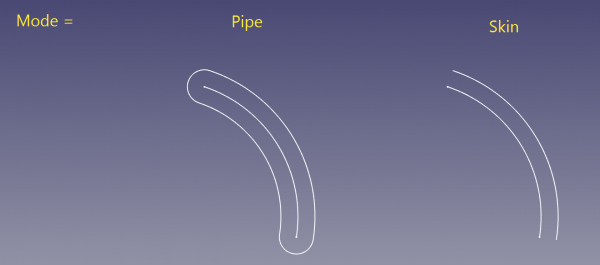
- DataMode ("Pipe" or "Skin"): sets how non-closed wires are processed. If "Pipe", the wire is outlined as if it was an extremely thin closed contour. If "Skin", an open wire is created.
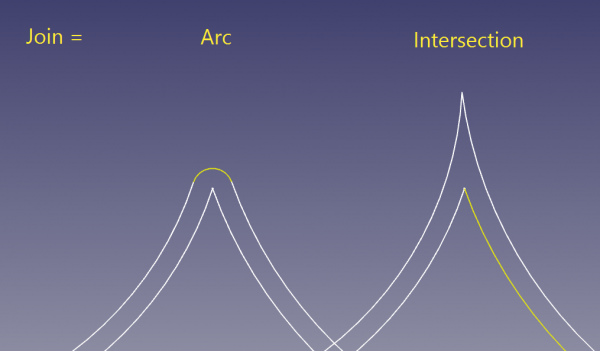
- DataJoin ("Arc", "Tangent", "Intersection"): sets the behavior around kinks. If "Arc", offset segments are connected with an arc of circle, centered at the vertex. "Tangent" is unsupported on OCC7.0.0. "Intersection": offset segments are extended till they intersect.
- DataIntersection ("false", "true"): sets if multiple wires are treated collectively or independently. If "false", wires are offset independently, intersections between resulting wires are ignored. If "true", the wires are offset in collective manner.
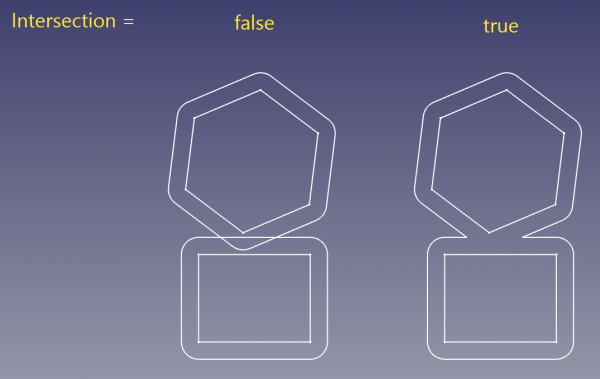
- Only wires within a compound are coupled. For example, if the structure is like compound(wire1, wire2, compound(wire3, wire4)), wire1 and wire2 will be treated collectively, but independently from wire3 and wire4. Likewise, wire3 and wire4 are treated collectively, but independently of wire1+wire2.
- Also, in collective mode, directions of wires are important, and influence direction of offset. This is in tight relationship with how holes in faces are treated.
- Wires being treated collectively must be coplanar. Wires being offset independently don't have to be coplanar.
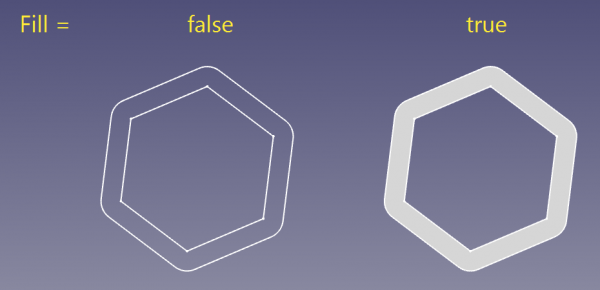
- DataFill ("false", "true"): if "true", the space between original wire/face and the offset is filled with a face.
Scripting
The command can by used in macros and from the Python Console by using the following function:
f = App.ActiveDocument.addObject("Part::Offset2D", "Offset2D")
f.Source =  #some object
f.Value = 10.0
2D offset is also available as a method of Part.Shape. Example:
import Part
circle = Part.Circle().toShape()
enlarged_circle = circle.makeOffset2D(10.0)
Part.show(circle)
Part.show(enlarged_circle)
# makeOffset2D(offset, join = 0, fill = False, openResult = false, intersection = false)
#
# * offset: distance to expand the shape by.
#
# * join: method of offsetting non-tangent joints. 0 = arcs, 1 = tangent, 2 =
# intersection
#
# * fill: if true, the output is a face filling the space covered by offset. If
# false, the output is a wire/face.
#
# * openResult: True for "Skin" mode; False for Pipe mode.
#
# * intersection: collective offset
#
# Returns: result of offsetting (wire or face or compound of those). Compounding
# structure follows that of source shape.
This page is retrieved from https://wiki.freecad.org/Part_Offset2D