


|
|
| Menu location |
|---|
| Part Design → Subtractive Primitive → Subtractive Cylinder |
| Workbenches |
| PartDesign |
| Default shortcut |
| None |
| Introduced in version |
| 0.17 |
| See also |
| PartDesign AdditiveCylinder |
Description
Inserts a subtractive cylinder in the active Body. Its shape is subtracted from the existing solid.
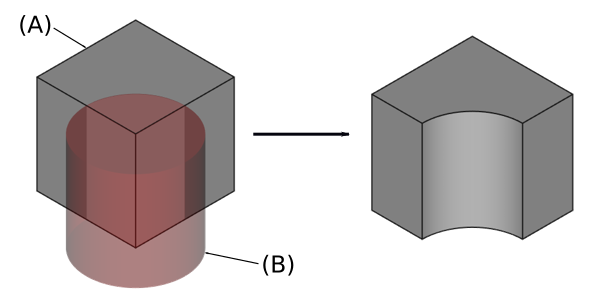
On the left: active body (A) shown in grey and subtractive cylinder (B) shown in transparent red; result on the right.
Usage
- There are several ways to invoke the tool:
- Press the
 Subtractive Cylinder button. Note: the Subtractive Cylinder is part of an icon menu labelled Subtractive Primitive. After launching FreeCAD, the Subtractive Box is the one displayed in the toolbar. To get to the Cylinder, click on the down arrow besides the visible icon and select Subtractive cylinder in the menu.
 - Select the Part Design → Subtractive Primitive → Subtractive Cylinder option from the menu.
- Press the
- The task panel opens.
- Set the parameters. introduced in 1.2: If the Show interactive draggers when editing features preference is selected (default), some parameters can be adjusted with interactive gizmos in the 3D View.
- Optionally set the Attachment.
- Click OK.
- A Cylinder feature appears under the active Body.
Options
It is possible to create skewed cylinders by specifying angles in respect to the normal vector of the chosen attachment.
The Cylinder can be edited after its creation in two ways:
- Double-clicking it in the Tree View, or by right-clicking and selecting Edit Primitive in the context menu; this brings up the task panel and (introduced in 1.2) the interactive gizmos (if enabled).
- Via the Property View.
Properties
- DataAttachment: defines the attachment mode as well as the Attachment Offset. See Part EditAttachment.
- DataLabel: label given to the Cylinder object. Change to suit your needs.
- DataRadius: the radius value of the cylinder.
- DataAngle: angle of rotation of the cross section (360 degrees forms a full cylinder).
- DataHeight: the height of the cylinder along its axis.
- DataFirst Angle: angle in first direction.
- DataSecond Angle: angle in second direction.
This page is retrieved from https://wiki.freecad.org/PartDesign_SubtractiveCylinder