|
|
| Descrizione |
|---|
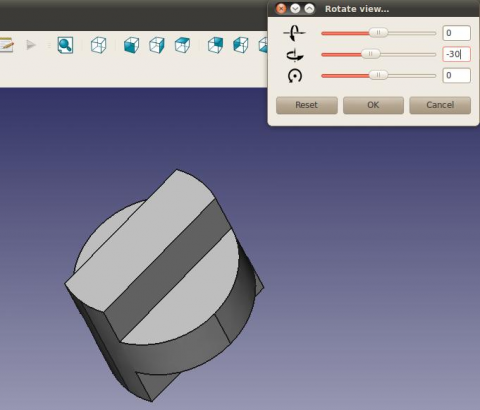
| Questa macro fornisce una GUI per consentire una rotazione di precisione degli oggetti nella vista. Versione macro: 1.0 Ultima modifica: 2012-01-04 Versione FreeCAD: Tutte Download: Icons Package Icon ToolBar Autore: Joe Dowsett |
| Autore |
| Joe Dowsett |
| Download |
| Icons Package Icon ToolBar |
| Link |
| Raccolta di macro Come installare le macro Personalizzare la toolbar |
| Versione macro |
| 1.0 |
| Data ultima modifica |
| 2012-01-04 |
| Versioni di FreeCAD |
| Tutte |
| Scorciatoia |
| Nessuna |
| Vedere anche |
| Macro Rotate View Macro FCCamera |


Descrizione
Questa interfaccia grafica consente di ruotare la vista con maggiore precisione rispetto all'uso del mouse. La rotazione avviene secondo assi fissi rispetto all'utente e non agli oggetti, sebbene l'obiettivo sia che gli oggetti ruotino approssimativamente attorno al loro centro condiviso anziché attorno al centro della vista.
Per impostazione predefinita, l'interfaccia grafica utente (GUI) è posizionata in alto a destra dello schermo; questo comportamento può essere modificato tramite editing.
Temporary code for external macro link. Do not use this code. This code is used exclusively by Addon Manager. Link for optional manual installation: Macro
# This code is copied instead of the original macro code
# to guide the user to the online download page.
# Use it if the code of the macro is larger than 64 KB and cannot be included in the wiki
# or if the RAW code URL is somewhere else in the wiki.

from PySide import QtGui, QtCore

diag = QtGui.QMessageBox(QtGui.QMessageBox.Information,
    "Information",
    "This macro must be downloaded from this link\n"
    "\n"
    "https://raw.githubusercontent.com/FreeCAD/FreeCAD-macros/master/PureGui/ViewRotation.FCMacro" + "\n"
    "\n"
    "Quit this window to access the download page")

diag.setWindowFlags(QtCore.Qt.WindowStaysOnTopHint)
diag.setWindowModality(QtCore.Qt.ApplicationModal)
diag.exec_()

import webbrowser
webbrowser.open("https://raw.githubusercontent.com/FreeCAD/FreeCAD-macros/master/PureGui/ViewRotation.FCMacro")
Si riferiscono a tre icone per simboleggiare le direzioni di rotazione. Un file zip contenente queste icone può essere trovato qui, le immagini devono essere collocate nella cartella contenente le tue macro. Sentiti libero di contribuire da farne migliori!
Script
L'ultima versione della macro è disponibile all'indirizzo ViewRotation.FCMacro ma il modo più semplice per installare questa macro è tramite Addon Manager.
Icona barra degli strumenti 
Macro View Rotation.FCMacro
# -*- coding: utf-8 -*-
#
# FreeCAD macro ViewRotation.
# This GUI allows the view to be rotated with more precision than when using
# the mouse. Rotation is according to axes fixed with respect to the user and
# not the objects, though the aim is that the objects rotate about their
# approximate shared centre rather than the view centre.
# The GUI defaults to the top right of the screen, this behaviour can be
# changed by editing.
# [https://forum.freecad.org/viewtopic.php?f=3&t=1784&hilit=View+Rotation#p12012 View+Rotation]

from __future__ import division

__Name__ = 'View Rotation'
__Comment__ = 'This GUI allows the view to be rotated precisely'
__Author__ = 'Joe Dowsett'
__Version__ = '1.0'
__License__ = 'CC-BY-3.0'
__Web__ = 'https://wiki.freecad.org/Macro_View_Rotation'
__Wiki__ = 'https://wiki.freecad.org/Macro_View_Rotation'
__Icon__ = ''
__Help__ = 'Rotation is according to axes fixed with respect to the user.'
__Status__ = ''
__Requires__ = ''
__Files__ = 'ViewRotationOut.png,ViewRotationRight.png,ViewRotationUp.png'

from math import pi
import os

from PySide import QtCore
from PySide import QtGui
from pivy import coin

import FreeCAD as app
import FreeCADGui as gui


def get_macro_dir():
    """Return the directory where macros are located"""
    default_macro_dir = os.path.join(app.ConfigGet('UserAppData'), 'Macro')
    return app.ParamGet('User parameter:BaseApp/Preferences/Macro').GetString('MacroPath', default_macro_dir)


def find_centre():
    doc = app.activeDocument()
    if doc is None:
        return app.Vector(0, 0, 0)

    xmax = 0
    xmin = 0
    ymax = 0
    ymin = 0
    zmax = 0
    zmin = 0
    for obj in doc.Objects:
        try:
            if obj.TypeId[:4] == 'Mesh':
                box = obj.Mesh.BoundBox
            elif obj.TypeId[:6] == 'Points':
                box = obj.Points.BoundBox
            elif obj.TypeId[:4] == 'Part':
                box = obj.Shape.BoundBox
            else:
                continue
        except AttributeError:
            continue
        xmax = max(xmax, box.XMax)
        xmin = min(xmin, box.XMin)
        ymax = max(ymax, box.YMax)
        ymin = min(ymin, box.YMin)
        zmax = max(zmax, box.ZMax)
        zmin = min(zmin, box.ZMin)

    return app.Vector((xmax + xmin) / 2, (ymax + ymin) / 2, (zmax + zmin) / 2)


class RotateGui(QtGui.QWidget):
    def __init__(self):
        super(RotateGui, self).__init__()
        self.init_ui()
        self.init_rotate()

    def init_ui(self):
        macro_dir = get_macro_dir()
        self.sliders = []
        self.line_edits = []

        vbox = QtGui.QVBoxLayout()

        icons = ('ViewRotationRight.png', 'ViewRotationUp.png', 'ViewRotationOut.png')
        for icon in icons:
            slider = QtGui.QSlider(QtCore.Qt.Horizontal, self)
            slider.setFocusPolicy(QtCore.Qt.NoFocus)
            slider.setSingleStep(5)
            slider.setPageStep(15)
            slider.setValue(0)
            slider.setMaximum(180)
            slider.setMinimum(-180)
            slider.valueChanged[int].connect(self.valueChange)
            self.sliders.append(slider)

            line_edit = QtGui.QLineEdit(self)
            line_edit.setText('0')
            line_edit.setAlignment(QtCore.Qt.AlignRight)
            line_edit.returnPressed.connect(self.valueEntered)
            self.line_edits.append(line_edit)

            label = QtGui.QLabel(self)
            label.setPixmap(QtGui.QPixmap(os.path.join(macro_dir, icon)))

            hbox = QtGui.QHBoxLayout()
            hbox.addWidget(label, 1, QtCore.Qt.AlignCenter)
            hbox.addWidget(slider, 4)
            hbox.addWidget(line_edit, 1)
            vbox.addLayout(hbox)

        reset_button = QtGui.QPushButton('Reset')
        reset_button.clicked.connect(self.reset)

        ok_button = QtGui.QPushButton('OK')
        ok_button.clicked.connect(self.close)

        cancel_button = QtGui.QPushButton('Cancel')
        cancel_button.clicked.connect(self.cancel)

        hbox = QtGui.QHBoxLayout()
        hbox.addWidget(reset_button, 1)
        hbox.addWidget(ok_button, 1)
        hbox.addWidget(cancel_button, 1)
        vbox.addStretch(1)
        vbox.addLayout(hbox)

        self.setLayout(vbox)

        desktop_widget = QtGui.QDesktopWidget()
        right = desktop_widget.availableGeometry().width()

        self.setGeometry(right - 300, 0, 300, 150)
        self.setWindowTitle('Rotate view')
        self.show()

    def init_rotate(self):
        self.internal = False
        self.current = 0

        self.cam = gui.activeDocument().ActiveView.getCameraNode()
        self.centre = coin.SbVec3f(find_centre())
        self.view = self.cam.orientation.getValue()
        self.pos = self.cam.position.getValue()

        # Store a copy of the original view to be restored in the case of user
        # selecting Reset or Cancel.
        self.original_view = coin.SbRotation(self.view.getValue())
        self.original_pos = coin.SbVec3f(self.pos.getValue())

        self.config_direction(0)


    def reset(self):
        # Reset the view to the original one.
        self.cam.orientation = self.original_view
        self.cam.position = self.original_pos
        self.internal = True
        for sld in self.sliders:
            sld.setValue(0)
        self.internal = False
        for tbox in self.line_edits:
            tbox.setText("0")
        self.config_direction(0)

    def cancel(self):
        self.reset()
        self.close()


    def config_direction(self, i):
        # Evaluate the vectors corresponding to the three directions for the
        # current view, and assign the i-th one to self.direction.
        self.view = self.cam.orientation.getValue()
        self.view = coin.SbRotation(self.view.getValue())
        self.pos = self.cam.position.getValue()
        self.pos = coin.SbVec3f(self.pos.getValue())

        up = coin.SbVec3f(0,1,0)
        self.up = self.view.multVec(up)
        out = coin.SbVec3f(0,0,1)
        self.out = self.view.multVec(out)
        u = self.up.getValue()
        o = self.out.getValue()
        r = (u[1]*o[2]-u[2]*o[1], u[2]*o[0]-u[0]*o[2], u[0]*o[1]-u[1]*o[0])
        self.right = coin.SbVec3f(r)

        self.direction = [self.right, self.up, self.out][i]

    def check(self, i):
        # Check if the direction of rotation has changed, if so then set
        # previous slider & textbox to zero, and setup the new direction.
        if i != self.current:
            self.internal = True
            self.sliders[self.current].setValue(0)
            self.line_edits[self.current].setText("0")
            self.internal = False
            self.current = i
            self.config_direction(i)

    def rotate(self, value):
        # Carry out the desired rotation about self.direction.
        val = value*pi/180.0
        rot = coin.SbRotation(self.direction, -val)
        nrot = self.view*rot
        prot = rot.multVec(self.pos - self.centre) + self.centre
        self.cam.orientation = nrot
        self.cam.position = prot

    def valueChange(self, value):
        # Respond to the change in value of a slider, update the corresponding
        # text box, check for a direction change then rotate
        # if the value was changed internally, ignore event.
        if self.internal:
            return

        sender = self.sender()
        for i in range(3):
            if sender == self.sliders[i]:
                break
        self.line_edits[i].setText(str(value))
        self.check(i)
        self.rotate(value)

    def valueEntered(self):
        # Respond to a value being entered in a text box, updating the
        # corresponding slider, check for direction change then rotate.
        sender = self.sender()
        for i in range(3):
            if sender == self.line_edits[i]:
                break
        value = int(self.line_edits[i].text())
        self.internal = True
        self.sliders[i].setValue(value)
        self.internal = False
        self.check(i)
        self.rotate(value)

if __name__ == '__main__':
    # We need to set a variable, otherwise, the dialog doesn't appear.
    rotate = RotateGui()
Opzioni
Alla fine della funzione 'initUI' i primi due argomenti (right-300, 0) (riga 91) forniscono la posizione dell'angolo in alto a sinistra della finestra. Per esperienza il comportamento è quello previsto su Ubuntu, mentre su Vista la finestra veniva posizionata troppo in alto e lo 0 doveva essere modificato in ~30.
self.setGeometry(right-300, 0, 300, 150)
Forum
Questa pagina è recuperata da https://wiki.freecad.org/Macro_View_Rotation