|
|
| Description |
|---|
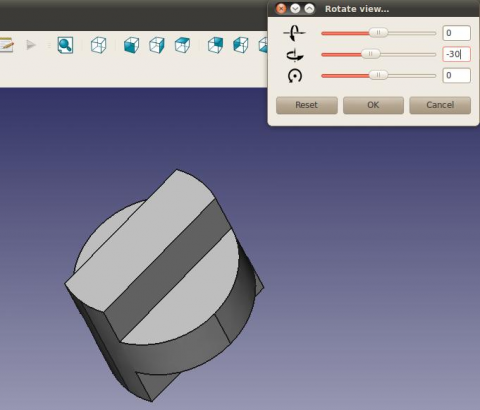
| Cette interface graphique permet de faire pivoter la vue avec plus de précision qu'avec la souris. La rotation s'effectue selon des axes fixés par rapport à l'utilisateur et non par rapport aux objets, bien que l'objectif soit que les objets tournent autour de leur centre partagé approximatif plutôt qu'autour du centre de la vue. L'interface graphique se place par défaut en haut à droite de l'écran. Ce comportement peut être modifié par édition. |
| Auteur |
| Joe Dowsett |
| Téléchargement |
| Icône de la barre d'outils |
| Liens |
| Page des macros Comment installer une macro Comment créer une barre d'outils |
| Version Macro |
| 1.0 |
| Dernière modification |
| 2012-01-04 |
| Version(s) FreeCAD |
| Toutes |
| Raccourci clavier |
| None |
| Voir aussi |
| Macro Rotate View, Macro FCCamera |

Description
Cette interface graphique permet de faire pivoter la vue avec plus de précision qu'avec l'utilisation de la souris. La rotation se fait selon un des axes fixes par rapport à l'utilisateur, et non par rapport aux objets, l'objectif est de faire tourner les objets approximativement autour de leurs centres communs plutôt que le centre de la vue.
L'interface graphique se place par défaut en haut à droite de l'écran. Ce comportement peut être modifié par édition.
Temporary code for external macro link. Do not use this code. This code is used exclusively by Addon Manager. Link for optional manual installation: Macro
# This code is copied instead of the original macro code
# to guide the user to the online download page.
# Use it if the code of the macro is larger than 64 KB and cannot be included in the wiki
# or if the RAW code URL is somewhere else in the wiki.

from PySide import QtGui, QtCore

diag = QtGui.QMessageBox(QtGui.QMessageBox.Information,
    "Information",
    "This macro must be downloaded from this link\n"
    "\n"
    "https://raw.githubusercontent.com/FreeCAD/FreeCAD-macros/master/PureGui/ViewRotation.FCMacro" + "\n"
    "\n"
    "Quit this window to access the download page")

diag.setWindowFlags(QtCore.Qt.WindowStaysOnTopHint)
diag.setWindowModality(QtCore.Qt.ApplicationModal)
diag.exec_()

import webbrowser
webbrowser.open("https://raw.githubusercontent.com/FreeCAD/FreeCAD-macros/master/PureGui/ViewRotation.FCMacro")
Trois icônes symbolisent les directions de rotation. Vous pouvez trouver un fichier zip contenant ces icônes here, les images doivent être placées dans le dossier contenant vos macros. N'hésitez pas à nous en proposer de meilleures !
Script
La dernière version de la macro se trouve à l'adresse ViewRotation.FCMacro, mais le moyen le plus simple d'installer cette macro consiste à utiliser le  gestionnaire des extensions.
Icône de la barre d'outils 
Macro View Rotation.FCMacro
# -*- coding: utf-8 -*-
#
# FreeCAD macro ViewRotation.
# This GUI allows the view to be rotated with more precision than when using
# the mouse. Rotation is according to axes fixed with respect to the user and
# not the objects, though the aim is that the objects rotate about their
# approximate shared centre rather than the view centre.
# The GUI defaults to the top right of the screen, this behaviour can be
# changed by editing.
# [https://forum.freecad.org/viewtopic.php?f=3&t=1784&hilit=View+Rotation#p12012 View+Rotation]

from __future__ import division

__Name__ = 'View Rotation'
__Comment__ = 'This GUI allows the view to be rotated precisely'
__Author__ = 'Joe Dowsett'
__Version__ = '1.0'
__License__ = 'CC-BY-3.0'
__Web__ = 'https://wiki.freecad.org/Macro_View_Rotation'
__Wiki__ = 'https://wiki.freecad.org/Macro_View_Rotation'
__Icon__ = ''
__Help__ = 'Rotation is according to axes fixed with respect to the user.'
__Status__ = ''
__Requires__ = ''
__Files__ = 'ViewRotationOut.png,ViewRotationRight.png,ViewRotationUp.png'

from math import pi
import os

from PySide import QtCore
from PySide import QtGui
from pivy import coin

import FreeCAD as app
import FreeCADGui as gui


def get_macro_dir():
    """Return the directory where macros are located"""
    default_macro_dir = os.path.join(app.ConfigGet('UserAppData'), 'Macro')
    return app.ParamGet('User parameter:BaseApp/Preferences/Macro').GetString('MacroPath', default_macro_dir)


def find_centre():
    doc = app.activeDocument()
    if doc is None:
        return app.Vector(0, 0, 0)

    xmax = 0
    xmin = 0
    ymax = 0
    ymin = 0
    zmax = 0
    zmin = 0
    for obj in doc.Objects:
        try:
            if obj.TypeId[:4] == 'Mesh':
                box = obj.Mesh.BoundBox
            elif obj.TypeId[:6] == 'Points':
                box = obj.Points.BoundBox
            elif obj.TypeId[:4] == 'Part':
                box = obj.Shape.BoundBox
            else:
                continue
        except AttributeError:
            continue
        xmax = max(xmax, box.XMax)
        xmin = min(xmin, box.XMin)
        ymax = max(ymax, box.YMax)
        ymin = min(ymin, box.YMin)
        zmax = max(zmax, box.ZMax)
        zmin = min(zmin, box.ZMin)

    return app.Vector((xmax + xmin) / 2, (ymax + ymin) / 2, (zmax + zmin) / 2)


class RotateGui(QtGui.QWidget):
    def __init__(self):
        super(RotateGui, self).__init__()
        self.init_ui()
        self.init_rotate()

    def init_ui(self):
        macro_dir = get_macro_dir()
        self.sliders = []
        self.line_edits = []

        vbox = QtGui.QVBoxLayout()

        icons = ('ViewRotationRight.png', 'ViewRotationUp.png', 'ViewRotationOut.png')
        for icon in icons:
            slider = QtGui.QSlider(QtCore.Qt.Horizontal, self)
            slider.setFocusPolicy(QtCore.Qt.NoFocus)
            slider.setSingleStep(5)
            slider.setPageStep(15)
            slider.setValue(0)
            slider.setMaximum(180)
            slider.setMinimum(-180)
            slider.valueChanged[int].connect(self.valueChange)
            self.sliders.append(slider)

            line_edit = QtGui.QLineEdit(self)
            line_edit.setText('0')
            line_edit.setAlignment(QtCore.Qt.AlignRight)
            line_edit.returnPressed.connect(self.valueEntered)
            self.line_edits.append(line_edit)

            label = QtGui.QLabel(self)
            label.setPixmap(QtGui.QPixmap(os.path.join(macro_dir, icon)))

            hbox = QtGui.QHBoxLayout()
            hbox.addWidget(label, 1, QtCore.Qt.AlignCenter)
            hbox.addWidget(slider, 4)
            hbox.addWidget(line_edit, 1)
            vbox.addLayout(hbox)

        reset_button = QtGui.QPushButton('Reset')
        reset_button.clicked.connect(self.reset)

        ok_button = QtGui.QPushButton('OK')
        ok_button.clicked.connect(self.close)

        cancel_button = QtGui.QPushButton('Cancel')
        cancel_button.clicked.connect(self.cancel)

        hbox = QtGui.QHBoxLayout()
        hbox.addWidget(reset_button, 1)
        hbox.addWidget(ok_button, 1)
        hbox.addWidget(cancel_button, 1)
        vbox.addStretch(1)
        vbox.addLayout(hbox)

        self.setLayout(vbox)

        desktop_widget = QtGui.QDesktopWidget()
        right = desktop_widget.availableGeometry().width()

        self.setGeometry(right - 300, 0, 300, 150)
        self.setWindowTitle('Rotate view')
        self.show()

    def init_rotate(self):
        self.internal = False
        self.current = 0

        self.cam = gui.activeDocument().ActiveView.getCameraNode()
        self.centre = coin.SbVec3f(find_centre())
        self.view = self.cam.orientation.getValue()
        self.pos = self.cam.position.getValue()

        # Store a copy of the original view to be restored in the case of user
        # selecting Reset or Cancel.
        self.original_view = coin.SbRotation(self.view.getValue())
        self.original_pos = coin.SbVec3f(self.pos.getValue())

        self.config_direction(0)


    def reset(self):
        # Reset the view to the original one.
        self.cam.orientation = self.original_view
        self.cam.position = self.original_pos
        self.internal = True
        for sld in self.sliders:
            sld.setValue(0)
        self.internal = False
        for tbox in self.line_edits:
            tbox.setText("0")
        self.config_direction(0)

    def cancel(self):
        self.reset()
        self.close()


    def config_direction(self, i):
        # Evaluate the vectors corresponding to the three directions for the
        # current view, and assign the i-th one to self.direction.
        self.view = self.cam.orientation.getValue()
        self.view = coin.SbRotation(self.view.getValue())
        self.pos = self.cam.position.getValue()
        self.pos = coin.SbVec3f(self.pos.getValue())

        up = coin.SbVec3f(0,1,0)
        self.up = self.view.multVec(up)
        out = coin.SbVec3f(0,0,1)
        self.out = self.view.multVec(out)
        u = self.up.getValue()
        o = self.out.getValue()
        r = (u[1]*o[2]-u[2]*o[1], u[2]*o[0]-u[0]*o[2], u[0]*o[1]-u[1]*o[0])
        self.right = coin.SbVec3f(r)

        self.direction = [self.right, self.up, self.out][i]

    def check(self, i):
        # Check if the direction of rotation has changed, if so then set
        # previous slider & textbox to zero, and setup the new direction.
        if i != self.current:
            self.internal = True
            self.sliders[self.current].setValue(0)
            self.line_edits[self.current].setText("0")
            self.internal = False
            self.current = i
            self.config_direction(i)

    def rotate(self, value):
        # Carry out the desired rotation about self.direction.
        val = value*pi/180.0
        rot = coin.SbRotation(self.direction, -val)
        nrot = self.view*rot
        prot = rot.multVec(self.pos - self.centre) + self.centre
        self.cam.orientation = nrot
        self.cam.position = prot

    def valueChange(self, value):
        # Respond to the change in value of a slider, update the corresponding
        # text box, check for a direction change then rotate
        # if the value was changed internally, ignore event.
        if self.internal:
            return

        sender = self.sender()
        for i in range(3):
            if sender == self.sliders[i]:
                break
        self.line_edits[i].setText(str(value))
        self.check(i)
        self.rotate(value)

    def valueEntered(self):
        # Respond to a value being entered in a text box, updating the
        # corresponding slider, check for direction change then rotate.
        sender = self.sender()
        for i in range(3):
            if sender == self.line_edits[i]:
                break
        value = int(self.line_edits[i].text())
        self.internal = True
        self.sliders[i].setValue(value)
        self.internal = False
        self.check(i)
        self.rotate(value)

if __name__ == '__main__':
    # We need to set a variable, otherwise, the dialog doesn't appear.
    rotate = RotateGui()
Option
À la fin de la fonction "initUI", les deux premiers arguments (right-300, 0) (ligne 91) fournissent la position du coin supérieur gauche de la fenêtre - d'après mon expérience, le comportement était conforme aux attentes sous Ubuntu, mais Vista positionnait la fenêtre trop haut et le 0 devait être modifié à ~30.
self.setGeometry(right-300, 0, 300, 150)
Forum
Cette page est extraite de https://wiki.freecad.org/Macro_View_Rotation