|
|
| Descripción |
|---|
| Esta macro proporciona un interfaz gráfico para girar la vista. Download the Icon of the macro. Versión macro : 1.0 Fecha última modificación : 2012-01-04 Versión FreeCAD : All Descargar : Icons Package Icon ToolBar Autor : Joe Dowsett |
| Autor |
| Joe Dowsett |
| Descargar |
| Icons Package Icon ToolBar |
| Enlace |
| Macros recipes How to install macros How to customize toolbars |
| Versión Macro |
| 1.0 |
| Fecha última modificación |
| 2012-01-04 |
| Versión(es) FreeCAD |
| All |
| Acceso directo predeterminado |
| None |
| Ver también |
| Macro Rotate View Macro FCCamera |


Description
Descripción
Esta GUI permite girar la vista con mayor precisión que el ratón. La rotación es de acuerdo a los ejes fijados con respecto al usuario y no los objetos, aunque la intención es que los objetos giren aproximadamente sobre sus centros en lugar del centro de la vista.
La GUI se muestra en la parte superior derecha de la pantalla, este comportamiento se puede modificar editando
The GUI defaults to the top right of the screen, this behaviour can be changed by editing.
Temporary code for external macro link. Do not use this code. This code is used exclusively by Addon Manager. Link for optional manual installation: Macro
# This code is copied instead of the original macro code
# to guide the user to the online download page.
# Use it if the code of the macro is larger than 64 KB and cannot be included in the wiki
# or if the RAW code URL is somewhere else in the wiki.

from PySide import QtGui, QtCore

diag = QtGui.QMessageBox(QtGui.QMessageBox.Information,
    "Information",
    "This macro must be downloaded from this link\n"
    "\n"
    "https://raw.githubusercontent.com/FreeCAD/FreeCAD-macros/master/PureGui/ViewRotation.FCMacro" + "\n"
    "\n"
    "Quit this window to access the download page")

diag.setWindowFlags(QtCore.Qt.WindowStaysOnTopHint)
diag.setWindowModality(QtCore.Qt.ApplicationModal)
diag.exec_()

import webbrowser
webbrowser.open("https://raw.githubusercontent.com/FreeCAD/FreeCAD-macros/master/PureGui/ViewRotation.FCMacro")
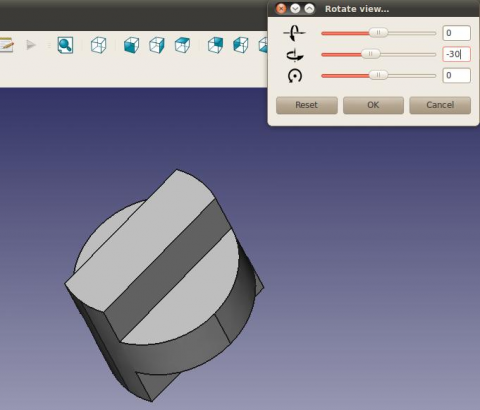
Se hace referencia a tres iconos para simbolizar las direcciones de rotación. Se puede encontrar un archivo zip que contiene estos iconos here, the images should be placed in the folder containing your macros. Por favor, siéntase libre de contribuir mejores!
Script
La última versión de la macro se encuentra en ViewRotation.FCMacro Pero la forma más fácil de instalar esta macro es a través de la Addon Manager.
ToolBar Icon 
Macro View Rotation.FCMacro
# -*- coding: utf-8 -*-
#
# FreeCAD macro ViewRotation.
# This GUI allows the view to be rotated with more precision than when using
# the mouse. Rotation is according to axes fixed with respect to the user and
# not the objects, though the aim is that the objects rotate about their
# approximate shared centre rather than the view centre.
# The GUI defaults to the top right of the screen, this behaviour can be
# changed by editing.
# [https://forum.freecad.org/viewtopic.php?f=3&t=1784&hilit=View+Rotation#p12012 View+Rotation]

from __future__ import division

__Name__ = 'View Rotation'
__Comment__ = 'This GUI allows the view to be rotated precisely'
__Author__ = 'Joe Dowsett'
__Version__ = '1.0'
__License__ = 'CC-BY-3.0'
__Web__ = 'https://wiki.freecad.org/Macro_View_Rotation'
__Wiki__ = 'https://wiki.freecad.org/Macro_View_Rotation'
__Icon__ = ''
__Help__ = 'Rotation is according to axes fixed with respect to the user.'
__Status__ = ''
__Requires__ = ''
__Files__ = 'ViewRotationOut.png,ViewRotationRight.png,ViewRotationUp.png'

from math import pi
import os

from PySide import QtCore
from PySide import QtGui
from pivy import coin

import FreeCAD as app
import FreeCADGui as gui


def get_macro_dir():
    """Return the directory where macros are located"""
    default_macro_dir = os.path.join(app.ConfigGet('UserAppData'), 'Macro')
    return app.ParamGet('User parameter:BaseApp/Preferences/Macro').GetString('MacroPath', default_macro_dir)


def find_centre():
    doc = app.activeDocument()
    if doc is None:
        return app.Vector(0, 0, 0)

    xmax = 0
    xmin = 0
    ymax = 0
    ymin = 0
    zmax = 0
    zmin = 0
    for obj in doc.Objects:
        try:
            if obj.TypeId[:4] == 'Mesh':
                box = obj.Mesh.BoundBox
            elif obj.TypeId[:6] == 'Points':
                box = obj.Points.BoundBox
            elif obj.TypeId[:4] == 'Part':
                box = obj.Shape.BoundBox
            else:
                continue
        except AttributeError:
            continue
        xmax = max(xmax, box.XMax)
        xmin = min(xmin, box.XMin)
        ymax = max(ymax, box.YMax)
        ymin = min(ymin, box.YMin)
        zmax = max(zmax, box.ZMax)
        zmin = min(zmin, box.ZMin)

    return app.Vector((xmax + xmin) / 2, (ymax + ymin) / 2, (zmax + zmin) / 2)


class RotateGui(QtGui.QWidget):
    def __init__(self):
        super(RotateGui, self).__init__()
        self.init_ui()
        self.init_rotate()

    def init_ui(self):
        macro_dir = get_macro_dir()
        self.sliders = []
        self.line_edits = []

        vbox = QtGui.QVBoxLayout()

        icons = ('ViewRotationRight.png', 'ViewRotationUp.png', 'ViewRotationOut.png')
        for icon in icons:
            slider = QtGui.QSlider(QtCore.Qt.Horizontal, self)
            slider.setFocusPolicy(QtCore.Qt.NoFocus)
            slider.setSingleStep(5)
            slider.setPageStep(15)
            slider.setValue(0)
            slider.setMaximum(180)
            slider.setMinimum(-180)
            slider.valueChanged[int].connect(self.valueChange)
            self.sliders.append(slider)

            line_edit = QtGui.QLineEdit(self)
            line_edit.setText('0')
            line_edit.setAlignment(QtCore.Qt.AlignRight)
            line_edit.returnPressed.connect(self.valueEntered)
            self.line_edits.append(line_edit)

            label = QtGui.QLabel(self)
            label.setPixmap(QtGui.QPixmap(os.path.join(macro_dir, icon)))

            hbox = QtGui.QHBoxLayout()
            hbox.addWidget(label, 1, QtCore.Qt.AlignCenter)
            hbox.addWidget(slider, 4)
            hbox.addWidget(line_edit, 1)
            vbox.addLayout(hbox)

        reset_button = QtGui.QPushButton('Reset')
        reset_button.clicked.connect(self.reset)

        ok_button = QtGui.QPushButton('OK')
        ok_button.clicked.connect(self.close)

        cancel_button = QtGui.QPushButton('Cancel')
        cancel_button.clicked.connect(self.cancel)

        hbox = QtGui.QHBoxLayout()
        hbox.addWidget(reset_button, 1)
        hbox.addWidget(ok_button, 1)
        hbox.addWidget(cancel_button, 1)
        vbox.addStretch(1)
        vbox.addLayout(hbox)

        self.setLayout(vbox)

        desktop_widget = QtGui.QDesktopWidget()
        right = desktop_widget.availableGeometry().width()

        self.setGeometry(right - 300, 0, 300, 150)
        self.setWindowTitle('Rotate view')
        self.show()

    def init_rotate(self):
        self.internal = False
        self.current = 0

        self.cam = gui.activeDocument().ActiveView.getCameraNode()
        self.centre = coin.SbVec3f(find_centre())
        self.view = self.cam.orientation.getValue()
        self.pos = self.cam.position.getValue()

        # Store a copy of the original view to be restored in the case of user
        # selecting Reset or Cancel.
        self.original_view = coin.SbRotation(self.view.getValue())
        self.original_pos = coin.SbVec3f(self.pos.getValue())

        self.config_direction(0)


    def reset(self):
        # Reset the view to the original one.
        self.cam.orientation = self.original_view
        self.cam.position = self.original_pos
        self.internal = True
        for sld in self.sliders:
            sld.setValue(0)
        self.internal = False
        for tbox in self.line_edits:
            tbox.setText("0")
        self.config_direction(0)

    def cancel(self):
        self.reset()
        self.close()


    def config_direction(self, i):
        # Evaluate the vectors corresponding to the three directions for the
        # current view, and assign the i-th one to self.direction.
        self.view = self.cam.orientation.getValue()
        self.view = coin.SbRotation(self.view.getValue())
        self.pos = self.cam.position.getValue()
        self.pos = coin.SbVec3f(self.pos.getValue())

        up = coin.SbVec3f(0,1,0)
        self.up = self.view.multVec(up)
        out = coin.SbVec3f(0,0,1)
        self.out = self.view.multVec(out)
        u = self.up.getValue()
        o = self.out.getValue()
        r = (u[1]*o[2]-u[2]*o[1], u[2]*o[0]-u[0]*o[2], u[0]*o[1]-u[1]*o[0])
        self.right = coin.SbVec3f(r)

        self.direction = [self.right, self.up, self.out][i]

    def check(self, i):
        # Check if the direction of rotation has changed, if so then set
        # previous slider & textbox to zero, and setup the new direction.
        if i != self.current:
            self.internal = True
            self.sliders[self.current].setValue(0)
            self.line_edits[self.current].setText("0")
            self.internal = False
            self.current = i
            self.config_direction(i)

    def rotate(self, value):
        # Carry out the desired rotation about self.direction.
        val = value*pi/180.0
        rot = coin.SbRotation(self.direction, -val)
        nrot = self.view*rot
        prot = rot.multVec(self.pos - self.centre) + self.centre
        self.cam.orientation = nrot
        self.cam.position = prot

    def valueChange(self, value):
        # Respond to the change in value of a slider, update the corresponding
        # text box, check for a direction change then rotate
        # if the value was changed internally, ignore event.
        if self.internal:
            return

        sender = self.sender()
        for i in range(3):
            if sender == self.sliders[i]:
                break
        self.line_edits[i].setText(str(value))
        self.check(i)
        self.rotate(value)

    def valueEntered(self):
        # Respond to a value being entered in a text box, updating the
        # corresponding slider, check for direction change then rotate.
        sender = self.sender()
        for i in range(3):
            if sender == self.line_edits[i]:
                break
        value = int(self.line_edits[i].text())
        self.internal = True
        self.sliders[i].setValue(value)
        self.internal = False
        self.check(i)
        self.rotate(value)

if __name__ == '__main__':
    # We need to set a variable, otherwise, the dialog doesn't appear.
    rotate = RotateGui()
Option
Option
al final de la función 'initUI'. Los dos primeros argumentos (derecha-300, 0) proporcionan la posición de la esquina superior izquierda de la ventana - mi experiencia es que el comportamiento es intencionado en Ubuntu pero Vista posiciona la ventana demasiado alta y el 0 necesita cambiarse a ~30.
self.setGeometry(right-300, 0, 300, 150)
Forum
Página de discusión
Esta página ha sido recuperada de https://wiki.freecad.org/Macro_View_Rotation