|
|
| Beschreibung |
|---|
| Dieses Makro erstellt eine Kopie eines ausgewählten Objekts oder Unterobjekts (in FreeCAD seit Version 0.19 enthalten: Part EinfacheKopie) Versionsmakro : 00.04 Datum der letzten Änderung : 2020-03-14 FreeCAD version : Alle Herunterladen : Werkzeugleisten-Symbol Autor: Mario52 |
| Autor |
| Mario52 |
| Herunterladen |
| Werkzeugleisten-Symbol |
| Links |
| Makros Rezepte Wie man Makros installiert Symbolleisten anpassen |
| Macro-Version |
| 00.04 |
| Datum der letzten Änderung |
| 2020-03-14 |
| FreeCAD-Version(s) |
| Alle |
| Standardverknüpfung |
| None |
| Siehe auch |
| None |

Beschreibung
Dieses Makro erstellt eine Kopie eines ausgewählten Objekts oder Unterobjekts (in FreeCAD seit Version 0.19 enthalten: Part EinfacheKopie).
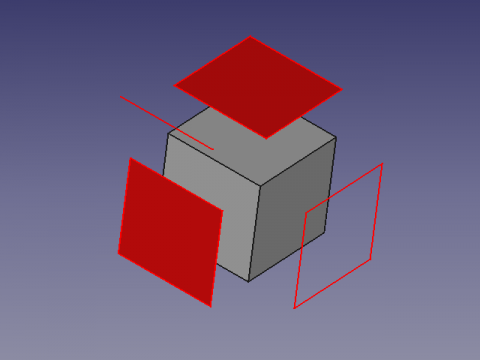
ReproWire
Anwendung
Wähle das Objekt aus und führe das Makro zum Erstellen der Kopie aus. Die erstellten Flächen können extrudiert werden.
Die Kopien sind rot markiert und mit „Shapexxx + Originalname“ umbenannt.
Skript
Werkzeugleistensymbol 
Macro_ReproWire.FCMacro
# -*- coding: utf-8 -*-
from __future__ import unicode_literals
import codecs   #https://docs.python.org/2/howto/unicode.html
import Part,Draft

#24/10/2015, 22/09/2018, 03/07/2019, 14/03/2020

__title__   = "Macro_ReproWire"
__author__  = "Mario52"
__url__     = "https://freecad.org/index-fr.html"
__Wiki__    = "https://wiki.freecad.org/Macro_Repro_Wire"
__version__ = "00.04"
__date__    = "2020/03/14"    #YYYY/MM/DD
__Comment__ = "Compatible with FreeCAD 0.17 0.18 and more"

global objectPlacementAngle ; objectPlacementAngle = ""
def objectRealPlacement3D(obj):
    global objectPlacementAngle
    try:
        objectPlacement      = obj.Shape.Placement
        ####
        objectPlacementBase  = FreeCAD.Vector(objectPlacement.Base)
        ####
        objectWorkCenter     = objectPlacementBase
        ####
        objectPlacementAngle = objectPlacement.Rotation.toEuler()

        if hasattr(obj, "getGlobalPlacement"):
            globalPlacement       = obj.getGlobalPlacement()
            globalPlacementBase   = FreeCAD.Vector(globalPlacement.Base)
            objectRealPlacement3D = globalPlacementBase.add(objectWorkCenter).sub(objectPlacementBase)
            objectPlacementAngle  = globalPlacement.Rotation.toEuler()
        else:
            objectRealPlacement3D = objectWorkCenter

        return objectRealPlacement3D
    except Exception:
        return FreeCAD.Vector(0.0, 0.0, 0.0)

sel = Gui.Selection.getSelection()
s   = Gui.Selection.getSelectionEx()

try:
    if len(sel) != 0:
            print( "Object(s) : ", len(sel), " , SubObject(s) : ", len(s))
            i2 = ii2 = -1
            for i in s:
                i2 += 1
                ii2 = -1
                try:
                    FreeCADGui.Selection.getSelectionEx()[i2].SubObjects[ii2]
                    for ii in i.SubElementNames:
                        placementOrigine = objectRealPlacement3D(FreeCAD.ActiveDocument.getObject(i.ObjectName))# search the original Placement
                        ii2 += 1
                        Part.show(FreeCADGui.Selection.getSelectionEx()[i2].SubObjects[ii2].copy())   # create repro shape subObject
                        print( i2+1 ,"/", ii2+1 ,"/", len(s) ," ", i.ObjectName ," ", ii)             # display the info SubObject
                        a = App.ActiveDocument.ActiveObject
                        a.Placement.Base = placementOrigine
                        a.Placement.Rotation = App.Rotation(objectPlacementAngle[0], objectPlacementAngle[1], objectPlacementAngle[2])
                        #    object Name  / original object Name / SubObject Name
                        a.Label = a.Name + " " + i.ObjectName + " " + ii                              # Label for the repro shape
                        try:
                            FreeCADGui.activeDocument().activeObject().LineColor  = (1.0,0.0,0.0)     # give LineColor
                            FreeCADGui.activeDocument().activeObject().PointColor = (1.0,0.0,0.0)     # give PointColor
                            FreeCADGui.activeDocument().activeObject().ShapeColor = (1.0,0.0,0.0)     # give ShapeColor
                        except Exception:
                            None
                except Exception:
#                    print( "Not SubObject")
                    placementOrigine = objectRealPlacement3D(FreeCAD.ActiveDocument.getObject(sel[i2].Name))# search the original Placement
                    Part.show(sel[i2].Shape)                                                          # create repro shape object
                    print( i2+1 ,"/", ii2+1 ,"/", len(s) ," ", sel[i2].Name)                          # display the info SubObject
                    a = App.ActiveDocument.ActiveObject
                    a.Placement.Base = placementOrigine
                    a.Placement.Rotation = App.Rotation(objectPlacementAngle[0], objectPlacementAngle[1], objectPlacementAngle[2])
                    #        object Name  /  original object Name
                    a.Label =a.Name + " " +  sel[i2].Name                                             # Label for the repro shape
                    try:
                        FreeCADGui.activeDocument().activeObject().LineColor  = (1.0,0.0,0.0)         # give LineColor
                        FreeCADGui.activeDocument().activeObject().PointColor = (1.0,0.0,0.0)         # give PointColor
                        FreeCADGui.activeDocument().activeObject().ShapeColor = (1.0,0.0,0.0)         # give ShapeColor
                    except Exception:
                        None
                try:
                    SubElement = FreeCADGui.Selection.getSelectionEx()[0].SubObjects[0]
                    print( FreeCADGui.Selection.getSelectionEx()[0].SubElementNames[0], " : ", SubElement.normalAt(0,0)) # ok Vector pour face
                except Exception:
                    None

            FreeCAD.ActiveDocument.recompute()
    else :
        FreeCAD.Console.PrintError("Select one object" + "\n")
except Exception:
    FreeCAD.Console.PrintError("Unexpected error" + "\n")
Version
00.04 2020-03-14 : Korrektur für gedrehtes Objekt
00.03 2019-03-07 : Kompatibilität mit Python 3 "print" zu "print()"
00.02 2018-09-22 : Kompatibel mit FreeCAD 0.17 (getGlobalPlacement())
00.01 2015-10-24 : Erweiterung auf alle Objekte
00.00 2015-10-22 :
Verweise
Diskussion im FreeCAD-Forum: are there any tools to extrude only selected surface from a sketch?
Diese Seite wird abgerufen von https://wiki.freecad.org/Macro_Repro_Wire