|
|
| Description |
|---|
| This macro creates a copy of a selected object or sub-object (include in FreeCAD since version 0.19: Part SimpleCopy) Macro version: 00.04 Last modified: 2020-03-14 FreeCAD version: All Download: ToolBar Icon Author: Mario52 |
| Author |
| Mario52 |
| Download |
| ToolBar Icon |
| Links |
| Macros recipes How to install macros How to customize toolbars |
| Macro Version |
| 00.04 |
| Date last modified |
| 2020-03-14 |
| FreeCAD Version(s) |
| All |
| Default shortcut |
| None |
| See also |
| None |

Description
This macro creates a copy of a selected object or sub-object (include in FreeCAD since version 0.19: Part SimpleCopy).
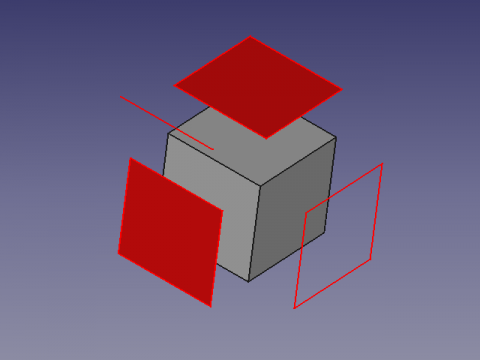
ReproWire
Usage
Select your object and run the macro for create your copy, you can extrude created faces.
The copies are coloured red and renamed with the Shapexxx + original names
Script
ToolBar Icon 
Macro_ReproWire.FCMacro
# -*- coding: utf-8 -*-
from __future__ import unicode_literals
import codecs   #https://docs.python.org/2/howto/unicode.html
import Part,Draft

#24/10/2015, 22/09/2018, 03/07/2019, 14/03/2020

__title__   = "Macro_ReproWire"
__author__  = "Mario52"
__url__     = "https://freecad.org/index-fr.html"
__Wiki__    = "https://wiki.freecad.org/Macro_Repro_Wire"
__version__ = "00.04"
__date__    = "2020/03/14"    #YYYY/MM/DD
__Comment__ = "Compatible with FreeCAD 0.17 0.18 and more"

global objectPlacementAngle ; objectPlacementAngle = ""
def objectRealPlacement3D(obj):
    global objectPlacementAngle
    try:
        objectPlacement      = obj.Shape.Placement
        ####
        objectPlacementBase  = FreeCAD.Vector(objectPlacement.Base)
        ####
        objectWorkCenter     = objectPlacementBase
        ####
        objectPlacementAngle = objectPlacement.Rotation.toEuler()

        if hasattr(obj, "getGlobalPlacement"):
            globalPlacement       = obj.getGlobalPlacement()
            globalPlacementBase   = FreeCAD.Vector(globalPlacement.Base)
            objectRealPlacement3D = globalPlacementBase.add(objectWorkCenter).sub(objectPlacementBase)
            objectPlacementAngle  = globalPlacement.Rotation.toEuler()
        else:
            objectRealPlacement3D = objectWorkCenter

        return objectRealPlacement3D
    except Exception:
        return FreeCAD.Vector(0.0, 0.0, 0.0)

sel = Gui.Selection.getSelection()
s   = Gui.Selection.getSelectionEx()

try:
    if len(sel) != 0:
            print( "Object(s) : ", len(sel), " , SubObject(s) : ", len(s))
            i2 = ii2 = -1
            for i in s:
                i2 += 1
                ii2 = -1
                try:
                    FreeCADGui.Selection.getSelectionEx()[i2].SubObjects[ii2]
                    for ii in i.SubElementNames:
                        placementOrigine = objectRealPlacement3D(FreeCAD.ActiveDocument.getObject(i.ObjectName))# search the original Placement
                        ii2 += 1
                        Part.show(FreeCADGui.Selection.getSelectionEx()[i2].SubObjects[ii2].copy())   # create repro shape subObject
                        print( i2+1 ,"/", ii2+1 ,"/", len(s) ," ", i.ObjectName ," ", ii)             # display the info SubObject
                        a = App.ActiveDocument.ActiveObject
                        a.Placement.Base = placementOrigine
                        a.Placement.Rotation = App.Rotation(objectPlacementAngle[0], objectPlacementAngle[1], objectPlacementAngle[2])
                        #    object Name  / original object Name / SubObject Name
                        a.Label = a.Name + " " + i.ObjectName + " " + ii                              # Label for the repro shape
                        try:
                            FreeCADGui.activeDocument().activeObject().LineColor  = (1.0,0.0,0.0)     # give LineColor
                            FreeCADGui.activeDocument().activeObject().PointColor = (1.0,0.0,0.0)     # give PointColor
                            FreeCADGui.activeDocument().activeObject().ShapeColor = (1.0,0.0,0.0)     # give ShapeColor
                        except Exception:
                            None
                except Exception:
#                    print( "Not SubObject")
                    placementOrigine = objectRealPlacement3D(FreeCAD.ActiveDocument.getObject(sel[i2].Name))# search the original Placement
                    Part.show(sel[i2].Shape)                                                          # create repro shape object
                    print( i2+1 ,"/", ii2+1 ,"/", len(s) ," ", sel[i2].Name)                          # display the info SubObject
                    a = App.ActiveDocument.ActiveObject
                    a.Placement.Base = placementOrigine
                    a.Placement.Rotation = App.Rotation(objectPlacementAngle[0], objectPlacementAngle[1], objectPlacementAngle[2])
                    #        object Name  /  original object Name
                    a.Label =a.Name + " " +  sel[i2].Name                                             # Label for the repro shape
                    try:
                        FreeCADGui.activeDocument().activeObject().LineColor  = (1.0,0.0,0.0)         # give LineColor
                        FreeCADGui.activeDocument().activeObject().PointColor = (1.0,0.0,0.0)         # give PointColor
                        FreeCADGui.activeDocument().activeObject().ShapeColor = (1.0,0.0,0.0)         # give ShapeColor
                    except Exception:
                        None
                try:
                    SubElement = FreeCADGui.Selection.getSelectionEx()[0].SubObjects[0]
                    print( FreeCADGui.Selection.getSelectionEx()[0].SubElementNames[0], " : ", SubElement.normalAt(0,0)) # ok Vector pour face
                except Exception:
                    None

            FreeCAD.ActiveDocument.recompute()
    else :
        FreeCAD.Console.PrintError("Select one object" + "\n")
except Exception:
    FreeCAD.Console.PrintError("Unexpected error" + "\n")
Version
00.04 2020-03-14 : correction for rotate object
00.03 03/07/2019 : compatibility with Python 3 "print" to "print()"
00.02 22/09/2018 : Compatible with FreeCAD 0.17 (getGlobalPlacement())
00.01 24/10/2015 : extension to all objects
00.00 22/10/2015 :
Links
The forum are there any tools to extrude only selected surface from a sketch?
This page is retrieved from https://wiki.freecad.org/Macro_Repro_Wire