|
|
| Descrizione |
|---|
| Questa macro visualizza le variabili globali all'interno del sistema FreeCAD, (es: FreeCAD.myVariable). Versione macro: 1.0 Ultima modifica: 2015-02-09 Versione FreeCAD: All Download: ToolBar Icon Autore: Piffpoof |
| Autore |
| Piffpoof |
| Download |
| ToolBar Icon |
| Link |
| Raccolta di macro Come installare le macro Personalizzare la toolbar |
| Versione macro |
| 1.0 |
| Data ultima modifica |
| 2015-02-09 |
| Versioni di FreeCAD |
| All |
| Scorciatoia |
| Nessuna |
| Vedere anche |
| Nessuno |


Descrizione
Questa macro visualizza le variabili globali all'interno del sistema di FreeCAD (ad esempio FreeCAD.myVariable). L'utente può aggiungere e rimuovere variabili dalla visualizzazione, che può anche essere aggiornata periodicamente.
Installazione
Tutto il codice per variableWatcher.FCMacro è contenuto in un'unica macro. Pertanto, l'installazione consiste nel copiare il codice nella cartella Macro appropriata e richiamare il Global Variable Watcher dal menu Macro, dalla console Python o da un pulsante della barra degli strumenti (metodo preferito).
- vedere Come installare le macro per informazioni su come installare il codice di questa macro.
- vedere Personalizza le barre degli strumenti per informazioni su come installarlo come pulsante su una barra degli strumenti.
Utilizzo
Selezionare le variabili globali da monitorare utilizzando il menu a comparsa più a destra. Fare clic sul pulsante "Display Now" per visualizzare immediatamente la variabile e il suo valore, oppure fare clic sul pulsante "Timer On" per avviare un timer automatico. L'intervallo per il timer è impostato nel menu a comparsa più a sinistra. L'opzione in alto nel menu a comparsa più a destra consente di aggiornare l'elenco delle variabili globali, poiché alcune potrebbero essere state create o eliminate sotto il controllo del programma.
È possibile rimuovere una variabile dall'elenco di quelle controllate facendo clic con il pulsante destro del mouse su di essa o sul suo valore e selezionando "remove variable".
Interfaccia utente
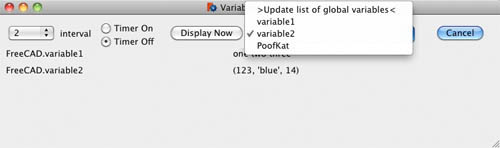
Osservazioni
Questa è una versione preliminare e non tutti gli aspetti sono stati definitivi, in particolare l'elencazione delle variabili globali e dei relativi valori.
Script
Icona barra degli strumenti 
Macro_Global_Variable_Watcher.FCMacro
# -*- coding: utf-8 -*-
#
#			Variable Watcher
#			displays variables of the form FreeCAD.*,
#			either manually or on a timed basis
#
################################
# routine to <description goes here>
"""
script does <long winded description goes here>
"""
################################

# import statements
import FreeCAD
import math, collections, time
from datetime import datetime
from threading import Timer
from PySide import QtGui, QtCore

# UI Class definitions

class VariableWatcher(QtGui.QDialog):
	""""""
	def __init__(self):
		super(VariableWatcher, self).__init__()
		self.initUI()
	def initUI(self):
		column1LH	= 10
		column2LH	= 350
		headerY		= 20
		row1		= 50
		row2		= 75
		row3		= 100
		row4		= 125
		row5		= 150
		# define window		xLoc,yLoc,xDim,yDim
		self.setGeometry(	250, 250, 750, 200)
		self.setWindowTitle("Variable Watcher")
		self.setWindowFlags(QtCore.Qt.WindowStaysOnTopHint)
		self.intervalDefault = str(2)
		# labels
		self.name1 = QtGui.QLabel(varLabelSpaces, self)
		self.name1.move(column1LH, row1)
		self.value1 = QtGui.QLabel(varValueSpaces, self)
		self.value1.move(column2LH, row1)
		self.name2 = QtGui.QLabel(varLabelSpaces, self)
		self.name2.move(column1LH, row2)
		self.value2 = QtGui.QLabel(varValueSpaces, self)
		self.value2.move(column2LH, row2)
		self.name3 = QtGui.QLabel(varLabelSpaces, self)
		self.name3.move(column1LH, row3)
		self.value3 = QtGui.QLabel(varValueSpaces, self)
		self.value3.move(column2LH, row3)
		self.name4 = QtGui.QLabel(varLabelSpaces, self)
		self.name4.move(column1LH, row4)
		self.value4 = QtGui.QLabel(varValueSpaces, self)
		self.value4.move(column2LH, row4)
		self.name5 = QtGui.QLabel(varLabelSpaces, self)
		self.name5.move(column1LH, row5)
		self.value5 = QtGui.QLabel(varValueSpaces, self)
		self.value5.move(column2LH, row5)
		self.intervalLbl = QtGui.QLabel("interval", self)
		self.intervalLbl.move(90, headerY)
		self.timestampLbl = QtGui.QLabel("                 ", self)
		self.timestampLbl.move(300, 180)
		# radio buttons
		self.timerOnRB  = QtGui.QRadioButton("Timer On",self)
		self.timerOnRB.setEnabled(True)
		self.timerOnRB.clicked.connect(self.onTimerOnRB)
		self.timerOnRB.move(150,headerY-10)
		self.timerOffRB = QtGui.QRadioButton("Timer Off",self)
		self.timerOffRB.setEnabled(True)
		self.timerOffRB.setChecked(True)
		self.timerOffRB.clicked.connect(self.onTimerOffRB)
		self.timerOffRB.move(150,headerY+10)
		#
		nowButton = QtGui.QPushButton('Display Now', self)
		nowButton.clicked.connect(self.onDisplayNow)
		nowButton.move(250, headerY-7)
		# set up lists for pop-ups
		self.intervalPopupItems = ("0.5","1","2","3","4","5","6","7","8","9","10")
		# set up pop-up menu for timer interval
		self.intervalPop = QtGui.QComboBox(self)
		self.intervalPop.addItems(self.intervalPopupItems)
		self.intervalPop.setCurrentIndex(self.intervalPopupItems.index(self.intervalDefault))
		self.interval = self.intervalDefault
		self.intervalPop.move(10,headerY-5)
		self.intervalPop.activated[str].connect(self.onIntervalActivated)
		# set up pop-up menu FreeCAD global variables to watch
		self.globVar = QtGui.QComboBox(self)
		self.globVar.addItems(fcGlobalVars())
		self.globVar.setCurrentIndex(0)
		self.globVar.setGeometry(0,0,250,30)
		self.globVar.move(375,headerY-7)
		self.globVar.activated[str].connect(self.onMenuChoice)
		#
		cancelButton = QtGui.QPushButton('Cancel', self)
		cancelButton.clicked.connect(self.onCancel)
		cancelButton.move(650, headerY-7)
		# contextual menu for removing variable from watch list
		mnuRemove = QtGui.QAction(self)
		mnuRemove.setText("remove variable")
		mnuRemove.triggered.connect(self.onRemoveVariable)
		# define menu and add option
		self.name1.setContextMenuPolicy(QtCore.Qt.ActionsContextMenu)
		self.name1.addAction(mnuRemove)
		self.name2.setContextMenuPolicy(QtCore.Qt.ActionsContextMenu)
		self.name2.addAction(mnuRemove)
		self.name3.setContextMenuPolicy(QtCore.Qt.ActionsContextMenu)
		self.name3.addAction(mnuRemove)
		self.name4.setContextMenuPolicy(QtCore.Qt.ActionsContextMenu)
		self.name4.addAction(mnuRemove)
		self.name5.setContextMenuPolicy(QtCore.Qt.ActionsContextMenu)
		self.name5.addAction(mnuRemove)
		self.value1.setContextMenuPolicy(QtCore.Qt.ActionsContextMenu)
		self.value1.addAction(mnuRemove)
		self.value2.setContextMenuPolicy(QtCore.Qt.ActionsContextMenu)
		self.value2.addAction(mnuRemove)
		self.value3.setContextMenuPolicy(QtCore.Qt.ActionsContextMenu)
		self.value3.addAction(mnuRemove)
		self.value4.setContextMenuPolicy(QtCore.Qt.ActionsContextMenu)
		self.value4.addAction(mnuRemove)
		self.value5.setContextMenuPolicy(QtCore.Qt.ActionsContextMenu)
		self.value5.addAction(mnuRemove)

		self.show()
		#
	def onIntervalActivated(self, text):
		self.interval = text

	def onTimerOffRB(self):
		# don't do much, this button serves as a semaphore for the timer routine
		pass

	def onTimerOnRB(self):
		# launch timer routine which is based on the Off radio button
		self.timerRoutine()

	def timerRoutine(self):
		if self.timerOnRB.isChecked():
			# if the On button is still checked then launch another timer event
			#print self.interval
			Timer(float(self.interval), self.timerRoutine, ()).start()
			#Timer(2, self.timerRoutine, ()).start()
		else:
			FreeCAD.Console.PrintMessage("Timer ceasing\n")
		# now do what should be done
		self.timerRoutineActions()

	def timerRoutineActions(self):
		global watchedVariables
		if len(watchedVariables)>0:
			self.displayVariables()
		else:
			FreeCAD.Console.PrintMessage("Timer found no variables\n")
		self.timestamp()

	def timestamp(self):
		self.timestampLbl.setText(datetime.now().strftime('%H:%M:%S'))

	def onDisplayNow(self):
		self.timestamp()
		if len(watchedVariables)>0:
			self.displayVariables()
		else:
			FreeCAD.Console.PrintMessage("Found no variables\n")

	def onMenuChoice(self,aChoice):
		# handle the user choice from the list of FreeCAD global variables
		if aChoice==topOfMenuChoices:
			# wants to update list of Global variable in FreeCAD
			self.globVarPopupItems  = fcGlobalVars()
			self.globVar.clear()
			self.globVar.addItems(self.globVarPopupItems)
		else:
			if hasattr(FreeCAD,aChoice):
				varStr = "FreeCAD."+aChoice
				exec "varVal = "+varStr
				exec "dataTypeStr = str(type(" + varStr + "))"
				self.addVariable(varStr,varVal.__repr__())

	def addVariable(self, aNameStr, aValueStr):
		global watchedVariables
		if len(watchedVariables)<watchVariableLimit:
			# screen limited in size for now
			if aNameStr not in watchedVariables.keys():
				# prevent adding same variable twice
				watchedVariables[aNameStr] = aValueStr
				self.displayVariables()

	def onRemoveVariable(self):
		global watchedVariables
		if self.name1.underMouse() or self.value1.underMouse():
			variableToRemove = self.name1.text()
		if self.name2.underMouse() or self.value2.underMouse():
			variableToRemove = self.name2.text()
		if self.name3.underMouse() or self.value3.underMouse():
			variableToRemove = self.name3.text()
		#print variableToRemove
		watchedVariables.pop(variableToRemove)
		self.displayVariables()

	def displayVariables(self):
		global watchedVariables

		sortedKeys = watchedVariables.keys()
		sortedKeysCount = len(sortedKeys)
		# clear display variables
		self.name1.setText("")
		self.value1.setText("")
		self.name2.setText("")
		self.value2.setText("")
		self.name3.setText("")
		self.value3.setText("")
		self.name4.setText("")
		self.value4.setText("")
		self.name5.setText("")
		self.value5.setText("")
		# now display variable names and values
		# use 'if hasattr(FreeCAD,"ABC"):' to ensure that variable still exists
		for i in range(0,min(len(watchedVariables),5)):
			aNameStr = sortedKeys[i]
			exec "aValueStr = "+aNameStr+".__repr__()"
			#print aNameStr, " ", aValueStr
			if i==0:
				self.name1.setText(aNameStr)
				self.value1.setText(aValueStr)
			elif i==1:
				self.name2.setText(aNameStr)
				self.value2.setText(aValueStr)
			elif i==2:
				self.name3.setText(aNameStr)
				self.value3.setText(aValueStr)
			elif i==3:
				self.name4.setText(aNameStr)
				self.value4.setText(aValueStr)
			elif i==4:
				self.name5.setText(aNameStr)
				self.value5.setText(aValueStr)

	def onCancel(self):
		# need to shut down timer if running
		self.close()

# Class definitions

# Functions definitions

def fcGlobalVars():
	varDict = list()
	varDict.append(topOfMenuChoices)
	for i in FreeCAD.__dict__.keys():
		typeStr = type(FreeCAD.__dict__[i])
		# disregard functions or methods, module
		if str(typeStr) in ("<type 'type'>","<type 'builtin_function_or_method'>","<type 'module'>"):
			pass
		else:
			# ignore reserved variable names
			if str(i) in ("PythonAssistantWindowStatus","GuiUp","ActiveDocument", "__path__", "__package__", "__doc__", "__name__"):
				pass
			else:
				varDict.append(i)
	return varDict

# Constant definitions
topOfMenuChoices = ">Update list of global variables<"
varLabelSpaces = ">                                                                    <"
varValueSpaces = ">                                                                                      <"

# code ***********************************************************************************
global watchVariables, watchVariableLimit
watchedVariables = {}
watchVariableLimit = 5 # number of lines on screen

form = VariableWatcher()
form.exec_()
#
#OS: Mac OS X
#Word size: 64-bit
#Version: 0.14.3703 (Git)
#Branch: releases/FreeCAD-0-14
#Hash: c6edd47334a3e6f209e493773093db2b9b4f0e40
#Python version: 2.7.5
#Qt version: 4.8.6
#Coin version: 3.1.3
#SoQt version: 1.5.0
#OCC version: 6.7.0
#
#thus ends the macro...
Questa pagina è recuperata da https://wiki.freecad.org/Macro_Global_Variable_Watcher