|
|
| Description |
|---|
| This macro displays the global variables within the FreeCAD system, (e.g. FreeCAD.myVariable). Macro version: 1.0 Last modified: 2015-02-09 FreeCAD version: All Download: ToolBar Icon Author: Piffpoof |
| Author |
| Piffpoof |
| Download |
| ToolBar Icon |
| Links |
| Macros recipes How to install macros How to customize toolbars |
| Macro Version |
| 1.0 |
| Date last modified |
| 2015-02-09 |
| FreeCAD Version(s) |
| All |
| Default shortcut |
| None |
| See also |
| None |

Description
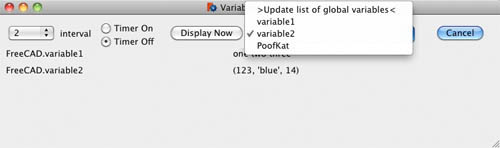
This macro displays the global variables within the FreeCAD system (e.g. FreeCAD.myVariable). The user may add and remove variables from the display, which may also be updated on a timed basis.
Installation
All the code for variableWatcher.FCMacro is in one macro. So installation is comprised of copying the code to the appropriate Macro directory and invoking the Global Variable Watcher from the Macro menu, the Python console or a toolbar button (the preferred method).
- see How to install macros for information on how to install this macro code
- see Customize Toolbars for information how to install as a button on a toolbar
Usage
Select global variables to be watched by using the rightmost pop-up menu. Click the "Display Now" button to immediately display the variable and its value, or click on the "Timer On" button to start an automatic timer. The interval for the timer is set in the far left pop-up menu. The topmost option on the rightmost pop-up menu is to update the list of global variables as they may have been created or deleted under program control.
A variable may be removed from the watch list by right-clicking over it or it's value, and selecting "remove variable".
User Interface
Remarks
This is a pre-release version and not all aspects are finalized - especially the listing the global variable and their values.
Script
ToolBar Icon 
Macro_Global_Variable_Watcher.FCMacro
# -*- coding: utf-8 -*-
#
#			Variable Watcher
#			displays variables of the form FreeCAD.*,
#			either manually or on a timed basis
#
################################
# routine to <description goes here>
"""
script does <long winded description goes here>
"""
################################

# import statements
import FreeCAD
import math, collections, time
from datetime import datetime
from threading import Timer
from PySide import QtGui, QtCore

# UI Class definitions

class VariableWatcher(QtGui.QDialog):
	""""""
	def __init__(self):
		super(VariableWatcher, self).__init__()
		self.initUI()
	def initUI(self):
		column1LH	= 10
		column2LH	= 350
		headerY		= 20
		row1		= 50
		row2		= 75
		row3		= 100
		row4		= 125
		row5		= 150
		# define window		xLoc,yLoc,xDim,yDim
		self.setGeometry(	250, 250, 750, 200)
		self.setWindowTitle("Variable Watcher")
		self.setWindowFlags(QtCore.Qt.WindowStaysOnTopHint)
		self.intervalDefault = str(2)
		# labels
		self.name1 = QtGui.QLabel(varLabelSpaces, self)
		self.name1.move(column1LH, row1)
		self.value1 = QtGui.QLabel(varValueSpaces, self)
		self.value1.move(column2LH, row1)
		self.name2 = QtGui.QLabel(varLabelSpaces, self)
		self.name2.move(column1LH, row2)
		self.value2 = QtGui.QLabel(varValueSpaces, self)
		self.value2.move(column2LH, row2)
		self.name3 = QtGui.QLabel(varLabelSpaces, self)
		self.name3.move(column1LH, row3)
		self.value3 = QtGui.QLabel(varValueSpaces, self)
		self.value3.move(column2LH, row3)
		self.name4 = QtGui.QLabel(varLabelSpaces, self)
		self.name4.move(column1LH, row4)
		self.value4 = QtGui.QLabel(varValueSpaces, self)
		self.value4.move(column2LH, row4)
		self.name5 = QtGui.QLabel(varLabelSpaces, self)
		self.name5.move(column1LH, row5)
		self.value5 = QtGui.QLabel(varValueSpaces, self)
		self.value5.move(column2LH, row5)
		self.intervalLbl = QtGui.QLabel("interval", self)
		self.intervalLbl.move(90, headerY)
		self.timestampLbl = QtGui.QLabel("                 ", self)
		self.timestampLbl.move(300, 180)
		# radio buttons
		self.timerOnRB  = QtGui.QRadioButton("Timer On",self)
		self.timerOnRB.setEnabled(True)
		self.timerOnRB.clicked.connect(self.onTimerOnRB)
		self.timerOnRB.move(150,headerY-10)
		self.timerOffRB = QtGui.QRadioButton("Timer Off",self)
		self.timerOffRB.setEnabled(True)
		self.timerOffRB.setChecked(True)
		self.timerOffRB.clicked.connect(self.onTimerOffRB)
		self.timerOffRB.move(150,headerY+10)
		#
		nowButton = QtGui.QPushButton('Display Now', self)
		nowButton.clicked.connect(self.onDisplayNow)
		nowButton.move(250, headerY-7)
		# set up lists for pop-ups
		self.intervalPopupItems = ("0.5","1","2","3","4","5","6","7","8","9","10")
		# set up pop-up menu for timer interval
		self.intervalPop = QtGui.QComboBox(self)
		self.intervalPop.addItems(self.intervalPopupItems)
		self.intervalPop.setCurrentIndex(self.intervalPopupItems.index(self.intervalDefault))
		self.interval = self.intervalDefault
		self.intervalPop.move(10,headerY-5)
		self.intervalPop.activated[str].connect(self.onIntervalActivated)
		# set up pop-up menu FreeCAD global variables to watch
		self.globVar = QtGui.QComboBox(self)
		self.globVar.addItems(fcGlobalVars())
		self.globVar.setCurrentIndex(0)
		self.globVar.setGeometry(0,0,250,30)
		self.globVar.move(375,headerY-7)
		self.globVar.activated[str].connect(self.onMenuChoice)
		#
		cancelButton = QtGui.QPushButton('Cancel', self)
		cancelButton.clicked.connect(self.onCancel)
		cancelButton.move(650, headerY-7)
		# contextual menu for removing variable from watch list
		mnuRemove = QtGui.QAction(self)
		mnuRemove.setText("remove variable")
		mnuRemove.triggered.connect(self.onRemoveVariable)
		# define menu and add option
		self.name1.setContextMenuPolicy(QtCore.Qt.ActionsContextMenu)
		self.name1.addAction(mnuRemove)
		self.name2.setContextMenuPolicy(QtCore.Qt.ActionsContextMenu)
		self.name2.addAction(mnuRemove)
		self.name3.setContextMenuPolicy(QtCore.Qt.ActionsContextMenu)
		self.name3.addAction(mnuRemove)
		self.name4.setContextMenuPolicy(QtCore.Qt.ActionsContextMenu)
		self.name4.addAction(mnuRemove)
		self.name5.setContextMenuPolicy(QtCore.Qt.ActionsContextMenu)
		self.name5.addAction(mnuRemove)
		self.value1.setContextMenuPolicy(QtCore.Qt.ActionsContextMenu)
		self.value1.addAction(mnuRemove)
		self.value2.setContextMenuPolicy(QtCore.Qt.ActionsContextMenu)
		self.value2.addAction(mnuRemove)
		self.value3.setContextMenuPolicy(QtCore.Qt.ActionsContextMenu)
		self.value3.addAction(mnuRemove)
		self.value4.setContextMenuPolicy(QtCore.Qt.ActionsContextMenu)
		self.value4.addAction(mnuRemove)
		self.value5.setContextMenuPolicy(QtCore.Qt.ActionsContextMenu)
		self.value5.addAction(mnuRemove)

		self.show()
		#
	def onIntervalActivated(self, text):
		self.interval = text

	def onTimerOffRB(self):
		# don't do much, this button serves as a semaphore for the timer routine
		pass

	def onTimerOnRB(self):
		# launch timer routine which is based on the Off radio button
		self.timerRoutine()

	def timerRoutine(self):
		if self.timerOnRB.isChecked():
			# if the On button is still checked then launch another timer event
			#print self.interval
			Timer(float(self.interval), self.timerRoutine, ()).start()
			#Timer(2, self.timerRoutine, ()).start()
		else:
			FreeCAD.Console.PrintMessage("Timer ceasing\n")
		# now do what should be done
		self.timerRoutineActions()

	def timerRoutineActions(self):
		global watchedVariables
		if len(watchedVariables)>0:
			self.displayVariables()
		else:
			FreeCAD.Console.PrintMessage("Timer found no variables\n")
		self.timestamp()

	def timestamp(self):
		self.timestampLbl.setText(datetime.now().strftime('%H:%M:%S'))

	def onDisplayNow(self):
		self.timestamp()
		if len(watchedVariables)>0:
			self.displayVariables()
		else:
			FreeCAD.Console.PrintMessage("Found no variables\n")

	def onMenuChoice(self,aChoice):
		# handle the user choice from the list of FreeCAD global variables
		if aChoice==topOfMenuChoices:
			# wants to update list of Global variable in FreeCAD
			self.globVarPopupItems  = fcGlobalVars()
			self.globVar.clear()
			self.globVar.addItems(self.globVarPopupItems)
		else:
			if hasattr(FreeCAD,aChoice):
				varStr = "FreeCAD."+aChoice
				exec "varVal = "+varStr
				exec "dataTypeStr = str(type(" + varStr + "))"
				self.addVariable(varStr,varVal.__repr__())

	def addVariable(self, aNameStr, aValueStr):
		global watchedVariables
		if len(watchedVariables)<watchVariableLimit:
			# screen limited in size for now
			if aNameStr not in watchedVariables.keys():
				# prevent adding same variable twice
				watchedVariables[aNameStr] = aValueStr
				self.displayVariables()

	def onRemoveVariable(self):
		global watchedVariables
		if self.name1.underMouse() or self.value1.underMouse():
			variableToRemove = self.name1.text()
		if self.name2.underMouse() or self.value2.underMouse():
			variableToRemove = self.name2.text()
		if self.name3.underMouse() or self.value3.underMouse():
			variableToRemove = self.name3.text()
		#print variableToRemove
		watchedVariables.pop(variableToRemove)
		self.displayVariables()

	def displayVariables(self):
		global watchedVariables

		sortedKeys = watchedVariables.keys()
		sortedKeysCount = len(sortedKeys)
		# clear display variables
		self.name1.setText("")
		self.value1.setText("")
		self.name2.setText("")
		self.value2.setText("")
		self.name3.setText("")
		self.value3.setText("")
		self.name4.setText("")
		self.value4.setText("")
		self.name5.setText("")
		self.value5.setText("")
		# now display variable names and values
		# use 'if hasattr(FreeCAD,"ABC"):' to ensure that variable still exists
		for i in range(0,min(len(watchedVariables),5)):
			aNameStr = sortedKeys[i]
			exec "aValueStr = "+aNameStr+".__repr__()"
			#print aNameStr, " ", aValueStr
			if i==0:
				self.name1.setText(aNameStr)
				self.value1.setText(aValueStr)
			elif i==1:
				self.name2.setText(aNameStr)
				self.value2.setText(aValueStr)
			elif i==2:
				self.name3.setText(aNameStr)
				self.value3.setText(aValueStr)
			elif i==3:
				self.name4.setText(aNameStr)
				self.value4.setText(aValueStr)
			elif i==4:
				self.name5.setText(aNameStr)
				self.value5.setText(aValueStr)

	def onCancel(self):
		# need to shut down timer if running
		self.close()

# Class definitions

# Functions definitions

def fcGlobalVars():
	varDict = list()
	varDict.append(topOfMenuChoices)
	for i in FreeCAD.__dict__.keys():
		typeStr = type(FreeCAD.__dict__[i])
		# disregard functions or methods, module
		if str(typeStr) in ("<type 'type'>","<type 'builtin_function_or_method'>","<type 'module'>"):
			pass
		else:
			# ignore reserved variable names
			if str(i) in ("PythonAssistantWindowStatus","GuiUp","ActiveDocument", "__path__", "__package__", "__doc__", "__name__"):
				pass
			else:
				varDict.append(i)
	return varDict

# Constant definitions
topOfMenuChoices = ">Update list of global variables<"
varLabelSpaces = ">                                                                    <"
varValueSpaces = ">                                                                                      <"

# code ***********************************************************************************
global watchVariables, watchVariableLimit
watchedVariables = {}
watchVariableLimit = 5 # number of lines on screen

form = VariableWatcher()
form.exec_()
#
#OS: Mac OS X
#Word size: 64-bit
#Version: 0.14.3703 (Git)
#Branch: releases/FreeCAD-0-14
#Hash: c6edd47334a3e6f209e493773093db2b9b4f0e40
#Python version: 2.7.5
#Qt version: 4.8.6
#Coin version: 3.1.3
#SoQt version: 1.5.0
#OCC version: 6.7.0
#
#thus ends the macro...
This page is retrieved from https://wiki.freecad.org/Macro_Global_Variable_Watcher