|
|
| Descrizione |
|---|
| Fornisce informazioni su coordinate, lunghezza e angoli in tempo reale accanto al puntatore del mouse. Versione macro: 00.04 Ultima modifica: 2018-03-27 Download: ToolBar Icon Autore: Mario52 |
| Autore |
| Mario52 |
| Download |
| ToolBar Icon |
| Link |
| Raccolta di macro Come installare le macro Personalizzare la toolbar |
| Versione macro |
| 00.04 |
| Data ultima modifica |
| 2018-03-27 |
| Versioni di FreeCAD |
| None |
| Scorciatoia |
| Nessuna |
| Vedere anche |
| Nessuno |

Descrizione
Fornisce in tempo reale informazioni su coordinate, lunghezza e angoli accanto al puntatore del mouse in un'annotazione a bolla visualizzata nella vista 3D
Temporary code for external macro link. Do not use this code. This code is used exclusively by Addon Manager. Link for optional manual installation: Macro
# This code is copied instead of the original macro code
# to guide the user to the online download page.
# Use it if the code of the macro is larger than 64 KB and cannot be included in the wiki
# or if the RAW code URL is somewhere else in the wiki.

from PySide import QtGui, QtCore

diag = QtGui.QMessageBox(QtGui.QMessageBox.Information,
    "Information",
    "This macro must be downloaded from this link\n"
    "\n"
    "https://gist.githubusercontent.com/mario52a/974214c4b83beaa41495/raw/7789c1995dba2af74a14d549638267f7740c036c/Macro_FCInfoToMouse.FCMacro" + "\n"
    "\n"
    "Quit this window to access the download page")

diag.setWindowFlags(QtCore.Qt.WindowStaysOnTopHint)
diag.setWindowModality(QtCore.Qt.ApplicationModal)
diag.exec_()

import webbrowser
webbrowser.open("https://gist.githubusercontent.com/mario52a/974214c4b83beaa41495/raw/7789c1995dba2af74a14d549638267f7740c036c/Macro_FCInfoToMouse.FCMacro")
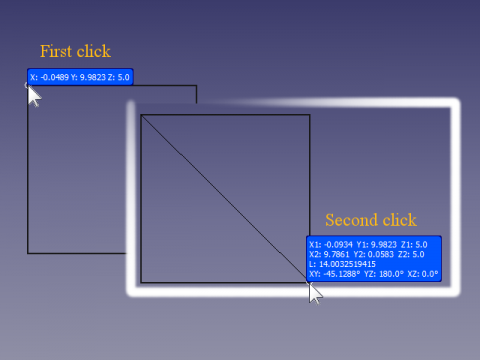
macro FCInfoToMouse in azione
Utilizzo
- Installare la macro FCInfoToMouse nella cartella delle macro tramite Addon Manager
- Eseguire la macro
- Risultato: viene visualizzata un'annotazione e le informazioni sulle coordinate del mouse vengono visualizzate in tempo reale.

Figura 1
- X, Y, Z: le coordinate del mouse vengono visualizzate nella bolla (questo vale solo quando è abilitata la modalità "Singola") come mostrato nella Fig. 1
- Una volta cliccato il mouse per la prima volta, vengono visualizzate informazioni aggiuntive (quando è abilitata la modalità "Forced", verrà visualizzata solo questa impostazione)
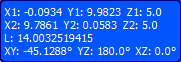
Figura 2
- X1, Y1, Z1 : Coordinate iniziali del primo clic del mouse
- X2, Y2, Z2 : Coordinate correnti del mouse
- L : Distanza tra il primo clic del mouse e la posizione attuale del puntatore del mouse
- XY, YZ, XZ : Angoli tra il primo punto e il puntatore del mouse in movimento nei piani XY, YZ e XZ
Figura 3 - quando il puntatore del mouse è sopra un oggetto, viene visualizzato il nome dell'oggetto
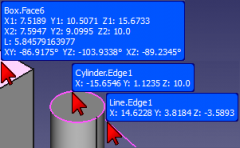
- Se il mouse passa sopra un oggetto, il nome dell'oggetto appare nella parte superiore dell'annotazione (vedere Figura 3).
Scorciatoie da tastiera
SHIFT + Q: Esce dalla macro FCInfoToMouse. Dopo aver chiuso la macro, l'annotazione rimane nella posizione corrente del puntatore del mouse. Se si desidera eliminare manualmente l'annotazione, iniziare a utilizzare il mouse normalmente.
SHIFT + M: Alterna la modalità tra:
- single che visualizza solo le coordinate del puntatore del mouse (Figura 1)
- force che visualizza la "comprehensive visualisation" (Figura 2)
- normal che visualizza il comportamento predefinito della macro
SHIFT + C : per mostrare o nascondere l'annotazione.
SHIFT + D : per "aprire/chiudere" un foglio di calcolo con le coordinate salvate in:
Cell A Cell B Cell C Cell D x, y, z x y z
Note
In qualsiasi momento, è possibile modificare le proprietà della annotazione impostando i parametri nella scheda Vista che si apre facendo clic sull'oggetto FCInfoToMouse nella Vista Combinata.
Se si desidera cambiare il numero di decimali,modificare la riga 43 del codice (default 4 decimali)
Esempio per 6 cifre decimali:
valore originale
global arrondi ; arrondi = 4
sostituire con
global arrondi ; arrondi = 6
Per rendere la configurazione dell'annotazione permanente è possibile modificare i valori di configurazione nelle linee della sezione da 104 a 122
Script
L'icona FCInfoToMouse.png  .
.
Macro_FCInfoToMouse.FCMacro
# -*- coding: utf-8 -*-
"""
***************************************************************************
*   Copyright (c) 2016 <mario52>                                          *
*                                                                         *
*   This file is a supplement to the FreeCAD CAx development system.      *
*                                                                         *
*   This program is free software; you can redistribute it and/or modify  *
*   it under the terms of the GNU Lesser General Public License (LGPL)    *
*   as published by the Free Software Foundation; either version 2 of     *
*   the License, or (at your option) any later version.                   *
*   for detail see the LICENCE text file.                                 *
*                                                                         *
*   This software is distributed in the hope that it will be useful,      *
*   but WITHOUT ANY WARRANTY; without even the implied warranty of        *
*   MERCHANTABILITY or FITNESS FOR A PARTICULAR PURPOSE.  See the         *
*   GNU Library General Public License for more details.                  *
*                                                                         *
*   You should have received a copy of the GNU Library General Public     *
*   License along with this macro; if not, write to the Free Software     *
*   Foundation, Inc., 59 Temple Place, Suite 330, Boston, MA  02111-1307  *
*   USA                                                                   *
***************************************************************************
*           WARNING! All changes in this file will be lost and            *
*                  may cause malfunction of the program                   *
***************************************************************************
"""
# https://forum.freecad.org/viewtopic.php?f=22&t=9215
# FCInfoToMouse

__title__   = "FCInfoToMouse"
__author__  = "Mario52"
__url__     = "https://wiki.freecad.org/Macro_FCInfoToMouse"
__version__ = "00.04"
__date__    = "27/03/2018"
#
import Draft, Part
import math,FreeCAD
from FreeCAD import Base
import time
App = FreeCAD

global arrondi    ; arrondi    = 4

global objectAnn  ; objectAnn  = ""
global positionX1 ; positionX1 = 0.0
global positionY1 ; positionY1 = 0.0
global positionZ1 ; positionZ1 = 0.0
global force      ; force      = 0
global hidden     ; hidden     = 0
global coorBegin  ; coorBegin  = ""
global pas        ; pas        = 0

global spreadSheet; spreadSheet= 0
global compteur   ; compteur   = 0
global spread     ; spread     = ""

from math import sqrt, pi, sin, cos, asin, acos, atan, atan2, degrees

def angle2(vecteur_x1,vecteur_y1,vecteur_x2,vecteur_y2,mode):   #tester getAngle ( Vector )
# calcul de l'inclinaison d'une ligne a partir de deux Vecteurs
# si "mode" = 1 alors affichage en degres sinon en radian
    try:
        deltaX = vecteur_x2 - vecteur_x1
        deltaY = vecteur_y2 - vecteur_y1
        if mode ==1:
            angle = degrees(atan2(float(deltaY),float(deltaX))) # degres  (mode = 1)
        else:
            angle = atan2(float(deltaY),float(deltaX))          # radian  (mode = 0)
        return round(angle,arrondi)
    except Exception:
        None

def sub(first, other):
	"sub(Vector,Vector) - subtracts second vector from first one"
	if isinstance(first,FreeCAD.Vector) and isinstance(other,FreeCAD.Vector):
		return FreeCAD.Vector(first.x-other.x, first.y-other.y, first.z-other.z)

def length(first):
	"lengh(Vector) - gives vector length"
	if isinstance(first,FreeCAD.Vector):
		return math.sqrt(first.x*first.x + first.y*first.y + first.z*first.z)

def dist(first, other):
	"dist(Vector,Vector) - returns the distance between both points/vectors"
	if isinstance(first,FreeCAD.Vector) and isinstance(other,FreeCAD.Vector):
		return length(sub(first,other))

def codeColor(color):
    try:
        rgb = float((float(color)/255.0))
    except Exception:
        rgb = 0.0
    return rgb


doc = FreeCAD.ActiveDocument
if doc == None:
    doc = FreeCAD.newDocument()

# for modify the configuration : line 104 to 122
# PS: if DisplayMode = "Line" and Frame = False the annotation is transparent
#
##### Configuration  Modify here # Begin #######################################
                                                                               #
#BackgroundColor :                                                             #
red_B           = 0.0                # 0.0 to 255.0                            #
green_B         = 84.0               # 0.0 to 255.0                            #
blue_B          = 255.0              # 0.0 to 255.0                            #
                                                                               #
displayMode     = "Line"             # "Line" or "Object"                      #
fontName        = "MS Shell Dlg 2"   # "MS Shell Dlg 2" for Windows            #
fontSize        = 8.0                # Font size                               #
frame           = False              # "False" or "True"                       #
justification   = "Left"             # "Left", "Right", "Center"               #
                                                                               #
#TextColor       :                                                             #
red_T           = 255.0              # 0.0 to 255.0                            #
green_T         = 255.0              # 0.0 to 255.0                            #
blue_T          = 255.0              # 0.0 to 255.0                            #
                                                                               #
##### Configuration  End End ###################################################

v=Gui.activeDocument().activeView()
objectAnn = App.ActiveDocument.addObject("App::AnnotationLabel","FCInfoToMouse")# create work annotation
objectAnn.LabelText=["Hello FreeCAD World"]

FreeCADGui.getDocument(doc.Name).getObject(objectAnn.Label).BackgroundColor = (codeColor(red_B),codeColor(green_B),codeColor(blue_B))   #
FreeCADGui.getDocument(doc.Name).getObject(objectAnn.Label).DisplayMode     = displayMode                                               #
FreeCADGui.getDocument(doc.Name).getObject(objectAnn.Label).FontName        = fontName                                                  #
FreeCADGui.getDocument(doc.Name).getObject(objectAnn.Label).FontSize        = fontSize                                                  #
FreeCADGui.getDocument(doc.Name).getObject(objectAnn.Label).Frame           = frame                                                     #
FreeCADGui.getDocument(doc.Name).getObject(objectAnn.Label).Justification   = justification                                             #
FreeCADGui.getDocument(doc.Name).getObject(objectAnn.Label).TextColor       = (codeColor(red_T),codeColor(green_T),codeColor(blue_T))   #

import os, sys, platform
global PolicePath;    PolicePath = ""

#if platform.system() == "Windows" :
#    PolicePath = "C:/Windows/Fonts/ARIAL.TTF"
#elif platform.system() == "Linux" :
#    PolicePath = "/usr/share/fonts/truetype/ubuntu-font-family/Ubuntu-M.ttf"
#elif platform.system() == "Darwin":
#    PolicePath = "/Library/Fonts/Arial.ttf"
#else:
#    PolicePath = "C:/Windows/Fonts/ARIAL.TTF"

p=FreeCAD.ParamGet("User parameter:BaseApp/Preferences/Mod/Draft")
PolicePath = p.GetString("FontFile")

class ViewObserver:
    def __init__(self, view):
       self.view = view

    def logPosition(self, info):
        global objectAnn
        global positionX1, positionY1, positionZ1
        global pas, arrondi
        global coorBegin
        global force
        global hidden
        global PolicePath
        global spreadSheet
        global compteur
        global spread

######## for testing key ############
#        try:                       #
#            print info["Key"]      #
#            print info["State"]    #
##            print ord(info["Key"]) #
#        except Exception:          #
#            None                   #
#####################################

        Button1 = 0

        try:
            if (info["Key"] == "Q") and (info["State"] == "DOWN"):                        # SHIFT + Q for quit
                v.removeEventCallback("SoEvent",c)                                        # close event observation
                FreeCAD.Console.PrintMessage( "End FCInfoToMouse" + "\n")
        except Exception:
            None

        try:
            if (info["Key"] == "M") and (info["State"] == "DOWN"):                        # SHIFT + M for force display
                if force == 0:
                    force = 1
                    FreeCAD.Console.PrintMessage( "Forced " + "\n")
                elif force == 1:
                    force = 2
                    FreeCAD.Console.PrintMessage( "Single " + "\n")
                elif force == 2:
                    force = 0
                    FreeCAD.Console.PrintMessage( "Normal " + "\n")
        except Exception:
            None

        try:
            if (info["Key"] == "C") and (info["State"] == "DOWN"):                        # SHIFT + C for hidden / visible annotation OK
                if hidden == 0:
                    hidden = 1
                    FreeCADGui.getDocument(doc.Name).getObject(objectAnn.Label).Visibility = False
                    FreeCAD.Console.PrintMessage( "concealed " + "\n")
                else:
                    hidden = 0
                    FreeCADGui.getDocument(doc.Name).getObject(objectAnn.Label).Visibility = True
                    FreeCAD.Console.PrintMessage( "visible " + "\n")
        except Exception:
            None

        try:
            if (info["Key"] == "D") and (info["State"] == "DOWN"):                        # SHIFT + S for Open spreadSheet
                if spreadSheet == 0:
                    #spread = FreeCAD.ActiveDocument.getObjectsByLabel(spread.Name)[0]    # for append in existant SpreadSheet
                    spread = App.activeDocument().addObject('Spreadsheet::Sheet','MySpreedSheett')
                    spreadSheet = 1
                    FreeCAD.Console.PrintMessage("SpreadSheet open : " + spread.Name + "\n")
                else:
                    spreadSheet = 0
                    FreeCAD.Console.PrintMessage("SpreadSheet closed" + "\n")
                compteur    = 0
        except Exception:
            None

        try:
            object2 = ""
            object = v.getObjectInfo(v.getCursorPos())                                    # here for object preselected
            object2 = object["Object"] + "." + object["Component"]                        # object + component
            pnt = FreeCAD.Vector(float(object["x"]),float(object["y"]),float(object["z"]))# vector on position mouse to object
#            print "pnt ",pnt
        except Exception:
            pos = info["Position"]                                                        # if mouse in 3D view
            pnt = self.view.getPoint(pos)                                                 # vector detect on mouse position 3D view
#            print "pnt ",pnt

        try:
            if (info["Button"] == "BUTTON1") and (info["State"] == "DOWN"):               # coordinates clic to mouse
                positionX1 = round(pnt[0],arrondi)
                positionY1 = round(pnt[1],arrondi)
                positionZ1 = round(pnt[2],arrondi)

                coorBegin = ""
                coorBegin = "X1: "+str(positionX1)+"  Y1: "+str(positionY1)+"  Z1: "+str(positionZ1)
                if pas == 0:
                    pas = 1
                else:
                    pas = 0

                try:                                                   # spreadSheet
                    if spreadSheet == 1:
                        compteur += 1
                        spread.set("A"+str(compteur) ,  str(positionX1) + ", " + str(positionY1) + ", " + str(positionZ1))
                        spread.set("B"+str(compteur) ,  str(positionX1))
                        spread.set("C"+str(compteur) ,  str(positionY1))
                        spread.set("D"+str(compteur) ,  str(positionZ1))
                        App.ActiveDocument.recompute()
                        FreeCAD.Console.PrintMessage(str(compteur) + " : " +  str(positionX1) + ", " + str(positionY1) + ", " + str(positionZ1) + "\n")
                except Exception:
                    None

        except Exception:
            None

        try:
            objectAnn.BasePosition = (pnt[0], pnt[1], pnt[2])
            if force == 2:
                objectAnn.LabelText = ["X: " + str(round(pnt[0],arrondi)) + " Y: " + str(round(pnt[1],arrondi)) + " Z: " + str(round(pnt[2],arrondi))]
            else:
                if ((pas == 1) or (force == 1)):
                    coorEnd = longueur = angles = ""
                    coorEnd = "X2: " + str(round(pnt[0],arrondi)) + "  Y2: " + str(round(pnt[1],arrondi)) + "  Z2: " + str(round(pnt[2],arrondi))
                    longueur = "L: " + str(round(dist(FreeCAD.Vector(positionX1,positionY1,positionZ1), FreeCAD.Vector(pnt[0], pnt[1], pnt[2])),12)) # around to 12 decimales
                    alphaXY = alphaXY = alphaXZ = 0.0
                    alphaXY = str(round(angle2(positionX1,positionY1,pnt[0],pnt[1],1),arrondi))
                    alphaYZ = str(round(angle2(positionY1,positionZ1,pnt[1],pnt[2],1),arrondi))
                    alphaXZ = str(round(angle2(positionX1,positionZ1,pnt[0],pnt[2],1),arrondi))

                    angles = "XY: " + alphaXY + unichr(176) + "  YZ: " + alphaYZ + unichr(176) + "  XZ: " + alphaXZ + unichr(176)    # unichr(176) = degrees character

                    if object2 == "":
                        objectAnn.LabelText = [coorBegin, coorEnd, longueur, angles,]
                    else:
                        objectAnn.LabelText = [object2, coorBegin, coorEnd, longueur, angles,]
                else:
                    if object2 == "":
                        objectAnn.LabelText = ["X: " + str(round(pnt[0],arrondi)) + " Y: " + str(round(pnt[1],arrondi)) + " Z: " + str(round(pnt[2],arrondi)),]
                    else:
                        objectAnn.LabelText = [object2, "X: " + str(round(pnt[0],arrondi)) + " Y: " + str(round(pnt[1],arrondi)) + " Z: " + str(round(pnt[2],arrondi))]

        except Exception:
            FreeCAD.Console.PrintError("End FCInfoToMouse by an error" + "\n")
            v.removeEventCallback("SoEvent",c)                                            # close event observation

##### Begin ######
FreeCAD.Console.PrintMessage("__Welcome to FCInfoToMouse__" + "\n")
FreeCAD.Console.PrintMessage("SHIFT + Q : for quit" + "\n")
FreeCAD.Console.PrintMessage("SHIFT + M : for force display, mode single, mode normal" + "\n")
FreeCAD.Console.PrintMessage("SHIFT + C : for concealed / visible" + "\n")
FreeCAD.Console.PrintMessage("SHIFT + D : for create spreadSheet / close spreadSheet" + "\n")
FreeCAD.Console.PrintMessage("____________________________" + "\n")

pas = 0
o = ViewObserver(v)
try:
    c = v.addEventCallback("SoEvent",o.logPosition)
except Exception:
    App.ActiveDocument.removeObject(objectAnn.Label)
    FreeCAD.Console.PrintMessage( "Not GUI End FCInfoToMouse" + "\n")
or to Gists Macro_FCInfoToMouse.FCMacro or the zip Macro_FCInfoToMouse.FCMacro.zip
Limitazioni
È possibile che la macro non riconosca alcuni tasti
Link
La discussione nel forum From autocad to freecad
Le mie macro in mario52a gists
Versione
27/03/2018 ver 00.04 : aggiunto funzione "Save the coordinate in a spreadSheet key "D" flip/flop on,off
24/01/2016 ver 00.03 : aggiunto la configurazione della sezione e sostituita la chiave "C" con "M"
23/01/2016 ver 00.02 : aggiunta la funzione "single", sostituito il tasto "H" con "C" e corretto il bug
02/01/2016 : ver 0.1
Questa pagina è recuperata da https://wiki.freecad.org/Macro_FCInfoToMouse