|
|
| Beschreibung |
|---|
| Zeigt neben dem Mauszeiger in Echtzeit Informationen zu Koordinaten, Länge und Winkeln an. Versionsmakro : 00.04 Datum der letzten Änderung : 2018-03-27 Herunterladen : Werkzeugleisten-Symbol Autor: Mario52 |
| Autor |
| Mario52 |
| Herunterladen |
| Werkzeugleisten-Symbol |
| Links |
| Makros Rezepte Wie man Makros installiert Symbolleisten anpassen |
| Macro-Version |
| 00.04 |
| Datum der letzten Änderung |
| 2018-03-27 |
| FreeCAD-Version(s) |
| None |
| Standardverknüpfung |
| None |
| Siehe auch |
| None |

Beschreibung
Liefert Informationen zu Koordinaten, Länge und Winkeln in Echtzeit neben dem Mauszeiger in einer Blasenbeschriftung, die in der 3D-Ansicht angezeigt werden.
Temporary code for external macro link. Do not use this code. This code is used exclusively by Addon Manager. Link for optional manual installation: Macro
# This code is copied instead of the original macro code
# to guide the user to the online download page.
# Use it if the code of the macro is larger than 64 KB and cannot be included in the wiki
# or if the RAW code URL is somewhere else in the wiki.

from PySide import QtGui, QtCore

diag = QtGui.QMessageBox(QtGui.QMessageBox.Information,
    "Information",
    "This macro must be downloaded from this link\n"
    "\n"
    "https://gist.githubusercontent.com/mario52a/974214c4b83beaa41495/raw/7789c1995dba2af74a14d549638267f7740c036c/Macro_FCInfoToMouse.FCMacro" + "\n"
    "\n"
    "Quit this window to access the download page")

diag.setWindowFlags(QtCore.Qt.WindowStaysOnTopHint)
diag.setWindowModality(QtCore.Qt.ApplicationModal)
diag.exec_()

import webbrowser
webbrowser.open("https://gist.githubusercontent.com/mario52a/974214c4b83beaa41495/raw/7789c1995dba2af74a14d549638267f7740c036c/Macro_FCInfoToMouse.FCMacro")
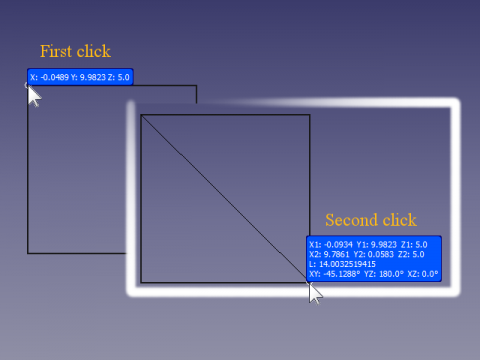
FCInfo an Maus-Makro in Aktion
Anwendung
- Das Makro FCInfoToMouse über den Addon-Manager in das Makroverzeichnis installieren
- Das Makro ausführen
- Ergebnis: Es erscheint eine Anmerkung und die Mauskoordinaten werden in Echtzeit angezeigt.

Bild 1
- X, Y, Z: Die Mauskoordinaten werden in der Blase angezeigt (dies gilt nur, wenn der Modus "Single" (Einzeln) aktiviert ist), wie in Abb. 1 zu sehen ist.
- Sobald die Maus zum ersten Mal angeklickt wird, werden zusätzliche Informationen angezeigt (wenn der Modus "Forced" (Erzwungen) aktiviert ist, wird ausschließlich diese Einstellung angezeigt).
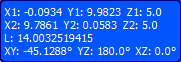
Bild 2
- X1, Y1, Z1 : Anfangskoordinaten des ersten Mausklicks
- X2, Y2, Z2 : Aktuelle Koordinaten der Maus
- L : Länge zwischen dem ersten Mausklick und der Position des aktuellen Mauszeigers
- XY, YZ, XZ : Winkel zwischen dem ersten Punkt und dem beweglichen Mauszeiger in den Ebenen XY, YZ und XZ
Abbildung 3 – Wenn sich der Mauszeiger über einem Objekt befindet, wird der Name des Objekts angezeigt.
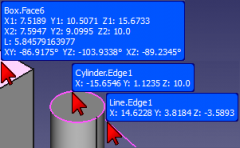
- Wenn die Maus über ein Objekt bewegt wird, erscheint der Name des Objekts oben in der Anmerkung (siehe Abbildung 3)..
Tastenkombinationen
SHIFT + Q: Beenden Sie das Makro FCInfoToMouse. Nach dem Beenden des Makros bleibt die Anmerkung an der aktuellen Position des Mauszeigers stehen. Die Maus wie gewohnt verwenden, wenn die Anmerkung manuell gelöscht werden soll.
SHIFT + M: Zwischen folgenden Modi wechseln:
- single (einfach) das nur die Koordinaten des Mauszeigers anzeigt (Abbildung 1)
- force (erzwungen) die die "umfassende Visualisierung" anzeigt (Abbildung 2)
- normal das das Standardverhalten des Makros anzeigt
SHIFT + C : für "versteckt/sichtbar"
SHIFT + D : zum "Öffnen/Schließen" einer Tabelle mit den gespeicherten Koordinaten unter:
Zelle A Zelle B Zelle C Zelle D x, y, z x y z
Hinweise
Die Eigenschaften der Anmerkung können jederzeit geändert werden, indem in der Kombinationsansicht auf das Objekt „FCInfoZuMaus“ geklickt wird und dann auf die Registerkarte „Ansicht“ geklickt wird.
Wenn die Anzahl der Dezimalstellen geändert werden soll, die Zeile 43 (Standardwert 4) ändern.
Beispiel für sechs Dezimalstellen:
Originalwert
global arrondi ; arrondi = 4
ersetzt durch
global arrondi ; arrondi = 6
Um die Konfiguration der permanenten Anmerkung vorzunehmen, kann man die Werte in den Zeilen 104 bis 122 des Konfigurationsabschnitts ändern.
Skript
Das Symbolbild FCInfoToMouse.png  .
.
Macro_FCInfoToMouse.FCMacro
# -*- coding: utf-8 -*-
"""
***************************************************************************
*   Copyright (c) 2016 <mario52>                                          *
*                                                                         *
*   This file is a supplement to the FreeCAD CAx development system.      *
*                                                                         *
*   This program is free software; you can redistribute it and/or modify  *
*   it under the terms of the GNU Lesser General Public License (LGPL)    *
*   as published by the Free Software Foundation; either version 2 of     *
*   the License, or (at your option) any later version.                   *
*   for detail see the LICENCE text file.                                 *
*                                                                         *
*   This software is distributed in the hope that it will be useful,      *
*   but WITHOUT ANY WARRANTY; without even the implied warranty of        *
*   MERCHANTABILITY or FITNESS FOR A PARTICULAR PURPOSE.  See the         *
*   GNU Library General Public License for more details.                  *
*                                                                         *
*   You should have received a copy of the GNU Library General Public     *
*   License along with this macro; if not, write to the Free Software     *
*   Foundation, Inc., 59 Temple Place, Suite 330, Boston, MA  02111-1307  *
*   USA                                                                   *
***************************************************************************
*           WARNING! All changes in this file will be lost and            *
*                  may cause malfunction of the program                   *
***************************************************************************
"""
# https://forum.freecad.org/viewtopic.php?f=22&t=9215
# FCInfoToMouse

__title__   = "FCInfoToMouse"
__author__  = "Mario52"
__url__     = "https://wiki.freecad.org/Macro_FCInfoToMouse"
__version__ = "00.04"
__date__    = "27/03/2018"
#
import Draft, Part
import math,FreeCAD
from FreeCAD import Base
import time
App = FreeCAD

global arrondi    ; arrondi    = 4

global objectAnn  ; objectAnn  = ""
global positionX1 ; positionX1 = 0.0
global positionY1 ; positionY1 = 0.0
global positionZ1 ; positionZ1 = 0.0
global force      ; force      = 0
global hidden     ; hidden     = 0
global coorBegin  ; coorBegin  = ""
global pas        ; pas        = 0

global spreadSheet; spreadSheet= 0
global compteur   ; compteur   = 0
global spread     ; spread     = ""

from math import sqrt, pi, sin, cos, asin, acos, atan, atan2, degrees

def angle2(vecteur_x1,vecteur_y1,vecteur_x2,vecteur_y2,mode):   #tester getAngle ( Vector )
# calcul de l'inclinaison d'une ligne a partir de deux Vecteurs
# si "mode" = 1 alors affichage en degres sinon en radian
    try:
        deltaX = vecteur_x2 - vecteur_x1
        deltaY = vecteur_y2 - vecteur_y1
        if mode ==1:
            angle = degrees(atan2(float(deltaY),float(deltaX))) # degres  (mode = 1)
        else:
            angle = atan2(float(deltaY),float(deltaX))          # radian  (mode = 0)
        return round(angle,arrondi)
    except Exception:
        None

def sub(first, other):
	"sub(Vector,Vector) - subtracts second vector from first one"
	if isinstance(first,FreeCAD.Vector) and isinstance(other,FreeCAD.Vector):
		return FreeCAD.Vector(first.x-other.x, first.y-other.y, first.z-other.z)

def length(first):
	"lengh(Vector) - gives vector length"
	if isinstance(first,FreeCAD.Vector):
		return math.sqrt(first.x*first.x + first.y*first.y + first.z*first.z)

def dist(first, other):
	"dist(Vector,Vector) - returns the distance between both points/vectors"
	if isinstance(first,FreeCAD.Vector) and isinstance(other,FreeCAD.Vector):
		return length(sub(first,other))

def codeColor(color):
    try:
        rgb = float((float(color)/255.0))
    except Exception:
        rgb = 0.0
    return rgb


doc = FreeCAD.ActiveDocument
if doc == None:
    doc = FreeCAD.newDocument()

# for modify the configuration : line 104 to 122
# PS: if DisplayMode = "Line" and Frame = False the annotation is transparent
#
##### Configuration  Modify here # Begin #######################################
                                                                               #
#BackgroundColor :                                                             #
red_B           = 0.0                # 0.0 to 255.0                            #
green_B         = 84.0               # 0.0 to 255.0                            #
blue_B          = 255.0              # 0.0 to 255.0                            #
                                                                               #
displayMode     = "Line"             # "Line" or "Object"                      #
fontName        = "MS Shell Dlg 2"   # "MS Shell Dlg 2" for Windows            #
fontSize        = 8.0                # Font size                               #
frame           = False              # "False" or "True"                       #
justification   = "Left"             # "Left", "Right", "Center"               #
                                                                               #
#TextColor       :                                                             #
red_T           = 255.0              # 0.0 to 255.0                            #
green_T         = 255.0              # 0.0 to 255.0                            #
blue_T          = 255.0              # 0.0 to 255.0                            #
                                                                               #
##### Configuration  End End ###################################################

v=Gui.activeDocument().activeView()
objectAnn = App.ActiveDocument.addObject("App::AnnotationLabel","FCInfoToMouse")# create work annotation
objectAnn.LabelText=["Hello FreeCAD World"]

FreeCADGui.getDocument(doc.Name).getObject(objectAnn.Label).BackgroundColor = (codeColor(red_B),codeColor(green_B),codeColor(blue_B))   #
FreeCADGui.getDocument(doc.Name).getObject(objectAnn.Label).DisplayMode     = displayMode                                               #
FreeCADGui.getDocument(doc.Name).getObject(objectAnn.Label).FontName        = fontName                                                  #
FreeCADGui.getDocument(doc.Name).getObject(objectAnn.Label).FontSize        = fontSize                                                  #
FreeCADGui.getDocument(doc.Name).getObject(objectAnn.Label).Frame           = frame                                                     #
FreeCADGui.getDocument(doc.Name).getObject(objectAnn.Label).Justification   = justification                                             #
FreeCADGui.getDocument(doc.Name).getObject(objectAnn.Label).TextColor       = (codeColor(red_T),codeColor(green_T),codeColor(blue_T))   #

import os, sys, platform
global PolicePath;    PolicePath = ""

#if platform.system() == "Windows" :
#    PolicePath = "C:/Windows/Fonts/ARIAL.TTF"
#elif platform.system() == "Linux" :
#    PolicePath = "/usr/share/fonts/truetype/ubuntu-font-family/Ubuntu-M.ttf"
#elif platform.system() == "Darwin":
#    PolicePath = "/Library/Fonts/Arial.ttf"
#else:
#    PolicePath = "C:/Windows/Fonts/ARIAL.TTF"

p=FreeCAD.ParamGet("User parameter:BaseApp/Preferences/Mod/Draft")
PolicePath = p.GetString("FontFile")

class ViewObserver:
    def __init__(self, view):
       self.view = view

    def logPosition(self, info):
        global objectAnn
        global positionX1, positionY1, positionZ1
        global pas, arrondi
        global coorBegin
        global force
        global hidden
        global PolicePath
        global spreadSheet
        global compteur
        global spread

######## for testing key ############
#        try:                       #
#            print info["Key"]      #
#            print info["State"]    #
##            print ord(info["Key"]) #
#        except Exception:          #
#            None                   #
#####################################

        Button1 = 0

        try:
            if (info["Key"] == "Q") and (info["State"] == "DOWN"):                        # SHIFT + Q for quit
                v.removeEventCallback("SoEvent",c)                                        # close event observation
                FreeCAD.Console.PrintMessage( "End FCInfoToMouse" + "\n")
        except Exception:
            None

        try:
            if (info["Key"] == "M") and (info["State"] == "DOWN"):                        # SHIFT + M for force display
                if force == 0:
                    force = 1
                    FreeCAD.Console.PrintMessage( "Forced " + "\n")
                elif force == 1:
                    force = 2
                    FreeCAD.Console.PrintMessage( "Single " + "\n")
                elif force == 2:
                    force = 0
                    FreeCAD.Console.PrintMessage( "Normal " + "\n")
        except Exception:
            None

        try:
            if (info["Key"] == "C") and (info["State"] == "DOWN"):                        # SHIFT + C for hidden / visible annotation OK
                if hidden == 0:
                    hidden = 1
                    FreeCADGui.getDocument(doc.Name).getObject(objectAnn.Label).Visibility = False
                    FreeCAD.Console.PrintMessage( "concealed " + "\n")
                else:
                    hidden = 0
                    FreeCADGui.getDocument(doc.Name).getObject(objectAnn.Label).Visibility = True
                    FreeCAD.Console.PrintMessage( "visible " + "\n")
        except Exception:
            None

        try:
            if (info["Key"] == "D") and (info["State"] == "DOWN"):                        # SHIFT + S for Open spreadSheet
                if spreadSheet == 0:
                    #spread = FreeCAD.ActiveDocument.getObjectsByLabel(spread.Name)[0]    # for append in existant SpreadSheet
                    spread = App.activeDocument().addObject('Spreadsheet::Sheet','MySpreedSheett')
                    spreadSheet = 1
                    FreeCAD.Console.PrintMessage("SpreadSheet open : " + spread.Name + "\n")
                else:
                    spreadSheet = 0
                    FreeCAD.Console.PrintMessage("SpreadSheet closed" + "\n")
                compteur    = 0
        except Exception:
            None

        try:
            object2 = ""
            object = v.getObjectInfo(v.getCursorPos())                                    # here for object preselected
            object2 = object["Object"] + "." + object["Component"]                        # object + component
            pnt = FreeCAD.Vector(float(object["x"]),float(object["y"]),float(object["z"]))# vector on position mouse to object
#            print "pnt ",pnt
        except Exception:
            pos = info["Position"]                                                        # if mouse in 3D view
            pnt = self.view.getPoint(pos)                                                 # vector detect on mouse position 3D view
#            print "pnt ",pnt

        try:
            if (info["Button"] == "BUTTON1") and (info["State"] == "DOWN"):               # coordinates clic to mouse
                positionX1 = round(pnt[0],arrondi)
                positionY1 = round(pnt[1],arrondi)
                positionZ1 = round(pnt[2],arrondi)

                coorBegin = ""
                coorBegin = "X1: "+str(positionX1)+"  Y1: "+str(positionY1)+"  Z1: "+str(positionZ1)
                if pas == 0:
                    pas = 1
                else:
                    pas = 0

                try:                                                   # spreadSheet
                    if spreadSheet == 1:
                        compteur += 1
                        spread.set("A"+str(compteur) ,  str(positionX1) + ", " + str(positionY1) + ", " + str(positionZ1))
                        spread.set("B"+str(compteur) ,  str(positionX1))
                        spread.set("C"+str(compteur) ,  str(positionY1))
                        spread.set("D"+str(compteur) ,  str(positionZ1))
                        App.ActiveDocument.recompute()
                        FreeCAD.Console.PrintMessage(str(compteur) + " : " +  str(positionX1) + ", " + str(positionY1) + ", " + str(positionZ1) + "\n")
                except Exception:
                    None

        except Exception:
            None

        try:
            objectAnn.BasePosition = (pnt[0], pnt[1], pnt[2])
            if force == 2:
                objectAnn.LabelText = ["X: " + str(round(pnt[0],arrondi)) + " Y: " + str(round(pnt[1],arrondi)) + " Z: " + str(round(pnt[2],arrondi))]
            else:
                if ((pas == 1) or (force == 1)):
                    coorEnd = longueur = angles = ""
                    coorEnd = "X2: " + str(round(pnt[0],arrondi)) + "  Y2: " + str(round(pnt[1],arrondi)) + "  Z2: " + str(round(pnt[2],arrondi))
                    longueur = "L: " + str(round(dist(FreeCAD.Vector(positionX1,positionY1,positionZ1), FreeCAD.Vector(pnt[0], pnt[1], pnt[2])),12)) # around to 12 decimales
                    alphaXY = alphaXY = alphaXZ = 0.0
                    alphaXY = str(round(angle2(positionX1,positionY1,pnt[0],pnt[1],1),arrondi))
                    alphaYZ = str(round(angle2(positionY1,positionZ1,pnt[1],pnt[2],1),arrondi))
                    alphaXZ = str(round(angle2(positionX1,positionZ1,pnt[0],pnt[2],1),arrondi))

                    angles = "XY: " + alphaXY + unichr(176) + "  YZ: " + alphaYZ + unichr(176) + "  XZ: " + alphaXZ + unichr(176)    # unichr(176) = degrees character

                    if object2 == "":
                        objectAnn.LabelText = [coorBegin, coorEnd, longueur, angles,]
                    else:
                        objectAnn.LabelText = [object2, coorBegin, coorEnd, longueur, angles,]
                else:
                    if object2 == "":
                        objectAnn.LabelText = ["X: " + str(round(pnt[0],arrondi)) + " Y: " + str(round(pnt[1],arrondi)) + " Z: " + str(round(pnt[2],arrondi)),]
                    else:
                        objectAnn.LabelText = [object2, "X: " + str(round(pnt[0],arrondi)) + " Y: " + str(round(pnt[1],arrondi)) + " Z: " + str(round(pnt[2],arrondi))]

        except Exception:
            FreeCAD.Console.PrintError("End FCInfoToMouse by an error" + "\n")
            v.removeEventCallback("SoEvent",c)                                            # close event observation

##### Begin ######
FreeCAD.Console.PrintMessage("__Welcome to FCInfoToMouse__" + "\n")
FreeCAD.Console.PrintMessage("SHIFT + Q : for quit" + "\n")
FreeCAD.Console.PrintMessage("SHIFT + M : for force display, mode single, mode normal" + "\n")
FreeCAD.Console.PrintMessage("SHIFT + C : for concealed / visible" + "\n")
FreeCAD.Console.PrintMessage("SHIFT + D : for create spreadSheet / close spreadSheet" + "\n")
FreeCAD.Console.PrintMessage("____________________________" + "\n")

pas = 0
o = ViewObserver(v)
try:
    c = v.addEventCallback("SoEvent",o.logPosition)
except Exception:
    App.ActiveDocument.removeObject(objectAnn.Label)
    FreeCAD.Console.PrintMessage( "Not GUI End FCInfoToMouse" + "\n")
oder zu Gists Macro_FCInfoToMouse.FCMacro oder die Zip-Datei Macro_FCInfoToMouse.FCMacro.zip
Einschränkungen
Es ist möglich, dass das Makro einige Tasten nicht erkennt.
Verweise
Diskussion im FreeCAD-Forum: From autocad to freecad
Meine Makros auf gist mario52a
Version
27/03/2018 ver 00.04 : Funktion hinzufügen "Save the coordinate in a spreadSheet", Taste "D" Flip/Flop ein, aus
24/01/2016 ver 00.03 : Abschnittskonfiguration hinzufügen und Taste "C" durch "M" ersetzt
23/01/2016 ver 00.02 : Funktion "single" hinzugefügt, Taste "H" durch "C" ersetzt und einen Fehler korrigiert
02/01/2016 : ver 0.1
Diese Seite wird abgerufen von https://wiki.freecad.org/Macro_FCInfoToMouse