|
|
| Descrizione |
|---|
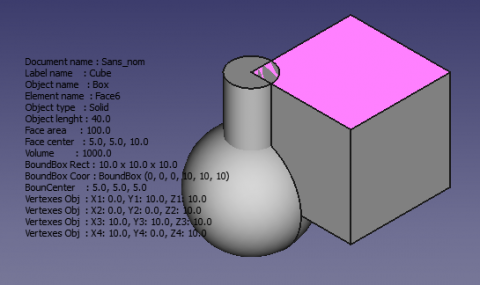
| Fornisce una serie di informazioni sulla forma selezionata e visualizza i dati nello schermo 3D. Versione macro: 00.05 Ultima modifica: 2016-08-28 Download: Icona della barra degli strumenti Autore: Mario52 |
| Autore |
| Mario52 |
| Download |
| Icona della barra degli strumenti |
| Link |
| Raccolta di macro Come installare le macro Personalizzare la toolbar |
| Versione macro |
| 00.05 |
| Data ultima modifica |
| 2016-08-28 |
| Versioni di FreeCAD |
| None |
| Scorciatoia |
| Nessuna |
| Vedere anche |
| Ispeziona |


Descrizione
Fornisce una serie di informazioni sulla forma selezionata e visualizza i dati direttamente nella vista 3D
Temporary code for external macro link. Do not use this code. This code is used exclusively by Addon Manager. Link for optional manual installation: Macro
# This code is copied instead of the original macro code
# to guide the user to the online download page.
# Use it if the code of the macro is larger than 64 KB and cannot be included in the wiki
# or if the RAW code URL is somewhere else in the wiki.

from PySide import QtGui, QtCore

diag = QtGui.QMessageBox(QtGui.QMessageBox.Information,
    "Information",
    "This macro must be downloaded from this link\n"
    "\n"
    "https://gist.githubusercontent.com/mario52a/553b1fc7a8ca5bfa44c6/raw/fc57ec0869a8f68ce396acbaed5e87f396426186/Macro_FCInfoGlass.FCMacro" + "\n"
    "\n"
    "Quit this window to access the download page")

diag.setWindowFlags(QtCore.Qt.WindowStaysOnTopHint)
diag.setWindowModality(QtCore.Qt.ApplicationModal)
diag.exec_()

import webbrowser
webbrowser.open("https://gist.githubusercontent.com/mario52a/553b1fc7a8ca5bfa44c6/raw/fc57ec0869a8f68ce396acbaed5e87f396426186/Macro_FCInfoGlass.FCMacro")
FCInfoGlass
Utilizzo
Selezionare un oggetto o avviare l'applicazione e selezionare un oggetto. Nella vista 3D appare una serie di informazioni.
Per spostare la visualizzazione dei dati sullo schermo modificare le righe 84 e 85 del codice
global posiX                 ; posiX                           = 900  # position window coordinate X                   "defaut  = 900"
global posiY                 ; posiY                           = 190  # position window coordinate Y                   "defaut  = 190"
- 900, 190 = posizione X, Y dell'angolo superiore sinistro
Modificare questa riga per cambiare il colore (line 92)
#######################################################################
# Section color                                                       #
global colorize              ; colorize                      ="black" # colorize the text choice                       "defaut  = "black"
                                                                      # "black" "white" "red" "green" "blue" "yellow" "magenta" "cyan"
Esempi
Disponibili : "black" "white" "red" "green" "blue" "yellow" "magenta" "cyan"
-
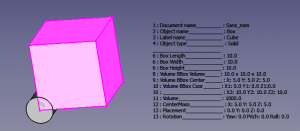 colore ="black"
 -
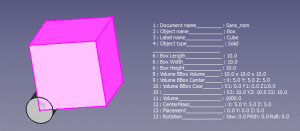 colore ="white"
-
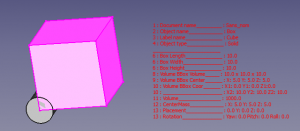 colore ="red"
 -
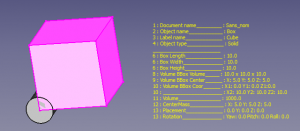 colore ="yellow"
In questa sezione si può attivare o disattivare la visualizzazione delle informazioni; assegnare il valore 1 per visualizzare le informazioni oppure 0 per non visualizzarle
Esempi
riga visualizata ( = 1 ):
global LabelObject ;LabelObject = 1 # Label #3 Label Object
riga non visualizzata ( = 0 ):
global LabelObject ;LabelObject = 0 # Label #3 Label Object
Le righe della sezione da 79 a 171
#######################################################################
global visualiserWindow      ; visualiserWindow                = 0    # si visualiserWindow = 1 la fenetre est visible (pour test)  "defaut  = 0"
                                                                      # if visualiserWindow = 1 the windows is visible (for test)   "default = 0"
###Section Configuration ##############################################
# Placement window hidden                                             #
global posiX                 ; posiX                           = 900  # position window coordinate X                   "defaut  = 900"
global posiY                 ; posiY                           = 190  # position window coordinate Y                   "defaut  = 190"
#######################################################################
global SizeX                 ; SizeX                           = 600  # size window length  (do not modify)            "defaut  = 600"
global SizeY                 ; SizeY                           = 600  # size window heigth  (do not modify)            "defaut  = 600"


#######################################################################
# Section color                                                       #
global colorize              ; colorize                      ="black" # colorize the text choice                       "defaut  = "black"
                                                                      # "black" "white" "red" "green" "blue" "yellow" "magenta" "cyan"


#######################################################################
# Section inter                                                       #
global mode                  ; mode                            = 1    # mode 1=degrees mode 0=radians                  "defaut  = 1"
global arondi                ; arondi                          = 4    # many numbers after the decimal point           "defaut  = 4"
global chaineRemplacement    ; chaineRemplacement              = "_"  # replacement string (1 character)               "defaut  = "_"


#######################################################################
# section switch
# if switch = 1 then actif (True Displayed) else inactif (False not Displayed)
global PrintReportView       ;PrintReportView                  = 1    # Affichage dans la vue rapport                  #0  Displayed ReportView
##
global DocumentName          ;DocumentName                     = 1    # Nom du document                                #1  Document Name
global InternalName          ;InternalName                     = 1    # Nom interne de l'objet                         #2  Internal Name
global LabelObject           ;LabelObject                      = 1    # Label                                          #3  Label Object
global ElementName           ;ElementName                      = 1    # Nom de l'element                               #4  Element Name
global ObjectType            ;ObjectType                       = 1    # Type d'objet                                   #5  Object Type
global LineSeparateTitle     ;LineSeparateTitle                = 1    # ligne de separation des titres ____________    #6  Line Separate of Title

## Object subObject
global ObjectLength          ;ObjectLength                     = 1    # longueur Objet ou perimetre si c est une face  #7  Object Length or perimetre if are a face
global ObjectCurveRadius     ;ObjectCurveRadius                = 1    # rayon du subObject si arc ou cerle             #8  radius subObject if arc or cirle
global ObjectCurveCenter     ;ObjectCurveCenter                = 1    # coordonnees centrale subObject si arc ou cerle #9  coordinates center subObject if arc or cirle

## Draft
global LineDimension         ;LineDimension                    = 1    # Dimensions Line                                #10  Line Dimension
global DWireDimension        ;DWireDimension                   = 1    # Dimensions DWire                               #11  DWire Dimension
global CircleDimension       ;CircleDimension                  = 1    # Dimensions Circle                              #12 Circle Dimension
global CirclePartDimension   ;CirclePartDimension              = 1    # Dimensions Circle Part                         #13 Circle Part Dimension

global ArcDimension          ;ArcDimension                     = 1    # Dimensions Arc                                 #14 Arc Dimension
global EllipseDimension      ;EllipseDimension                 = 1    # Dimensions Ellipse                             #15 Ellipse Dimension
global EllipsePartDimension  ;EllipsePartDimension             = 1    # Dimensions Ellipse Part                        #16 Ellipse Part Dimension
global PolygonDimension      ;PolygonDimension                 = 1    # Dimensions Polygon                             #17 Polygon Dimension
global RectangleDimension    ;RectangleDimension               = 1    # Dimensions Rectangle                           #18 Rectangle Dimension
global BSplineDimension      ;BSplineDimension                 = 1    # Dimensions BSpline                             #19 BSpline Dimension
global PointDimension        ;PointDimension                   = 1    # Dimensions Point                               #20 Point Dimension
global BezCurveDimension     ;BezCurveDimension                = 1    # Dimensions BezCurve                            #21 BezCurve Dimension

## Solid
global CylinderDimension     ;CylinderDimension                = 1    # Dimensions du Cylindre Rayon Hauteur Angle     #22 Cylinder Dimension
global BoxDimension          ;BoxDimension                     = 1    # Dimensions du Box Length Width Height          #23 Box Dimension
global SphereDimension       ;SphereDimension                  = 1    # Dimensions de la Sphere                        #24 Sphere Dimension
global EllipsoidDimension    ;EllipsoidDimension               = 1    # Dimensions Ellipsoid                           #25 Ellipsoid Dimension
global ConeDimension         ;ConeDimension                    = 1    # Dimensions du Cone                             #26 Cone Dimension
global TorusDimension        ;TorusDimension                   = 1    # Dimensions du Tore                             #27 Torus Dimension

## Part
global PlanePartDimension    ;PlanePartDimension               = 1    # Dimensions Plan Part                           #28 Plane Part Dimension
global PrismPartDimension    ;PrismPartDimension               = 1    # Dimensions Prisme Part                         #29 Prism Part Dimension
global WedgePartDimension    ;WedgePartDimension               = 1    # Dimensions Wedge Part                          #30 Wedge Part Dimension
global HelixPartDimension    ;HelixPartDimension               = 1    # Dimensions Helix Part                          #31 Helix Part Dimension
global SpiralPartDimension   ;SpiralPartDimension              = 1    # Dimensions Spirale Part                        #32 Spiral Part Dimension
global VertexPartDimensio    ;VertexPartDimension              = 1    # Dimensions Vertex Part                         #33 Vertex Part Dimension
global LinePartDimension     ;LinePartDimension                = 1    # Dimensions Line Part                           #34 Line Part Dimension
global RegularPolygonPartDimension;RegularPolygonPartDimension = 1    # Dimensions RegularPolygon Part                 #35 Regular Polygon Part Dimension

## Face
global FaceSurface           ;FaceSurface                      = 1    # Surface de la face                             #36 Face Surface
global NormalAt              ;NormalAt                         = 1    # Donne la normale (inclinaison)                 #37 normalAt(0,0) Face and edges normalAt(0)
global FaceCenter            ;FaceCenter                       = 1    # Center Face (mass)                             #38 Face Center
global BoundBoxFaceVol       ;BoundBoxFaceVol                  = 1    # BoundBoxFace Volume                            #39 BoundBox Face Volume
global BoundBoxFaceCent      ;BoundBoxFaceCent                 = 1    # BoundBoxFaceCenter                             #40 BoundBox Face Center
global BoundBoxFaceCoor      ;BoundBoxFaceCoor                 = 1    # BoundBoxFace coordinates                       #41 BoundBox Face Coordinates

## Volume
global BounBoxVolumeVol      ;BounBoxVolumeVol                 = 1    # rectangle du BoundBox                          #42 BounBox Volume Volume
global BounBoxVolumeCent     ;BounBoxVolumeCent                = 1    # centre de la forme                             #43 BounBox Volume Center
global BounBoxVolumeCoor     ;BounBoxVolumeCoor                = 1    # boundinbox (dimensions hors tout)              #44 BounBox Volume Coordinates
global VolumeObject          ;VolumeObject                     = 1    # volume                                         #45 Volume Object
global CenterMass            ;CenterMass                       = 1    # centre de la masse                             #46 Center Mass object
global PlacementForme        ;PlacementForme                   = 1    # placement de la forme                          #47 Placement Forme
global LineInclination       ;LineInclination                  = 1    # search inclination XY YZ ZX uniquement lignes  #48 Line Inclination
global VertexesObject        ;VertexesObject                   = 1    # Vertexes de l'objet selectionne                #49 Vertexes Object
global VertexesForme         ;VertexesForme                    = 0    # Vertexes complet de la forme                   #50 Vertexes Forme
                                                                      # peut prendre du temps, depasser la fenetre et donner des donnees incompletes
                                                                      # can take time and exceed the window and give data's incompletes
### End Section Switch #######################################################################################################################
Dopo una modifica salvare la macro, ricaricarla e riavviarla
Per ora, non è possibile uscire dalla macro. (Per uscire dalla macro, salvare il progetto, chiudere e poi riaprire FreeCAD)
Con un clic del mouse su un oggetto vengono visualizzate le informazioni relative a tale oggetto, con due clic del mouse si seleziona l'oggetto completo e vengono visualizzate tutte le informazioni
Nota. È possibile che in ambiente Linux non si possa scegliere o avere accesso all'oggetto all'interno della finestra che visualizza le informazioni
In ambiente Windows è possibile cliccare all'interno della finestra per accedere all'oggetto, ad esclusione dei caratteri visualizzati
per visualizzare questa finestra e modificare le dimensioni, cambiare:
visualiserWindow riga 81 = 1
le righe 87 e 88 e SizeX SizeY per le dimensioni della finestra
Script
L'icona di Macro_FCInfoGlass.FCMacro 
Copiare lo script in Gits Macro_FCInfoGlass.FCMacro
poi copiare la Macro_FCInfoGlass.FCMacro e l'icona nella propria directory delle macro.
Link
La discussione nel forum FCInfo Macro
Le mie macro in mario52a gists
Versione
28/08/2016 Ver 00.05 : add radius with subObjects and center coordinates
25/11/2015 Ver 0.04 : add radius with subObjects and normalAT(0,0)
31/08/2015 Ver 0.03 : add many informations
04/08/2015 Ver 0.02 : add switch and presentation
Questa pagina è recuperata da https://wiki.freecad.org/Macro_FCInfoGlass