|
|
| Description |
|---|
| Donne une série d'informations sur l'objet avec affichage dans la vue 3D. Version macro : 00.05 Date dernière modification : 2016-08-28 Téléchargement : Icône de la barre d'outils Auteur: Mario52 |
| Auteur |
| Mario52 |
| Téléchargement |
| Icône de la barre d'outils |
| Liens |
| Page des macros Comment installer une macro Comment créer une barre d'outils |
| Version Macro |
| 00.05 |
| Dernière modification |
| 2016-08-28 |
| Version(s) FreeCAD |
| None |
| Raccourci clavier |
| None |
| Voir aussi |
| Arch Prendre des cotes |


Description
Donne une série d'informations sur l'objet avec affichage directement dans la vue 3D sans perturber les opérations effectuées sur votre projet.
Temporary code for external macro link. Do not use this code. This code is used exclusively by Addon Manager. Link for optional manual installation: Macro
# This code is copied instead of the original macro code
# to guide the user to the online download page.
# Use it if the code of the macro is larger than 64 KB and cannot be included in the wiki
# or if the RAW code URL is somewhere else in the wiki.

from PySide import QtGui, QtCore

diag = QtGui.QMessageBox(QtGui.QMessageBox.Information,
    "Information",
    "This macro must be downloaded from this link\n"
    "\n"
    "https://gist.githubusercontent.com/mario52a/553b1fc7a8ca5bfa44c6/raw/fc57ec0869a8f68ce396acbaed5e87f396426186/Macro_FCInfoGlass.FCMacro" + "\n"
    "\n"
    "Quit this window to access the download page")

diag.setWindowFlags(QtCore.Qt.WindowStaysOnTopHint)
diag.setWindowModality(QtCore.Qt.ApplicationModal)
diag.exec_()

import webbrowser
webbrowser.open("https://gist.githubusercontent.com/mario52a/553b1fc7a8ca5bfa44c6/raw/fc57ec0869a8f68ce396acbaed5e87f396426186/Macro_FCInfoGlass.FCMacro")
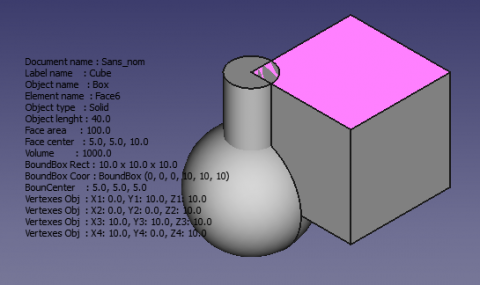
FCInfoGlass
Utilisation
Sélectionnez un objet ou lancez l'application et sélectionnez un objet, et une série d'informations apparaissent sur la vue 3D.
Modifiez ces lignes (lines 84 et 85) pour positionner la fenêtre (transparente) de texte dans votre écran.
global posiX                 ; posiX                           = 900  # position window coordinate X                   "defaut  = 900"
global posiY                 ; posiY                           = 190  # position window coordinate Y                   "defaut  = 190"
- 900, 190 = position X, Y du coin supérieur gauche de la fenêtre (transparente)
Modifiez cette ligne pour changer la couleur d'affichage (ligne 92)
#######################################################################
# Section color                                                       #
global colorize              ; colorize                      ="black" # colorize the text choice                       "defaut  = "black"
                                                                      # "black" "white" "red" "green" "blue" "yellow" "magenta" "cyan"
Exemples
Availlable : "black" "white" "red" "green" "blue" "yellow" "magenta" "cyan"
-
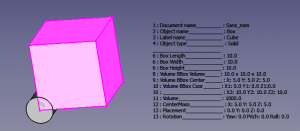 colorize ="black"
 -
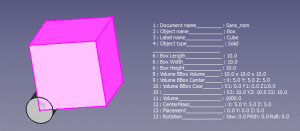 colorize ="white"
-
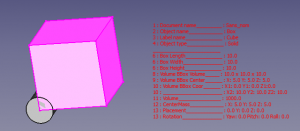 colorize ="red"
 -
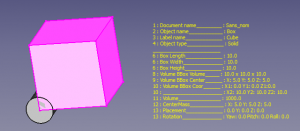 colorize ="yellow"
Dans cette section de la macro, vous pouvez activer 1 ou désactiver 0 l'affichage de certaines informations.
Exemple :
la ligne est affichée ( = 1 )
global LabelObject ;LabelObject = 1 # Label #3 Label Object
la ligne n'est pas affichée ( = 0 )
global LabelObject ;LabelObject = 0 # Label #3 Label Object
La section de modifications, lignes de 79 à 171
#######################################################################
global visualiserWindow      ; visualiserWindow                = 0    # si visualiserWindow = 1 la fenetre est visible (pour test)  "defaut  = 0"
                                                                      # if visualiserWindow = 1 the windows is visible (for test)   "default = 0"
###Section Configuration ##############################################
# Placement window hidden                                             #
global posiX                 ; posiX                           = 900  # position window coordinate X                   "defaut  = 900"
global posiY                 ; posiY                           = 190  # position window coordinate Y                   "defaut  = 190"
#######################################################################
global SizeX                 ; SizeX                           = 600  # size window length  (do not modify)            "defaut  = 600"
global SizeY                 ; SizeY                           = 600  # size window heigth  (do not modify)            "defaut  = 600"


#######################################################################
# Section color                                                       #
global colorize              ; colorize                      ="black" # colorize the text choice                       "defaut  = "black"
                                                                      # "black" "white" "red" "green" "blue" "yellow" "magenta" "cyan"


#######################################################################
# Section inter                                                       #
global mode                  ; mode                            = 1    # mode 1=degrees mode 0=radians                  "defaut  = 1"
global arondi                ; arondi                          = 4    # many numbers after the decimal point           "defaut  = 4"
global chaineRemplacement    ; chaineRemplacement              = "_"  # replacement string (1 character)               "defaut  = "_"


#######################################################################
# section switch
# if switch = 1 then actif (True Displayed) else inactif (False not Displayed)
global PrintReportView       ;PrintReportView                  = 1    # Affichage dans la vue rapport                  #0  Displayed ReportView
##
global DocumentName          ;DocumentName                     = 1    # Nom du document                                #1  Document Name
global InternalName          ;InternalName                     = 1    # Nom interne de l'objet                         #2  Internal Name
global LabelObject           ;LabelObject                      = 1    # Label                                          #3  Label Object
global ElementName           ;ElementName                      = 1    # Nom de l'element                               #4  Element Name
global ObjectType            ;ObjectType                       = 1    # Type d'objet                                   #5  Object Type
global LineSeparateTitle     ;LineSeparateTitle                = 1    # ligne de separation des titres ____________    #6  Line Separate of Title

## Object subObject
global ObjectLength          ;ObjectLength                     = 1    # longueur Objet ou perimetre si c est une face  #7  Object Length or perimetre if are a face
global ObjectCurveRadius     ;ObjectCurveRadius                = 1    # rayon du subObject si arc ou cerle             #8  radius subObject if arc or cirle
global ObjectCurveCenter     ;ObjectCurveCenter                = 1    # coordonnees centrale subObject si arc ou cerle #9  coordinates center subObject if arc or cirle

## Draft
global LineDimension         ;LineDimension                    = 1    # Dimensions Line                                #10  Line Dimension
global DWireDimension        ;DWireDimension                   = 1    # Dimensions DWire                               #11  DWire Dimension
global CircleDimension       ;CircleDimension                  = 1    # Dimensions Circle                              #12 Circle Dimension
global CirclePartDimension   ;CirclePartDimension              = 1    # Dimensions Circle Part                         #13 Circle Part Dimension

global ArcDimension          ;ArcDimension                     = 1    # Dimensions Arc                                 #14 Arc Dimension
global EllipseDimension      ;EllipseDimension                 = 1    # Dimensions Ellipse                             #15 Ellipse Dimension
global EllipsePartDimension  ;EllipsePartDimension             = 1    # Dimensions Ellipse Part                        #16 Ellipse Part Dimension
global PolygonDimension      ;PolygonDimension                 = 1    # Dimensions Polygon                             #17 Polygon Dimension
global RectangleDimension    ;RectangleDimension               = 1    # Dimensions Rectangle                           #18 Rectangle Dimension
global BSplineDimension      ;BSplineDimension                 = 1    # Dimensions BSpline                             #19 BSpline Dimension
global PointDimension        ;PointDimension                   = 1    # Dimensions Point                               #20 Point Dimension
global BezCurveDimension     ;BezCurveDimension                = 1    # Dimensions BezCurve                            #21 BezCurve Dimension

## Solid
global CylinderDimension     ;CylinderDimension                = 1    # Dimensions du Cylindre Rayon Hauteur Angle     #22 Cylinder Dimension
global BoxDimension          ;BoxDimension                     = 1    # Dimensions du Box Length Width Height          #23 Box Dimension
global SphereDimension       ;SphereDimension                  = 1    # Dimensions de la Sphere                        #24 Sphere Dimension
global EllipsoidDimension    ;EllipsoidDimension               = 1    # Dimensions Ellipsoid                           #25 Ellipsoid Dimension
global ConeDimension         ;ConeDimension                    = 1    # Dimensions du Cone                             #26 Cone Dimension
global TorusDimension        ;TorusDimension                   = 1    # Dimensions du Tore                             #27 Torus Dimension

## Part
global PlanePartDimension    ;PlanePartDimension               = 1    # Dimensions Plan Part                           #28 Plane Part Dimension
global PrismPartDimension    ;PrismPartDimension               = 1    # Dimensions Prisme Part                         #29 Prism Part Dimension
global WedgePartDimension    ;WedgePartDimension               = 1    # Dimensions Wedge Part                          #30 Wedge Part Dimension
global HelixPartDimension    ;HelixPartDimension               = 1    # Dimensions Helix Part                          #31 Helix Part Dimension
global SpiralPartDimension   ;SpiralPartDimension              = 1    # Dimensions Spirale Part                        #32 Spiral Part Dimension
global VertexPartDimensio    ;VertexPartDimension              = 1    # Dimensions Vertex Part                         #33 Vertex Part Dimension
global LinePartDimension     ;LinePartDimension                = 1    # Dimensions Line Part                           #34 Line Part Dimension
global RegularPolygonPartDimension;RegularPolygonPartDimension = 1    # Dimensions RegularPolygon Part                 #35 Regular Polygon Part Dimension

## Face
global FaceSurface           ;FaceSurface                      = 1    # Surface de la face                             #36 Face Surface
global NormalAt              ;NormalAt                         = 1    # Donne la normale (inclinaison)                 #37 normalAt(0,0) Face and edges normalAt(0)
global FaceCenter            ;FaceCenter                       = 1    # Center Face (mass)                             #38 Face Center
global BoundBoxFaceVol       ;BoundBoxFaceVol                  = 1    # BoundBoxFace Volume                            #39 BoundBox Face Volume
global BoundBoxFaceCent      ;BoundBoxFaceCent                 = 1    # BoundBoxFaceCenter                             #40 BoundBox Face Center
global BoundBoxFaceCoor      ;BoundBoxFaceCoor                 = 1    # BoundBoxFace coordinates                       #41 BoundBox Face Coordinates

## Volume
global BounBoxVolumeVol      ;BounBoxVolumeVol                 = 1    # rectangle du BoundBox                          #42 BounBox Volume Volume
global BounBoxVolumeCent     ;BounBoxVolumeCent                = 1    # centre de la forme                             #43 BounBox Volume Center
global BounBoxVolumeCoor     ;BounBoxVolumeCoor                = 1    # boundinbox (dimensions hors tout)              #44 BounBox Volume Coordinates
global VolumeObject          ;VolumeObject                     = 1    # volume                                         #45 Volume Object
global CenterMass            ;CenterMass                       = 1    # centre de la masse                             #46 Center Mass object
global PlacementForme        ;PlacementForme                   = 1    # placement de la forme                          #47 Placement Forme
global LineInclination       ;LineInclination                  = 1    # search inclination XY YZ ZX uniquement lignes  #48 Line Inclination
global VertexesObject        ;VertexesObject                   = 1    # Vertexes de l'objet selectionne                #49 Vertexes Object
global VertexesForme         ;VertexesForme                    = 0    # Vertexes complet de la forme                   #50 Vertexes Forme
                                                                      # peut prendre du temps, depasser la fenetre et donner des donnees incompletes
                                                                      # can take time and exceed the window and give data's incompletes
### End Section Switch #######################################################################################################################
Après un changement dans la configuration sauvez la macro rechargez là et lancez la macro.
Il n'est pas possible pour le moment de quitter la macro.
(Pour quitter la macro, sauvez votre projet, fermez FreeCAD et rouvrez FreeCAD)
Un clic de la souris sur un objet affiche les informations de cet objet, le nombre d'informations affichées varie si la pièce complète est sélectionnée.
PS : il est possible aussi que dans l'environnement Linux il n'est pas possible de cliquer ou avoir accès à l'objet à l’intérieur de la fenêtre affichant les informations
Il n'y a aucun problèmes dans l'environnement Windows vous pouvez cliquer à l'intérieur de la fenêtre et avoir accès à l'objet sauf sur les caractères affichés
pour visualiser cette fenêtre et modifier les dimensions, modifiez :
la ligne 81 visualiserWindow = 1
les lignes 87 et 88 SizeX et SizeY pour les dimensions de la fenêtre
Script
L'icône Macro_FCInfoGlass.FCMacro 
Copiez le script depuis Gits Macro_FCInfoGlass.FCMacro
et copiez la macro Macro_FCInfoGlass.FCMacro et l'icône dans votre répertoire de macros.
Liens
La discussion sur le forum FCInfo Macro
Mes macros sur gists de mario52a
Versions
28/08/2016 Ver 00.05 : ajout du rayon avec les sousObjets et coordonnées centrales
25/11/2015 Ver 0.04 : ajout du rayon avec les sousObjets et ajout normalAt(0,0)
31/08/2015 Ver 0.03 : ajout d'informations
04/08/2015 Ver 0.02 : ajout des switch et présentation
Cette page est extraite de https://wiki.freecad.org/Macro_FCInfoGlass