|
|
| Popis |
|---|
| Vytváří kružnici ze 3 vybraných bodů. Version macro : 01.00 Date last modification : 2013-03-11 FreeCAD version : All Download : ToolBar Icon Autor: Mario52 |
| Autor |
| Mario52 |
| Download |
| ToolBar Icon |
| Odkazy |
| Makro recepty| Jak nainstalovat makra Jak přizpůsobit panely nástrojů |
| Verze |
| 01.00 |
| Datum poslední úpravy |
| 2013-03-11 |
| Verze FreeCAD |
| All |
| Výchozí zástupce |
| None |
| Viz též |
| None |


Description
Popis
Toto makro vytváří kružnice pode 3 vybraných bodů. Body mohou být objekty jako jsou krychle, válce, v takovém případě jsou vybrané souřadnice středem těchto forem.
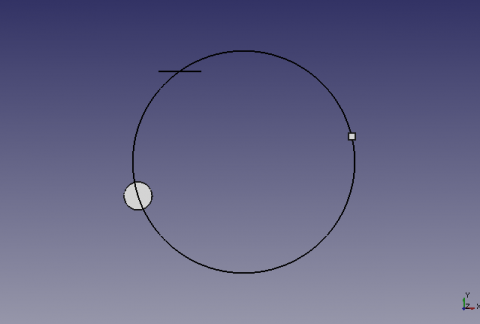
Circle built on 3 selected points
Usage
Použití
Vyberte 3 body nebo tvary ve 3D pohledu a spusťte makro. Je-li tvarem přímka, souřadnice budou střed přímky.
Options
Volby
Jsou-li vybrané objekty v různých rovinách, (xy Z10, xy Z2, xy Z5) pak bude kružnice vytvořena na plánu x,y Z=0. Mají-li všechny vybrané objekty stejnou souřadnici Z (xy Z5, xy Z5, xy Z5), bude kružnice vytvořena na plánu x,y Z=5.
Skript
ToolBar Icon 
Draft_Circle_3_Points.FCMacro
# -*- coding: utf-8 -*-
# créer un cercle a partir de 3 points séléctionnés
# avec comme options le cercle peut être construit sur un plans au choix
# aa la coordonnée d'une des trois formes sélectionnées au choix
# et création du point central O/N
# 04/03/2013 , 07/09/2018 replace PyQt4 to PySide, 23/03/2026 convert in spaces
# la formule provient de
# http://www-obs.univ-lyon1.fr/labo/fc/Ateliers_archives/ateliers_2005-06/cercle_3pts.pdf
# lire la note dans le pdf, sur l'ordre de sélection des points,
# si la formule renvoie une erreur (exemple les 3 points dans le même alignement)
#
import Draft, Part, FreeCAD, math, PartGui, FreeCADGui
from math import sqrt, pi, sin, cos
from FreeCAD import Base
from PySide import QtCore, QtGui

def errorDialog(msg):
    # Create a simple dialog QMessageBox
    # The first argument indicates the icon used: one of QtGui.QMessageBox.{NoIcon, Information, Warning, Critical, Question}
    diag = QtGui.QMessageBox(QtGui.QMessageBox.Critical,u"Error Message",msg)
    diag.setWindowModality(QtCore.Qt.ApplicationModal)
    diag.exec_()

def affiche(x,y,z,rayon,r,v,b,afficherPoint):
    pl.Base=FreeCAD.Vector(x,y,z)
    Draft.makeCircle((rayon),placement=pl,face=False,support=None)
    FreeCADGui.activeDocument().activeObject().LineColor = (r,v,b)
    if afficherPoint==1:
        Draft.makePoint(x,y,z)
    diag = QtGui.QMessageBox(QtGui.QMessageBox.Information,u"Coordinates",u"Coordinates X : "+str(x)+"\r\n"+u"Coordinates Y : "+str(y)+"\n"+u"Coordinates Z : "+str(z)+"\nRayon\t     : "+str(rayon))
    diag.setWindowModality(QtCore.Qt.ApplicationModal)
    diag.exec_()

# prendre les objets selectionnes
sel = FreeCADGui.Selection.getSelection()
i=0
centreX=0;centreY=0;rayon=0

# S'il y a 3 points sélectionnés alors..
if len(sel)==3 :
    i=0
    ta=[0,0,0,0,0,0,0,0,0]
    for obj in sel:
        x=(obj.Shape.BoundBox.Center)
        ta[i+0]=(x.x)
        ta[i+1]=(x.y)
        ta[i+2]=(x.z)
        i=i+3
# Change the values here below
            # mode by default vueChoix = 0 and alignerSur = 0
    vueChoix=0  # choice of the top view = 1 XY, view Front = 2 ZX, Right view = 3 ZY
    alignerSur=0    # Aligns the circle shaped the choice (1,2 or 3) or Z = 0
    afficherPoint=1 # Displays the center point of the circle

    # Affectation des variables
    if vueChoix==3:     # View of right ZY (Red)
        z_point_1=ta[0]
        x_point_1=ta[1]
        y_point_1=ta[2]

        z_point_2=ta[3]
        x_point_2=ta[4]
        y_point_2=ta[5]

        z_point_3=ta[6]
        x_point_3=ta[7]
        y_point_3=ta[8]

    elif vueChoix==2:   # Front view ZX (Green)
        y_point_1=ta[0]
        z_point_1=ta[1]
        x_point_1=ta[2]

        y_point_2=ta[3]
        z_point_2=ta[4]
        x_point_2=ta[5]

        y_point_3=ta[6]
        z_point_3=ta[7]
        x_point_3=ta[8]

    else:           # Top view XY (blue)
        x_point_1=ta[0]
        y_point_1=ta[1]
        z_point_1=ta[2]

        x_point_2=ta[3]
        y_point_2=ta[4]
        z_point_2=ta[5]

        x_point_3=ta[6]
        y_point_3=ta[7]
        z_point_3=ta[8]

    # Calculation of coordinates of the center of the circle
    try:
        centreX =((x_point_3**2-x_point_2**2+y_point_3**2-y_point_2**2)/(2*(y_point_3-y_point_2))-(x_point_2**2-x_point_1**2+y_point_2**2-y_point_1**2)/(2*(y_point_2-y_point_1)))/((x_point_3-x_point_2)/(y_point_3-y_point_2)-(x_point_2-x_point_1)/(y_point_2-y_point_1))
        centreY =-(x_point_2-x_point_1)/(y_point_2-y_point_1)*centreX+(x_point_2**2-x_point_1**2+y_point_2**2-y_point_1**2)/(2*(y_point_2-y_point_1))
        rayon =sqrt((x_point_1-centreX)**2+(y_point_1-centreY)**2)
    except:
        errorDialog(u"Impossible calculation too aligned elements")
    else:
    #finally: sera TOUJOURS execute
       # Definition of the coordinate Z
        centreZ=0
        # Création du cercle
        pl=FreeCAD.Placement()
        if vueChoix==1: # Plan XY Dessus
            pl.Rotation.Q=(0,0,0,1.0)
            if alignerSur==1:
                affiche(centreX,centreY,z_point_1,rayon,0.0,0.0,1.0,afficherPoint)
            elif alignerSur==2:
                affiche(centreX,centreY,z_point_2,rayon,0.0,0.0,1.0,afficherPoint)
            elif alignerSur==3:
                affiche(centreX,centreY,z_point_3,rayon,0.0,0.0,1.0,afficherPoint)
        elif vueChoix==2: # Plan XZ Face
            pl.Rotation.Q=(1,0,0,1.0)
            if alignerSur==1:
                affiche(centreY,z_point_1,centreX,rayon,0.0,1.0,0.0,afficherPoint)
            elif alignerSur==2:
                affiche(centreY,z_point_2,centreX,rayon,0.0,1.0,0.0,afficherPoint)
            elif alignerSur==3:
                affiche(centreY,z_point_3,centreX,rayon,0.0,1.0,0.0,afficherPoint)
        elif vueChoix==3: # Plan YZ Droite
            pl.Rotation.Q=(0,1,0,1.0)
            if alignerSur==1:
                affiche(z_point_1,centreX,centreY,rayon,1.0,0.0,0.0,afficherPoint)
            elif alignerSur==2:
                affiche(z_point_2,centreX,centreY,rayon,1.0,0.0,0.0,afficherPoint)
            elif alignerSur==3:
                affiche(z_point_3,centreX,centreY,rayon,1.0,0.0,0.0,afficherPoint)
        else:   # modifier pour avoir XYZ
            # si les coordonnées Z sont égales alors le cercle s'aligne à Z
            if z_point_1==z_point_2 and z_point_2==z_point_3:
                centreZ=z_point_1
                affiche(centreX,centreY,z_point_1,rayon,0.0,0.0,0.0,afficherPoint)
            else:
                # Si une coordonnée est différente alors Z=0
                affiche(centreX,centreY,0,rayon,0.0,0.0,0.0,afficherPoint)

else:
    # Si la condition n'est pas remplie, recommencer
    errorDialog(u"Select 3 points and repeat")
    #FreeCAD.Console.PrintError("Select 3 points and repeatr\n")
Anaglyphe
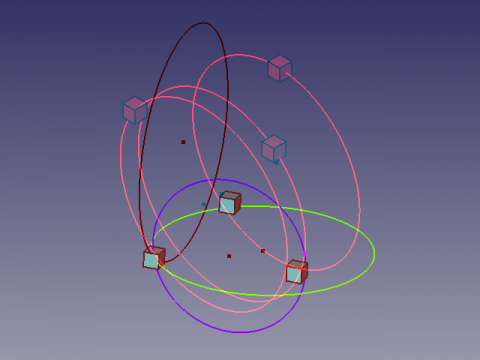
Anaglyph (3D pohled)
Zde je 3D pohled, který Vám umožňuje vidět 2 různé pozice pohledu použitím brýlí s filtry červené a cyan barvy  .
Dívejte se střídavě levým a pravým okem abyste viděli pohledy samostatně.
.
Dívejte se střídavě levým a pravým okem abyste viděli pohledy samostatně.
Credits
Uznání
Geneze makra Draft Circle 3 Points na fóru (PYTHONu) coordonnées d'un point helped flachyjoe thanks. Vzorec pochází od cercle_3pts.pdf a byl použit s laskavým svolením jeho autora.
Tato stránka je načtena z https://wiki.freecad.org/Macro_Draft_Circle_3_Points