|
|
| Description |
|---|
| Cut a line giving as an argument number cut, create line, bicolor, create point. The new line is created in the real coordinate of object, not in the coordinate of the Body. (Command line, paste this complete macro in the Python console). Macro version: 2.0 Last modified: 2019/06/17 FreeCAD version: All Download: ToolBar Icon Author: mario52 |
| Author |
| mario52 |
| Download |
| ToolBar Icon |
| Links |
| Macros recipes How to install macros How to customize toolbars |
| Macro Version |
| 2.0 |
| Date last modified |
| 2019/06/17 |
| FreeCAD Version(s) |
| All |
| Default shortcut |
| None |
| See also |
| None |

Description
This small macro cut a line and create a points , lines , two colours of line.
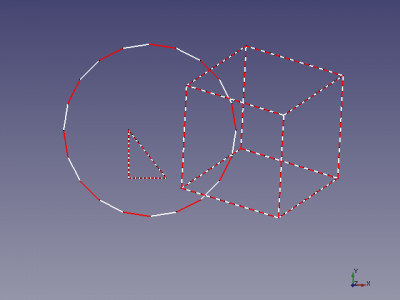
cutLine
Usage
Can be used from the Freecad macro editor.
- 4 : number cuts
- createPoint : create points or not (0) (Defaut 1)
- createLine : create line (>0) or not (0) (Defaut 0)
- biColor : create line biColor (>0) or not (0) (Defaut 0)
You can change the default values in the macro.
With bisColor the lines on the original line is created by a white line red line white line. The colors are modifiable in the code, line 20 and 23.
Script
ToolBar Icon 
Macro_cutLine.FCMacro
#################################################################
# https://forum.freecad.org/viewtopic.php?f=3&t=4217&hilit=discretize
# 08/03/2015 2019/06/17

__title__   = "cutLine"
__author__  = "Mario52"
__version__ = "00.02"
__date__    = "2019/06/17"

import Draft, Part
def cutLine(numberOfPoints = 2, createPoint = 1, createLine = 0, biColor = 0):           # create a points of forme

    def createLines(numberOfPoints, points, biColor):                                        # create line
        biscolor = 0
        for lin in range(numberOfPoints-1):
            creaLine = [FreeCAD.Vector(points[lin]),FreeCAD.Vector(points[lin+1])]
            wire = Draft.makeWire(creaLine,closed=False,face=False,support=None)
            if biColor != 0:                                                                 # biColor
                if biscolor == 0:
                    FreeCADGui.ActiveDocument.getObject(wire.Name).LineColor = (1.0,0.0,0.0) # 255 = 1 (10 = (1/255 * 10 ))
                    biscolor = 1
                else:
                    FreeCADGui.ActiveDocument.getObject(wire.Name).LineColor = (1.0,1.0,1.0) # 255 = 1 (10 = (1/255 * 10 ))
                    biscolor = 0
    try:
        points = []
        points[:] = []
        selectionObjects = FreeCADGui.Selection.getSelectionEx()         # getSelectionEx
        numberOfPoints += 1
        for selection in selectionObjects:
            compteur = pas = 0
            for selectedEdge in selection.SubObjects:
                    FreeCAD.Console.PrintMessage(selectionObjects[0].SubElementNames[compteur] + "\n")
#                    print( selectionObjects[0].SubElementNames[compteur])# getSelectionEx
                    compteur += 1
                    points = selectedEdge.discretize(numberOfPoints)
                    if createLine != 0:
                        createLines(numberOfPoints, points, biColor)
                    for p in points:
                        if createPoint != 0:
                            Draft.makePoint( p.x, p.y, p.z)
                        FreeCAD.Console.PrintMessage(str(compteur)+" X"+ str(p.x)+" Y"+ str(p.y)+ " Z"+ str(p.z) + "\n")
#                        print( compteur," X", p.x, " Y", p.y, " Z", p.z)
                    pas = 1                                              #

            if pas == 0:                                                 # the not SubObjects
                selectionObjects = FreeCADGui.Selection.getSelection()   # select all elements
                FreeCAD.Console.PrintMessage(selectionObjects[0].Name + "\n")
#                print( selectionObjects[0].Name)                         # getSelection()
                compteur = 0
                for ii in enumerate(selectionObjects[0].Shape.Edges):
                    compteur += 1
                    points = ii[1].discretize(numberOfPoints)            # discretize the element
                    for p in points:
                        if createPoint != 0:
                            Draft.makePoint( p.x, p.y, p.z)              # create points
                        FreeCAD.Console.PrintMessage(str(compteur)+" X"+ str(p.x)+" Y"+ str(p.y)+ " Z"+ str(p.z) + "\n")
#                         print( compteur, " X", p.x, " Y", p.y, " Z", p.z)  # list and display the coordinates
                    if createLine != 0:
                        createLines(numberOfPoints, points, biColor)
    except:
        FreeCAD.Console.PrintError("Error" + "\n" + "Give : cutLine(numberOfPoints = 2, createPoint = 1, createLine = 0, biColor = 0)"+"\n")
        FreeCAD.Console.PrintError("Select the complete shape or separate wire(s) line, circle ..."+"\n")

#        print( "Error : Give cutLine(numberOfPoints = 2, createPoint = 1, createLine = 0, biColor = 0)")

# Example in command line (paste the macro in FC Python console) and write:
#cutLine(2, createLine = 1, biColor = 1, createPoint = 0)
Example
Can be used from the Freecad macro editor.
If the macro is copied in the Python console, you can you can use it by:
cutLine(4, createLine = 1, biColor = 1, createPoint = 0)
Links
This function uses the function discretize the original code.
Ta strona pochodzi z https://wiki.freecad.org/Macro_Cut_Line