|
|
| Descrizione |
|---|
| Taglia una linea in segmenti bicolore e crea i punti.La nuova linea viene creata nella coordinata reale dell'oggetto, non nelle coordinate del corpo. (Riga di comando, incolla questa macro completa nella console Python). Versione macro: 2.0 Ultima modifica: 2019/06/17 Versione FreeCAD: All Download: ToolBar Icon Autore: mario52 |
| Autore |
| mario52 |
| Download |
| ToolBar Icon |
| Link |
| Raccolta di macro Come installare le macro Personalizzare la toolbar |
| Versione macro |
| 2.0 |
| Data ultima modifica |
| 2019/06/17 |
| Versioni di FreeCAD |
| All |
| Scorciatoia |
| Nessuna |
| Vedere anche |
| Nessuno |

Descrizione
Questa piccola macro taglia una linea e crea punti, linee, e dei segmenti bicolore della linea.
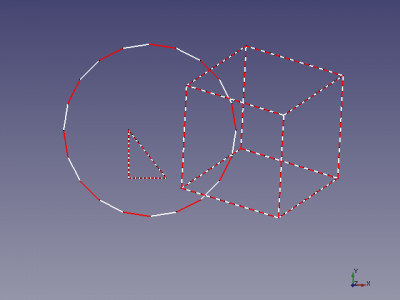
cutLine
Utilizzo
Può essere usata nell'editor delle macro di FreeCAD.
- 4 : numero di tagli
- createPoint : crea i punti (1) oppure no (0) (Defaut 1 crea pinti)
- createLine : crea le linee (>0) oppure no (0) (Defaut 0 non crea linee)
- biColor : crea linee bicolore (>0) oppure no (0) (Defaut 0)
È possibile modificare i valori predefiniti nella macro.
Con bisColor le linee sulla linea originale vengono create con una linea bianca, una linea rossa e una linea bianca. I colori sono modificabili nel codice, alle righe 20 e 23.
Script
Icona barra degli strumenti 
Macro_cutLine.FCMacro
#################################################################
# https://forum.freecad.org/viewtopic.php?f=3&t=4217&hilit=discretize
# 08/03/2015 2019/06/17

__title__   = "cutLine"
__author__  = "Mario52"
__version__ = "00.02"
__date__    = "2019/06/17"

import Draft, Part
def cutLine(numberOfPoints = 2, createPoint = 1, createLine = 0, biColor = 0):           # create a points of forme

    def createLines(numberOfPoints, points, biColor):                                        # create line
        biscolor = 0
        for lin in range(numberOfPoints-1):
            creaLine = [FreeCAD.Vector(points[lin]),FreeCAD.Vector(points[lin+1])]
            wire = Draft.makeWire(creaLine,closed=False,face=False,support=None)
            if biColor != 0:                                                                 # biColor
                if biscolor == 0:
                    FreeCADGui.ActiveDocument.getObject(wire.Name).LineColor = (1.0,0.0,0.0) # 255 = 1 (10 = (1/255 * 10 ))
                    biscolor = 1
                else:
                    FreeCADGui.ActiveDocument.getObject(wire.Name).LineColor = (1.0,1.0,1.0) # 255 = 1 (10 = (1/255 * 10 ))
                    biscolor = 0
    try:
        points = []
        points[:] = []
        selectionObjects = FreeCADGui.Selection.getSelectionEx()         # getSelectionEx
        numberOfPoints += 1
        for selection in selectionObjects:
            compteur = pas = 0
            for selectedEdge in selection.SubObjects:
                    FreeCAD.Console.PrintMessage(selectionObjects[0].SubElementNames[compteur] + "\n")
#                    print( selectionObjects[0].SubElementNames[compteur])# getSelectionEx
                    compteur += 1
                    points = selectedEdge.discretize(numberOfPoints)
                    if createLine != 0:
                        createLines(numberOfPoints, points, biColor)
                    for p in points:
                        if createPoint != 0:
                            Draft.makePoint( p.x, p.y, p.z)
                        FreeCAD.Console.PrintMessage(str(compteur)+" X"+ str(p.x)+" Y"+ str(p.y)+ " Z"+ str(p.z) + "\n")
#                        print( compteur," X", p.x, " Y", p.y, " Z", p.z)
                    pas = 1                                              #

            if pas == 0:                                                 # the not SubObjects
                selectionObjects = FreeCADGui.Selection.getSelection()   # select all elements
                FreeCAD.Console.PrintMessage(selectionObjects[0].Name + "\n")
#                print( selectionObjects[0].Name)                         # getSelection()
                compteur = 0
                for ii in enumerate(selectionObjects[0].Shape.Edges):
                    compteur += 1
                    points = ii[1].discretize(numberOfPoints)            # discretize the element
                    for p in points:
                        if createPoint != 0:
                            Draft.makePoint( p.x, p.y, p.z)              # create points
                        FreeCAD.Console.PrintMessage(str(compteur)+" X"+ str(p.x)+" Y"+ str(p.y)+ " Z"+ str(p.z) + "\n")
#                         print( compteur, " X", p.x, " Y", p.y, " Z", p.z)  # list and display the coordinates
                    if createLine != 0:
                        createLines(numberOfPoints, points, biColor)
    except:
        FreeCAD.Console.PrintError("Error" + "\n" + "Give : cutLine(numberOfPoints = 2, createPoint = 1, createLine = 0, biColor = 0)"+"\n")
        FreeCAD.Console.PrintError("Select the complete shape or separate wire(s) line, circle ..."+"\n")

#        print( "Error : Give cutLine(numberOfPoints = 2, createPoint = 1, createLine = 0, biColor = 0)")

# Example in command line (paste the macro in FC Python console) and write:
#cutLine(2, createLine = 1, biColor = 1, createPoint = 0)
Esempio
Può essere usata nell'editor delle macro di FreeCAD.
Se la macro viene copiata nella console Python può essere utilizzata con:
cutLine(4, createLine = 1, biColor = 1, createPoint = 0)
Link
Questa macro utilizza la funzione discretize the original code.
Questa pagina è recuperata da https://wiki.freecad.org/Macro_Cut_Line