|
|
| Beschreibung |
|---|
| Erstellt einen Kreis oder Bogen mit Radius, Durchmesser, Umfang, Fläche, Startwinkel, Endwinkel, Bogen, Winkelzentrum, Sehne, Pfeil, Mittelpunkt (Punkt), placemObject nach Wahl (ohne GUI). Der neue Kreis wird in den realen Koordinaten des Objekts erstellt, nicht in den Koordinaten des Körpers. (Befehlszeile, füge dieses vollständige Makro in die Python-Konsole ein). Versionsmakro : 0.4 Datum der letzten Änderung : 2019-06-19 FreeCAD version : Alle Herunterladen : Werkzeugleisten-Symbol Autor: mario52 |
| Autor |
| mario52 |
| Herunterladen |
| Werkzeugleisten-Symbol |
| Links |
| Makros Rezepte Wie man Makros installiert Symbolleisten anpassen |
| Macro-Version |
| 0.4 |
| Datum der letzten Änderung |
| 2019-06-19 |
| FreeCAD-Version(s) |
| Alle |
| Standardverknüpfung |
| None |
| Siehe auch |
| Makro Kreis+ |

Beschreibung
Dieses kleine Makro erstellt einen Kreis oder Bogen mit Radius, Durchmesser, Umfang, Fläche, Startwinkel, Endwinkel, Bogen, Winkelzentrum, Sehne, Pfeil, Mittelpunkt (Punkt) und placemObject nach Wahl. Der neue Kreis wird in den realen Koordinaten des Objekts erstellt, nicht in den Koordinaten des Körpers.
(Befehlszeile, fügen Sie dieses vollständige Makro in die Python-Konsole ein).
Der Kreis wird weiterhin auf den Bildschirm ausgerichtet (mit getCameraOrientation) (oder es wird eine Positionierung eingegeben).
Anwendung
Den Code kopieren und in die Python-Konsole von FreeCAD einfügen. Der Befehl wird ständig verwendet, um FreeCAD zu öffnen. Den Parameter der Wahl eingeben:
- x y z : Koordinaten des Kreises, wenn keine Koordinaten angegeben sind, wird der Kreis am Punkt 0,0,0 erstellt.
- radius : Kreisradius
- diameter : Kreisdurchmesser
- circumference : Kreisumfang
- area : Kreisfläche
- startangle : Startwinkel für Bogen
- endangle : Endwinkel für Bogen
- arc und anglecenter : Bogen in Kombination mit Winkelzentrum
- arc = Bogenlänge
- anglecenter = Winkel vom Mittelpunkt des Kreises zu den Endpunkten des Bogens
- cord und arrow : Linie in Kombination mit Pfeil des Kreises
- cord : Länge der Linie des Kreises
- arrow : Länge des Kreispfeils
- center : Wenn das Zentrum ungleich 0 ist, wird ein Punkt im Zentrum des Kreises erstellt
- placemObject
- example :
- pl=FreeCAD.Placement()
- pl.Rotation.Q=(0.0,-0.0,-0.0,1.0)
- pl.Base=FreeCAD.Vector(-1.89847898483,-0.490152746439,0.0)
- give placemObject = pl
Wenn kein Parameter "'circle()’" vorhanden ist, wird im Ausgabefenster eine Liste von Funktionen angezeigt.
Skript
Werkzeugleisten-Symbol 
Macro_circle.FCMacro
#-*- coding: utf-8 -*-
#from math import sqrt, pi
# creer un cercle ou un arc entierement parametrabel en utilisant :
# create a circle or arc fully parametrabel using:
#
# paste the complete macro in the Python console
#
# x x x coordinates
#with radius
#with diameter
#with circumference
#with area
#with startangle
#with endangle
#with [arc and anglecenter]      in combination (angle in degrees)
#with [cord and arrow]           in combination
#with center (if center as different 0 one point is created on center of circle)
#give placemObject
# ex :pl=FreeCAD.Placement()
#     pl.Rotation.Q=(0.0,-0.0,-0.0,1.0)
#     pl.Base=FreeCAD.Vector(-1.89847898483,-0.490152746439,0.0)
#     placemObject = pl
# s'il n'y a pas de parametre "circle()" une liste des fonctions s'affiche dans la Vue rapport
# if there is no parameter "circle()" a list of functions is displayed in the report view

__title__   = "circle"
__author__  = "Mario52"
__version__ = "0.4"
__date__    = "19/06/2019"

import Draft #, Part
import FreeCAD
App = FreeCAD

def circle(x=0.0,y=0.0,z=0.0,radius=0.0,diameter=0.0,circumference=0.0,area=0.0,startangle=0.0,endangle=0.0,arc=0.0,anglecenter=0.0,cord=0.0,arrow=0.0,center=0,placemObject=""):
    from math import sqrt, pi
    if placemObject == "":
        pl = FreeCAD.Placement()
        pl.Rotation = FreeCADGui.ActiveDocument.ActiveView.getCameraOrientation()
        pl.Base = FreeCAD.Vector(x,y,z)
    else:
        pl = FreeCAD.Placement()
        pl = placemObject                                  # placement imposted
    if diameter != 0:                                      # with diameter
        radius = diameter / 2.0
    elif circumference != 0:                               # with circumference
        radius = (circumference / pi) / 2.0
    elif area != 0:                                        # with area
        radius =  sqrt((area / pi))
    elif (cord != 0) and (arrow != 0):                     # with cord and arrow
        radius = ((arrow**2) + (cord**2) / 4.0) / (arrow*2)
    elif (arc != 0) and (anglecenter != 0):                # with arc and anglecenter central in degrees
        radius = ((360/anglecenter)*arc) / pi/2.0
        if endangle != 0:
            startangle  = endangle - anglecenter
        endangle   = anglecenter + startangle
        startangle  = endangle - anglecenter
    if radius != 0:
        try:
            Draft.makeCircle(radius,placement=pl,face=False,startangle=startangle,endangle=endangle,support=None)
            if center != 0:
                x=pl.Base.x
                y=pl.Base.y
                z=pl.Base.z
                Draft.makePoint(x,y,z)

        except Exception:
            App.Console.PrintError("Unexpected keyword argument" + "\n")
        App.ActiveDocument.recompute()
    else:
        App.Console.PrintMessage("Unexpected keyword argument" + "\n")
        App.Console.PrintMessage("circle(x,y,z,radius,diameter,circumference,area,startangle,endangle,[arc,anglecenter],[cord,arrow],center,placemObject)" + "\n")
        App.Console.PrintMessage("circle(radius=10.0,placemObject=App.Placement(App.Vector(11,20,30), App.Rotation(30,40,0), App.Vector(0,0,0)))" + "\n")
#example
#circle(arc=50,anglecenter=20,center=1)
#circle(x=10.0,y=10.0,z=10.0,radius=10.0)
#circle(radius=10.0,center=1,placemObject=App.Placement(App.Vector(11,20,30), App.Rotation(30,40,0), App.Vector(0,0,0)))
Memo des Kreises
Beispiel-Codes
circle(radius=10)    # example 1
circle(x=15,diameter=20)    # example 2
circle(y=45,circumference=100)    # example 3
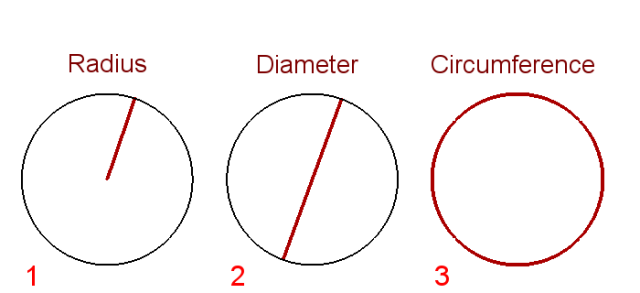
circle(y=-15,area=100)    # example 4
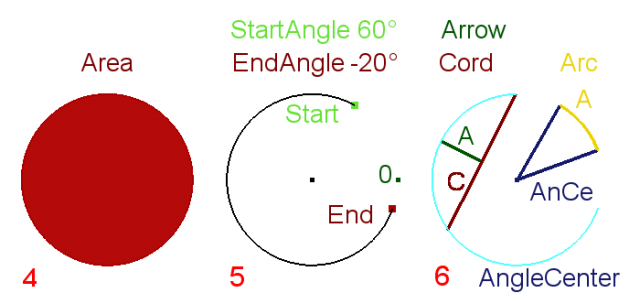
circle(y=-15,x=15,startangle=60,endangle=-20,center=1)    # example 5
circle(y=-15,x=45,cord=9,arrow=3,center=1)    # example 6 left
circle(x=65,y=-15,arc=3.5,anglecenter=40,startangle=20,center=1)    # example 6 rigth
Version
ver 0.4 19/06/2019 : Auf ver 0.19 aktualisiert
ver 0.3 10/06/2018 : /2 mit /2.0 (float) ersetzt
ver 0.2 24/02/2015 : Funktion "placemObject" hinzugefügt
Diese Seite wird abgerufen von https://wiki.freecad.org/Macro_Circle