|
|
| Description |
|---|
| Creates a circle or arc giving radius, diameter, circumference, area, startangle, endangle, arc, anglecenter, cord, arrow, center (point), placemObject on choice (without GUI). The new circle is created in the real coordinate of object, not in the coordinate of the Body. (Command line, paste this complete macro in the Python console). Macro version: 0.4 Last modified: 2019-06-19 FreeCAD version: All Download: ToolBar Icon Author: mario52 |
| Author |
| mario52 |
| Download |
| ToolBar Icon |
| Links |
| Macros recipes How to install macros How to customize toolbars |
| Macro Version |
| 0.4 |
| Date last modified |
| 2019-06-19 |
| FreeCAD Version(s) |
| All |
| Default shortcut |
| None |
| See also |
| Macro CirclePlus |

Description
This small macro create a circle or arc giving radius, diameter, circumference, area, startangle, end angle, arc, angle center, cord, arrow, center (point), placemObject on choice. The new circle is created in the real coordinate of object, not in the coordinate of the Body.
(Command line, paste this complete macro in the Python console).
The circle is still facing the screen (with getCameraOrientation) (or give the placement).
Usage
Copy the code and paste it in the console Python the FreeCAD the command is used all the time to the disposal FreeCAD open give the parameter on choice :
- x y z : coordinates of circle if not coordinates the circle is created on point 0,0,0
- radius : radius of circle
- diameter : diameter of circle
- circumference : circumference of circle
- area : area of circle
- startangle : start angle for arc
- endangle : end angle for arc
- arc and anglecenter : arc in combination with anglecenter
- arc = length of arc
- anglecenter = angle of center circle to extremities of arc
- cord and arrow : cord in combination with arrow of circle
- cord : length of cord of circle
- arrow : length of arrow of circle
- center : if center as different 0 one point is created on center of circle
- placemObject
- example :
- pl=FreeCAD.Placement()
- pl.Rotation.Q=(0.0,-0.0,-0.0,1.0)
- pl.Base=FreeCAD.Vector(-1.89847898483,-0.490152746439,0.0)
- give placemObject = pl
if there is no parameter "circle()" a list of functions is displayed in the report view.
Script
ToolBar Icon 
Macro_circle.FCMacro
#-*- coding: utf-8 -*-
#from math import sqrt, pi
# creer un cercle ou un arc entierement parametrabel en utilisant :
# create a circle or arc fully parametrabel using:
#
# paste the complete macro in the Python console
#
# x x x coordinates
#with radius
#with diameter
#with circumference
#with area
#with startangle
#with endangle
#with [arc and anglecenter]      in combination (angle in degrees)
#with [cord and arrow]           in combination
#with center (if center as different 0 one point is created on center of circle)
#give placemObject
# ex :pl=FreeCAD.Placement()
#     pl.Rotation.Q=(0.0,-0.0,-0.0,1.0)
#     pl.Base=FreeCAD.Vector(-1.89847898483,-0.490152746439,0.0)
#     placemObject = pl
# s'il n'y a pas de parametre "circle()" une liste des fonctions s'affiche dans la Vue rapport
# if there is no parameter "circle()" a list of functions is displayed in the report view

__title__   = "circle"
__author__  = "Mario52"
__version__ = "0.4"
__date__    = "19/06/2019"

import Draft #, Part
import FreeCAD
App = FreeCAD

def circle(x=0.0,y=0.0,z=0.0,radius=0.0,diameter=0.0,circumference=0.0,area=0.0,startangle=0.0,endangle=0.0,arc=0.0,anglecenter=0.0,cord=0.0,arrow=0.0,center=0,placemObject=""):
    from math import sqrt, pi
    if placemObject == "":
        pl = FreeCAD.Placement()
        pl.Rotation = FreeCADGui.ActiveDocument.ActiveView.getCameraOrientation()
        pl.Base = FreeCAD.Vector(x,y,z)
    else:
        pl = FreeCAD.Placement()
        pl = placemObject                                  # placement imposted
    if diameter != 0:                                      # with diameter
        radius = diameter / 2.0
    elif circumference != 0:                               # with circumference
        radius = (circumference / pi) / 2.0
    elif area != 0:                                        # with area
        radius =  sqrt((area / pi))
    elif (cord != 0) and (arrow != 0):                     # with cord and arrow
        radius = ((arrow**2) + (cord**2) / 4.0) / (arrow*2)
    elif (arc != 0) and (anglecenter != 0):                # with arc and anglecenter central in degrees
        radius = ((360/anglecenter)*arc) / pi/2.0
        if endangle != 0:
            startangle  = endangle - anglecenter
        endangle   = anglecenter + startangle
        startangle  = endangle - anglecenter
    if radius != 0:
        try:
            Draft.makeCircle(radius,placement=pl,face=False,startangle=startangle,endangle=endangle,support=None)
            if center != 0:
                x=pl.Base.x
                y=pl.Base.y
                z=pl.Base.z
                Draft.makePoint(x,y,z)

        except Exception:
            App.Console.PrintError("Unexpected keyword argument" + "\n")
        App.ActiveDocument.recompute()
    else:
        App.Console.PrintMessage("Unexpected keyword argument" + "\n")
        App.Console.PrintMessage("circle(x,y,z,radius,diameter,circumference,area,startangle,endangle,[arc,anglecenter],[cord,arrow],center,placemObject)" + "\n")
        App.Console.PrintMessage("circle(radius=10.0,placemObject=App.Placement(App.Vector(11,20,30), App.Rotation(30,40,0), App.Vector(0,0,0)))" + "\n")
#example
#circle(arc=50,anglecenter=20,center=1)
#circle(x=10.0,y=10.0,z=10.0,radius=10.0)
#circle(radius=10.0,center=1,placemObject=App.Placement(App.Vector(11,20,30), App.Rotation(30,40,0), App.Vector(0,0,0)))
Memo of circle
Examples codes
circle(radius=10)    # example 1
circle(x=15,diameter=20)    # example 2
circle(y=45,circumference=100)    # example 3
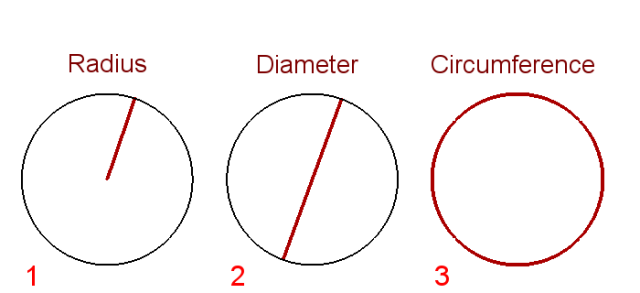
circle(y=-15,area=100)    # example 4
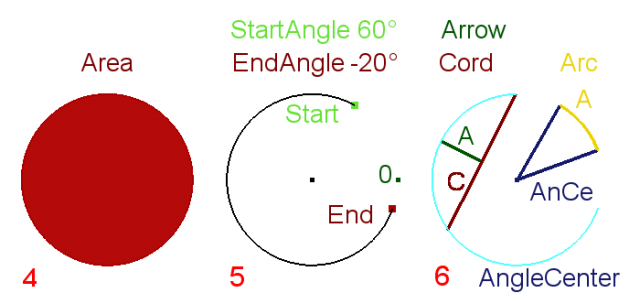
circle(y=-15,x=15,startangle=60,endangle=-20,center=1)    # example 5
circle(y=-15,x=45,cord=9,arrow=3,center=1)    # example 6 left
circle(x=65,y=-15,arc=3.5,anglecenter=40,startangle=20,center=1)    # example 6 rigth
Version
ver 0.4 19/06/2019 : upgrade ver 0.19
ver 0.3 10/06/2018 : replace /2 to /2.0 (float)
ver 0.2 24/02/2015 : adding function "placemObject"
This page is retrieved from https://wiki.freecad.org/Macro_Circle