|
|
| Description |
|---|
| This macro will present the user with a dialog to provide the distance between centers, the number of sides, and height and will create a prism based on the apothem, or inradius of a polygon. This can be extremely handy when one only knows the distance between flats. An example of this would be hexagonal stock of plastics or metal provided by vendors. Most vendors define such stock by the distance between flats. If one is using such stock in their projects, this Macro can be a real time saver. Macro version: 1.0 Last modified: 2014-12-31 FreeCAD version: All Download: ToolBar Icon Author: Quick61 |
| Author |
| Quick61 |
| Download |
| ToolBar Icon |
| Links |
| Macros recipes How to install macros How to customize toolbars |
| Macro Version |
| 1.0 |
| Date last modified |
| 2014-12-31 |
| FreeCAD Version(s) |
| All |
| Default shortcut |
| None |
| See also |
| None |
설명
이 매크로는 사용자에게 다각형의 한 변과 중심 간 거리, 변의 수, 높이를 입력하는 대화상자를 표시하고 다각형의 변심거리 또는 반지름을 기반으로 각기둥(prism)을 만듭니다. 이 기능은 각기둥의 평면 사이의 거리만 알고 있을 때 매우 유용할 수 있습니다. 이에 대한 예로는 공급업체가 제공하는 육각형 모양의 플라스틱이나 금속 재고를 들 수 있습니다.대부분의 공급업체는 이러한 재고를 평면 간 거리로 정의합니다. 누군가 자신의 프로젝트에 이런 재고를 사용한다면, 이 매크로는 엄청난 시간을 절약해줄 수 있습니다.
사용 방법
Copy the Macro into your FreeCAD Macro directory. Then either run the macro from the Execute Macro dialog or create a shortcut to use from your custom toolbar.
When run, the Macro wil present the user with a dialog like seen below. First enter the desired distance between flats. This can be any number and can include a decimal value, it will not take fractional input. Next enter the number of sides. This number is a whole number and should be an even number as well for proper results. Lastly enter the height you wish the prism to be. Again, this can be any number and can include a decimal value. Click OK and the prism will be created in your document.
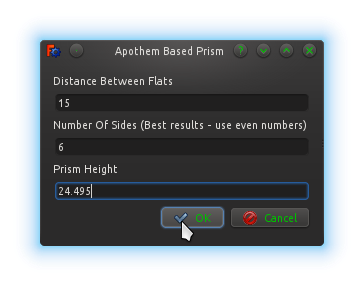
The Macro
ToolBar Icon 
Macro_Apothem_Based_Prism_GUI.FCMacro
# # # # # # # # # # #
#
# Apothem Based Prism
#
# This script will take the input of the distance between flats, (apothem, aka inradius),
# and the number of sidesfor a regular polygon along with a height and produce a
# correctly sized prism derived from the circumradius.
#
# # # # # # # # # # #

import FreeCAD, FreeCADGui, Part, PartGui, math
from FreeCAD import Base
from PySide import QtGui, QtCore
from math import cos, radians
App = FreeCAD
Gui = FreeCADGui

class p():


    def priSm(self):

        try:
            dbf = float(self.d1.text())
            nos = int(self.d2.text())
            hth = float(self.d3.text())
            aR = dbf / 2
            op1 = 180/float(nos)
            coS = cos(math.radians(op1))
            cR = aR / coS
            prism=App.ActiveDocument.addObject("Part::Prism","Prism")
            prism.Polygon=nos
            prism.Circumradius=cR
            prism.Height=hth
            prism.Placement=Base.Placement(Base.Vector(0.00,0.00,0.00),Base.Rotation(0.00,0.00,0.00,1.00))
            prism.Label='Prism'
            App.ActiveDocument.recompute()
            Gui.SendMsgToActiveView("ViewFit")
        except:
            FreeCAD.Console.PrintError("Unable to complete task")

            self.close()

    def close(self):
        self.dialog.hide()


#
# Make dialog box and get input for distance between flats, number of sides, and height
#

    def __init__(self):
        self.dialog = None

        self.dialog = QtGui.QDialog()
        self.dialog.resize(280,110)

        self.dialog.setWindowTitle("Apothem Based Prism")
        la = QtGui.QVBoxLayout(self.dialog)

        iN1 = QtGui.QLabel("Distance Between Flats")
        la.addWidget(iN1)
        self.d1 = QtGui.QLineEdit()
        la.addWidget(self.d1)

        iN2 = QtGui.QLabel("Number Of Sides (Best results - use even numbers)")
        la.addWidget(iN2)
        self.d2 = QtGui.QLineEdit()
        la.addWidget(self.d2)

        iN3 = QtGui.QLabel("Prism Height")
        la.addWidget(iN3)
        self.d3 = QtGui.QLineEdit()
        la.addWidget(self.d3)

        okbox = QtGui.QDialogButtonBox(self.dialog)
        okbox.setOrientation(QtCore.Qt.Horizontal)
        okbox.setStandardButtons(QtGui.QDialogButtonBox.Cancel|QtGui.QDialogButtonBox.Ok)
        la.addWidget(okbox)
        QtCore.QObject.connect(okbox, QtCore.SIGNAL("accepted()"), self.priSm)
        QtCore.QObject.connect(okbox, QtCore.SIGNAL("rejected()"), self.close)
        QtCore.QMetaObject.connectSlotsByName(self.dialog)
        self.dialog.show()
        self.dialog.exec_()

p()
Additions
SVG icon for use in custom toolbar shortcut.
Acknowledgements
A thanks to FreeCAD main developer shoogen and FreeCAD programmer wandererfan for their invaluable help and advice in constructing this Macro.
이 페이지에서 인용한 것은 https://wiki.freecad.org/Macro_Apothem_Based_Prism_GUI