FreeCAD Logo FreeCAD 1.0
  • İngilizce Afrika dili Arapça Belarusça Katalanca Çekçe Almanca Yunanca İspanyolca İspanyolca Baskça Fince Filipince Fransızca Galiçya Dili Hırvatça Macarca Endonezce İtalyanca Japonca Berberice Korece Litvanyaca Flemenkçe Bokmal Norveç Dili Lehçe Portekizce Portekizce Romence Rusça Slovakça Slovence Sırpça İsveççe Türkçe Ukraynaca Valensiya Dili Vietnamca Çince Çince
  • Özellikler
  • İndir
  • Blog
  • Dökümanlar
    Belge dizini Başlarken Kullanıcı belgeleri FreeCAD kılavuzu Çalışma Tezgahları Belgeleri Python kodlama belgeleri C++ kodlama belgeleri Öğreticiler Sıkça Sorulan Sorular Privacy policy FreeCAD hakkında
  • Katkıda bulun
    Nasıl yardım edilir Sponsor Bir hata bildir Çekme isteğinde bulunun İşler ve finansman Katılımcı Yönergeleri Geliştirici el kitabı Çeviriler
  • Topluluk
    Code of conduct Forum The FPA GitHub GitLab Codeberg Mastodon Matrix IRC IRC via Webchat Gitter Discord Reddit Twitter Facebook LinkedIn Calendar
  • ♥ Donate

Donate

$
SEPA Bilgisi
Lütfen SEPA banka havalenizi şu adrese ayarlayın:
Beneficiary: The FreeCAD project association
IBAN: BE04 0019 2896 4531
BIC/SWIFT: GEBABEBBXXX
Banka acentesi: BNP Paribas Fortis
Adres: Rue de la Station 64, 1360 Perwez, Belgium

While Stripe doesn't support monthly donations, you can still become a sponsor! Simply make a one-time donation equivalent to 12 months of support, and you'll gain access to the corresponding sponsoring tier. It's an easy and flexible way to contribute.

If you are not sure or not able to commit to a regular donation, but still want to help the project, you can do a one-time donation, of any amount.

Choose freely the amount you wish to donate one time only.

You can support FreeCAD by sponsoring it as an individual or organization through various platforms. Sponsorship provides a steady income for developers, allowing the FPA to plan ahead and enabling greater investment in FreeCAD. To encourage sponsorship, we offer different tiers, and unless you choose to remain anonymous, your name or company logo will be featured on our website accordingly.

from 1 USD / 1 EUR per month. You will not have your name displayed here, but you will have helped the project a lot anyway. Together, normal sponsors maintain the project on its feet as much as the bigger sponsors.

from 25 USD / 25 EUR per month. Your name or company name is displayed on this page.

from 100 USD / 100 EUR per month. Your name or company name is displayed on this page, with a link to your website, and a one-line description text.

from 200 USD / 200 EUR per month. Your name or company name and logo displayed on this page, with a link to your website and a custom description text. Companies that have helped FreeCAD early on also appear under Gold sponsors.

Instead of donating each month, you might find it more comfortable to make a one-time donation that, when divided by twelve, would give you right to enter a sponsoring tier. Don't hesitate to do so!

Choose freely the amount you wish to donate each month.

Please inform your forum name or twitter handle as a notein your transfer, or reach to us, so we can give you proper credits!

PySide
Diyalog oluşturma
Index

Giriş

Power users have the possibility of creating interfaces to help them produce complex tools for their custom addons, such as macros or full workbenches.

Interfaces are created using PySide, which is a library for using Qt with Python.
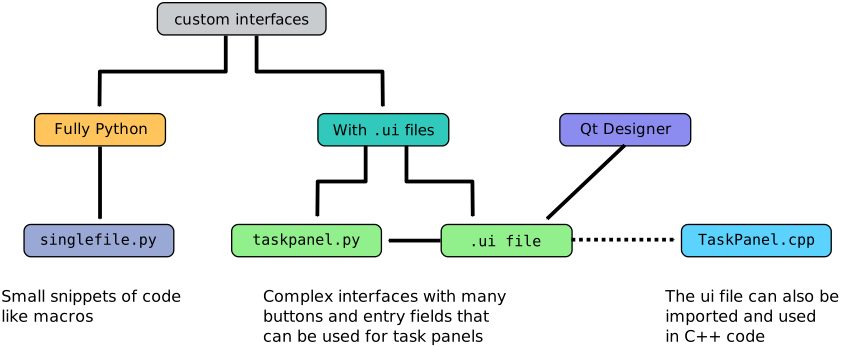
Two general methods to create interfaces, by including the interface in the Python file, or by using .ui files.

Description

There are typically two ways of creating interfaces with PySide.

Interface in a .ui file

In this method the interface is defined in a .ui file (an XML document that defines the structure of the interface), which is then imported into Python code that uses it. This is the recommended approach.

  • It allows the programmer to work with the graphical interface separately from the logic that will use it.
  • It allows anybody to look at the interface alone, that is, the .ui file, without having to run Python code.
  • The .ui file may be designed by anybody without programming knowledge.
  • The .ui interface can be used in a standalone window (modal), or in an embedded window (non-modal); therefore, this method is ideal to create custom task panels.
  • Since the .ui file just describes the "appearance" of the interface, it does not need to be tied to a particular programming language; it may be used both in Python and C++ code.

Interface completely in Python code

In this method the entire interface is defined by several Python calls.

  • This is an older way of working with interfaces.
  • This method produces very verbose code because many details of the interface need to be specified by hand.
  • It is not simple to separate the interface from the logic that uses that code, meaning that a user would need to run the Python file in the correct context in order to see how the interface would look.
  • This method has the advantage that several interfaces may be contained within a single document, at the expense of making the file very large.
  • This method is recommended only for small interfaces that don't define more than a few widgets, for example in macros.

For examples on this method see Interface creation completely in Python.


PySide
Dialog creation
Index

Bu sayfa şu adresten alınmıştır https://wiki.freecad.org/Interface_creation

İletişime geçin!
Forum GitHub Mastodon Matrix IRC Gitter.im Discord Reddit Twitter Facebook LinkedIn

© The FreeCAD Team. Homepage image credits (top to bottom): ppemawm, r-frank, epileftric, regis, rider_mortagnais, bejant.

Bu proje aşağıdakiler tarafından desteklenmektedir: , KiCad Services Corp. ve diğer sponsorlar

GitHubImprove this page on GitHub