Introduzione
Per eseguire l'analisi agli elementi finiti (FEA) all'interno di  FEM, FreeCAD usa due programmi esterni: uno è utilizzato per generare la Mesh FEM e l'altro per risolvere numericamente l'analisi attuale. È possibile verificare se l'installazione di FreeCAD è pronta per FEA eseguendo l'esempio FEM CalculiX - Trave a sbalzo 3D che è incluso in ogni installazione di FreeCAD dalla versione 0.17.
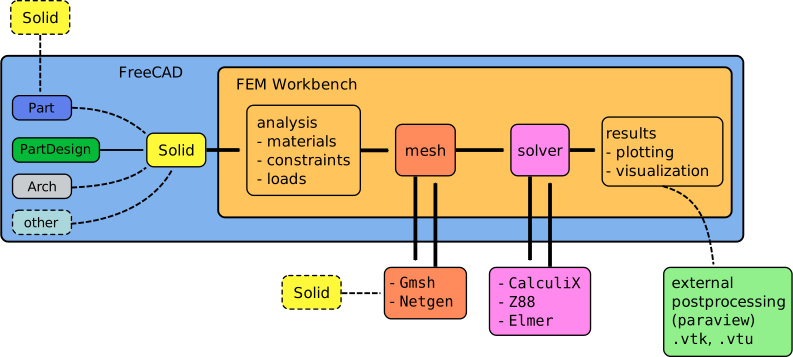
Flusso di lavoro del Workbench FEM; il workbench chiama due programmi esterni per eseguire il meshing di un oggetto solido e risolvere il problema degli elementi finiti
Il solutore FEM
Il solutore predefinito per eseguire calcoli agli elementi finiti è CalculiX, un semplice solutore per l'analisi delle strutture. FreeCAD scrive un file di input CalculiX, avvia il risolutore e legge l'output, che può quindi essere rappresentato visivamente nella vista 3D; questo significa che il binario CalculiX è autonomo e indipendente da FreeCAD. Dato che ci sono molti programmi in grado di generare una mesh, si consiglia di installare prima il risolutore e assicurarsi che funzioni.
Se il solutore è installato correttamente, è possibile eseguire il comando singolo ccx nel terminale per ottenere una semplice risposta:
User@PC:~$ ccx
Usage: CalculiX.exe -i jobname
Se il solver è installato, assicurarsi che FEM sia in grado di trovare il binario; andare in Modifica → Preferenze → FEM → CalculiX → Cerca nelle directory binarie conosciute. Se avete compilato il risolutore da soli, deselezionare l'opzione e indicare il percorso corretto per il file binario. Per gli altri solutori che possono essere utilizzati con FreeCAD, vedere Solutori FEM.
FEM mesh generator
Il generatore di mesh FEM
Per creare una Mesh FEM, FreeCAD utilizza [1] come mesher predefinito. Perché ciò funzioni, Gmsh deve essere installato separatamente da FreeCAD.
Se il programma è installato correttamente, è possibile eseguire il comando gmsh nel terminale per avviare l'interfaccia grafica del programma. Questa interfaccia non è utilizzata da FreeCAD ma dimostra che il programma è installato.
User@PC:~$ gmsh -info
Version          : 3.0.6
License          : GNU General Public License
Build OS         : Linux64
Build date       : 20171107
Build host       : lgw01-amd64-034
Build options    : 64Bit Ann Bamg Bfgs Blas(Generic) Blossom C++11 Cgns Chaco DIntegration Dlopen Fltk Gmm Jpeg Kbipack Lapack(Generic) LinuxJoystick MPI MathEx Med Mesh Mmg3d Mpeg NativeFileChooser Netgen ONELAB ONELABMetamodel OpenCASCADE OpenGL OptHom Parser Plugins Png Post Python Solver TetGen/BR Tetgen Voro3D Zlib
FLTK version     : 1.3.4
OCC version      : 6.9.1
MED version      : 3.0.6
Packaged by      : buildd
Web site         : http://gmsh.info
Mailing list     : gmsh@onelab.info
Se il mesher è installato, assicurarsii che FEM sia in grado di trovare il binario; andare in Modifica → Preferenze → FEM → Gmsh → Cerca nelle directory binarie conosciute. Se avete compilato il risolutore da soli, deselezionare l'opzione e indicare il percorso corretto per il file binario. Vedere Mesh FEM per le varie possibilità di ottenere una mesh valida per l'analisi.
Netgen
In order to create a FEM Mesh, you can use Netgen as an alternative to Gmsh. Depending on your operating system and your FreeCAD installation, Netgen may be bundled with the FreeCAD installation binaries.
Se il programma è installato correttamente, è possibile eseguire il comando netgen nel terminale per avviare l'interfaccia grafica del programma.
User@PC:~$ netgen -V
1.0 and above: A new improved Netgen implementation is available. Thanks to it, Netgen can finally be used with FreeCAD on Linux. Netgen Python bindings have to be installed to use the new implementation:
pip install --upgrade ngsolve
If the above command is not sufficient, one can try the following from the Python Console in FreeCAD:
import os, subprocess
temp_dir = os.path.dirname(os.sys.executable)
py_path = os.path.join(temp_dir, "python")
subprocess.run([py_path, "-m", "pip", "install", "--user", "netgen-mesher"])
or compile Netgen from the source. This might be necessary for Windows users and computers with old CPUs - an explanation can be found in this thread on the Netgen forum.
1.1 and above: Installation using the standard procedure (pip install --upgrade ngsolve), as described on the Netgen installation page, should work. It is only necessary to set the path to the Python executable for which Netgen libraries are installed in the Preferences. By default, the Python executable specified in General Python preferences is used.
1.1 and above: Thanks to the new installation method, it is now also possible to use the python3-netgen package provided by Linux distributions unless they are outdated. For example, the version provided by Ubuntu 22.04 LTS is too old (6.2.1905, from 2019) and won't work in FreeCAD while the version provided by Ubuntu 24.04 LTS is 6.2.2401 and works in FreeCAD.
Installing on Windows
Installazione su Windows
I pacchetti di FreeCAD disponibili dalla pagina download includono già Netgen e CalculiX, quindi non è necessario installare software aggiuntivo.

The download link is always in the form such as https://www.dhondt.de/calculix_2.22_4win.zip where 2.22 is the version number.
Installazione in Linux
Le distribuzioni Linux hanno diversi modi di installare software. Molte distribuzioni hanno un repository software e il gestori di pacchetti. Prima di compilare il codice sorgente, cercare nel proprio gestore i pacchetti netgen, gmsh, calculix-ccx o ccx, e installarli seguendo le istruzioni della propria distribuzione.
Ubuntu PPA
PPA di Ubuntu
I personal package archives (PPA) freecad-stable e freecad-daily forniscono una versione più recente di FreeCAD di quella disponibile nei repository ufficiali di Ubuntu. Questi PPA includono anche i pacchetti netgen, gmsh e calculix-ccx più recenti. Vedere Installare su Linux per maggiori informazioni sulla configurazione dei repository.
Se il PPA è già stato aggiunto al proprio sistema, installare i pacchetti come segue
sudo apt-get install netgen
sudo apt-get install gmsh
sudo apt-get install calculix-ccx
Il PPA freecad-community fornisce anche i pacchetti netgen, gmsh, e calculix-ccx per i test. Se sono abbastanza stabili, possono essere aggiunti ai repository giornalieri o stabili. I binari per ccx 2.14 funzionano su Debian Stretch, ma non su Debian Buster a causa di problemi di dipendenze.
Nota: in Ubuntu Repository si discute sulla creazione dei pacchetti PPA di Ubuntu. Al momento in cui è stato scritto, CalculiX non era incluso nei repository Debian, quindi c'erano molti pacchetti personali in Launchpad. Dovrebbe essere installato solo un pacchetto.
Arch Linux
Arch Linux
Prelevare il pacchetto CalculiX dal AUR repository.
Debian
- Debian 9 Buster: the packages in the repository are outdated, but you can use the packages from the Ubuntu PPA (
freecad-community). See Gmsh 4 package available for testing in Community Extras PPA (forum post). - Debian 8 Stretch: the packages in the repository are outdated, but you can use the packages from the Ubuntu PPA (
freecad-community). See Gmsh 4 package available for testing in Community Extras PPA (forum post). - Debian 7 Jessie: install the packages from Debian 8 Stretch using
dpkg. See Debian source package for Calculix (forum post).
openSUSE
Additional packages are typically installed with YAST (abbr. Yet another Setup Tool) the Linux operating system setup and configuration tool, or in any terminal/console (root rights required) with:
zypper install netgen
zypper install gmsh
zypper install ccx
CalculiX binary
Installare CalculiX binario
Gli autori di CalculiX forniscono un binario Linux precompilato del solutore; può essere scaricato dal sito web degli autori. Tuttavia, poiché le diverse distribuzioni Linux hanno percorsi di libreria diversi, molto probabilmente questo binario non funziona senza apportare alcune modifiche.
To use the binary with Fedora 21, see the thread Making FEM run on linux fedora 21. For newer Fedora versions, you should compile CalculiX yourself.
If you use this binary, check that the binary is executable, that it is in the executable $PATH of your system, and that you have the necessary version of the libraries (libgfortran, liblapack, libblas, etc.) against which it was compiled. This is mentioned in the forum post FEM WB.
Use the command ldd to see the libraries that are linked by the binary. Install any missing dependency.
User@PC:~$ ldd /usr/bin/ccx
linux-vdso.so.1 (0x00007fffbabdc000)
 libspooles.so.2.2 => /usr/lib/x86_64-linux-gnu/libspooles.so.2.2 (0x00007fe9bd042000)
 libpthread.so.0 => /lib/x86_64-linux-gnu/libpthread.so.0 (0x00007fe9bce23000)
 libarpack.so.2 => /usr/lib/x86_64-linux-gnu/libarpack.so.2 (0x00007fe9bcbd9000)
 liblapack.so.3 => /usr/lib/x86_64-linux-gnu/liblapack.so.3 (0x00007fe9bc353000)
 libgfortran.so.4 => /usr/lib/x86_64-linux-gnu/libgfortran.so.4 (0x00007fe9bbf74000)
 libm.so.6 => /lib/x86_64-linux-gnu/libm.so.6 (0x00007fe9bbbd6000)
 libc.so.6 => /lib/x86_64-linux-gnu/libc.so.6 (0x00007fe9bb7e5000)
 libgcc_s.so.1 => /lib/x86_64-linux-gnu/libgcc_s.so.1 (0x00007fe9bb5cd000)
 libmpi.so.20 => /usr/lib/x86_64-linux-gnu/libmpi.so.20 (0x00007fe9bb2db000)
 /lib64/ld-linux-x86-64.so.2 (0x00007fe9bdaa9000)
 libblas.so.3 => /usr/lib/x86_64-linux-gnu/libblas.so.3 (0x00007fe9bb080000)
 libopenblas.so.0 => /usr/lib/x86_64-linux-gnu/libopenblas.so.0 (0x00007fe9b8dda000)
 libquadmath.so.0 => /usr/lib/x86_64-linux-gnu/libquadmath.so.0 (0x00007fe9b8b9a000)
 libopen-rte.so.20 => /usr/lib/x86_64-linux-gnu/libopen-rte.so.20 (0x00007fe9b8912000)
 libopen-pal.so.20 => /usr/lib/x86_64-linux-gnu/libopen-pal.so.20 (0x00007fe9b8660000)
 librt.so.1 => /lib/x86_64-linux-gnu/librt.so.1 (0x00007fe9b8458000)
 libhwloc.so.5 => /usr/lib/x86_64-linux-gnu/libhwloc.so.5 (0x00007fe9b821b000)
 libdl.so.2 => /lib/x86_64-linux-gnu/libdl.so.2 (0x00007fe9b8017000)
 libutil.so.1 => /lib/x86_64-linux-gnu/libutil.so.1 (0x00007fe9b7e14000)
 libnuma.so.1 => /usr/lib/x86_64-linux-gnu/libnuma.so.1 (0x00007fe9b7c09000)
 libltdl.so.7 => /usr/lib/x86_64-linux-gnu/libltdl.so.7 (0x00007fe9b79ff000)
One of the aforementioned dependencies (libgfortran.so.4) needed for CalculiX may cause issues with newer Ubuntu releases where only libgfortran5 is available. Apart from using the old CalculiX version (2.17) available via sudo apt-get install calculix-ccx, one may build a new version of CalculiX. It's not necessary to do it manually since there is a script hosted on this website that can be obtained and used with the following commands:
wget https://feacluster.com/install/install
perl install
The script is interactive and asks for some inputs like the matrix solver type (Spooles or Pardiso). To build a different version of CalculiX just change the following line in the script:
$version = '2.2x';
Compilare CalculiX
Since CalculiX is a standalone application, you can either install a binary packaged for your distribution, or compile it yourself. Any CalculiX version from 2.7.x onwards should work with FreeCAD, and since the code hasn't changed much in years, lower versions than 2.7.x may work as well.
Compiling CalculiX is a task for experienced users, requiring editing the Makefiles and build options in different platforms. See the following information:
- Debian: Debian source package for Calculix, Gmsh 4 package available for testing in Community Extras PPA, Compiling CalculiX ccx on fedora, ubuntu and debian.
- Fedora 27, 28, 29: Compiling CalculiX ccx on fedora, ubuntu and debian.
- There is a CMake version of the source package in a github repository, but at the FreeCAD forums no one has reported if this package works.
Compilare Netgen
Netgen was originally linked by FreeCAD when FreeCAD used OCE, the community fork of OpenCascade (OCCT). As OCE lagged in development behind OCCT, FreeCAD switched back to OCCT. This broke the linking of Netgen, which could only link against OCCT 6.9 or OCE 0.18 and below. As OCCT 7.x versions improved the core functionality of FreeCAD, it was decided to drop Netgen support in favor of Gmsh.
Since then some success has been achieved patching and linking newer versions of Netgen against OCCT 7.x. Nevertheless, the inclusion of Netgen with FreeCAD is still problematic.
Installing on macOS
The macOS development packages of FreeCAD include Netgen but do not include CalculiX. To install CalculiX, you can use a homebrew tap that has been verified to work with macOS 26 (Tahoe):
brew install costerwi/homebrew-calculix/calculix-cgx
CalculiX:
The following posts may be outdated:
Ulteriori informazioni
The FEM Workbench is under constant development. The most recent information is found in the FreeCAD forum.
If you have problems installing Netgen, Gmsh, or CalculiX, or another external tool, please search the forum first:
Questa pagina è recuperata da https://wiki.freecad.org/FEM_Install