


|
|
| Ubicación en el Menú |
|---|
| Anotación → Estilos de anotación... |
| Entornos de trabajo |
| Borrador |
| Atajo de teclado por defecto |
| Ninguno |
| Introducido en versión |
| 0.19 |
| Ver también |
| Borrador Texto, Borrador Etiqueta, Borrador Dimensión |
Descripción
El  comando Borrador EditorEstiloAnotación permite definir estilos que afectan a las propiedades visuales de los objetos tipo anotación, como los creados por los comandos Borrador Texto, Borrador Dimensión y Borrador Etiqueta.
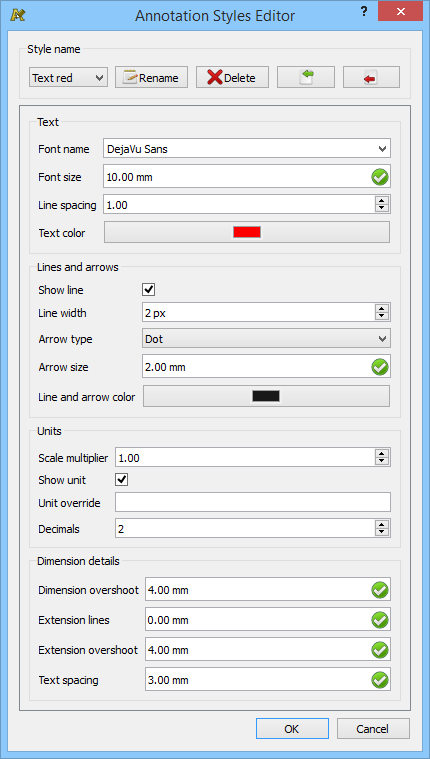
El cuadro de diálogo del editor de estilos de anotación
Uso
- There are several ways to invoke the command:
- Draft: Press the Annotation Styles button.
- Draft: Select the Annotation → Annotation Styles option from the menu.
- BIM: Select the Manage → Annotation Styles option from the menu.
- Draft: Press the
- The Annotation Styles Editor dialog box opens.
- Select a style from the Style Name dropdown list, or choose
Add new…to define a new style. - Optionally adjust the properties of the style.
- Optionally press the
 Rename button to rename the style.
 - Optionally press the
 Delete button to delete the style.
 - Optionally press the
 button to import all styles from a .json file. This will overwrite existing styles with the same name.
 - Optionally press the
 button to export all styles to a .json file.
 - Press the OK button to close the dialog box and finish the command.
Apply
To apply an annotation style change the VistaAnnotation Style property of annotation objects. This property can be found on the View tab of the Property View.

Selecting an annotation style
Guión
See also: Autogenerated API documentation and FreeCAD Scripting Basics.
The annotation styles are saved as serialized dictionaries in the Meta attribute of the document. This attribute is inspected by the annotation style editor when it is opened.
Each style that appears in the editor is internally saved with the style name prefixed by Draft_Style_. This will prevent name clashes with other keys that may be saved in Meta, which can hold arbitrary information.
You may define any new style by adding the necessary information to a key that starts with Draft_Style_. The corresponding value of this key must be a dictionary serialized using json.
import json

meta = App.ActiveDocument.Meta
props = {"ArrowSizeStart": 7.0, "ArrowSizeEnd": 7.0, "LineWidth": 6}
meta["Draft_Style_Thick lines"] = json.dumps(props)
App.ActiveDocument.Meta = meta
The properties not entered will be filled automatically when this style is selected in the style editor and the OK button is pressed.
In a similar way, any serialized dictionary can be unpacked for edition.
import json

meta = App.ActiveDocument.Meta
props = json.loads(meta["Draft_Style_Text red"])
Where props may have this value:
{"ArrowSizeStart": 2.0, "ArrowSizeEnd": 2.0, "ArrowTypeStart": 0, "ArrowTypeEnd": 0, "Decimals": 2, "DimOvershoot": 4.0, "ExtLines": 0.0, "ExtOvershoot": 4.0, "FontName": "DejaVu Sans", "FontSize": 10.0, "LineColor": 255, "LineSpacing": 1.0, "LineWidth": 2, "ScaleMultiplier": 1.0, "ShowLine": True, "ShowUnit": False, "TextColor": 4278190335, "TextSpacing": 3.0, "UnitOverride": ""}
The properties must have the following types:
Strings:
props = {
    "FontName": "DejaVu Sans",
    "UnitOverride": ""
}
Floats (must be supplied with a decimal point):
props = {
    "ArrowSizeStart": 2.0,
    "ArrowSizeEnd": 2.0,
    "DimOvershoot": 4.0,
    "ExtLines": 0.0,
    "ExtOvershoot": 4.0
    "FontSize": 10.0,
    "LineSpacing": 1.0,
    "ScaleMultiplier": 1.0,
    "TextSpacing": 3.0
}
Integers:
props = {
    "ArrowTypeStart": 0,
    "ArrowTypeEnd": 0,
    "Decimals": 2,
    "LineColor": 255,
    "LineWidth": 2,
    "TextColor": 4278190335
}
ArrowTypeStart and ArrowTypeEnd are enumerators. LineColor and TextColor correspond to 32-bit integers, from which the individual RGBA values can be extracted.
Booleans:
props = {
    "ShowLine": True,
    "ShowUnit": False
}
Esta página ha sido recuperada de https://wiki.freecad.org/Draft_AnnotationStyleEditor