


|
|
| Menu location |
|---|
| Surfaces → IsoCurve |
| Workbenches |
| Curves |
| Default shortcut |
| None |
| Introduced in version |
| - |
| See also |
| Curves JoinCurves |
Descrizione
The  Curves IsoCurve tool applies a UV oriented lattice onto selected surfaces.
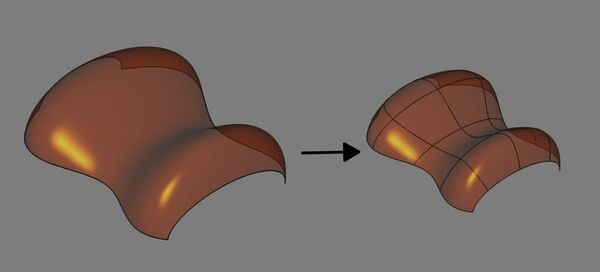
Above: shows the surface before (left) and after (right) applying the tool
Utilizzo
- Select one or more faces in the 3D view.
- There are several ways to invoke the tool:
- Press the IsoCurve button.
- Select the Surfaces → IsoCurve option from the menu.
- Press the
- A IsoCurve object is created for each selected face, applying a UV oriented lattice on each face.
- Optionally edit the values in the Property editor to change the numbers of iso curves along U and V directions and adjust the related properties (see Properties below).
Note
- Curves can be extracted as a subelement (e.g: with Curves JoinCurves) for others uses or just to help to visualize the shape.
Properties
See also: Property editor.
A IsoCurve object is derived from a Part Feature object and inherits all its properties. It also has the following additional properties:
Data
Iso Curve
- DatiFace (
LinkSub): Input face. - DatiMode (
Enumeration): Number of IsoCurves.Multi(default): ...Single: ...
- DatiNumber U (
Integer): Number of IsoCurves in U direction. - DatiNumber V (
Integer): Number of IsoCurves in V direction. - DatiOrientation (
Enumeration): Curve Orientation.U(default): ...V: ...
- DatiParameter (
Float): IsoCurve parameter.
Questa pagina è recuperata da https://wiki.freecad.org/Curves_IsoCurve