


简介

FreeCAD刀路工作台按如下工作流程创建这些机器指令:
General concepts
一般概念
刀路工作台生成G-code,用于定义铣削产品的刀具运行路径,产品外形通过刀路作业操作 FreeCAD G-Code指令模拟铣削后的3D数模所呈现,该G-code指令通过选择适合的前置处理程序被转换为适合目标CNC控制器的指令。 G-code由包含在刀路作业中的指令和操作生成。作业工作流将这些指令和操作按其执行顺序列出。该列表通过添加刀路操作、刀路修剪、刀路分步命令和通过刀路菜单或者图形界面按钮刀路修改完成。
The G-code is generated from directives and Operations contained in a CAM Job. The Job Workflow lists these in the order they will be executed. The list is populated by adding CAM Operations, Path Dressups, Supplemental Commands, and Path Modifications from the CAM Menu, or GUI buttons.
刀路工作台提供刀具管理器(库,刀具表),G-code检查和铣削模拟工具。它连接前置处理程序并允许导入和导出工作模板。
刀路工作台的外部依赖包括:
- 在 编辑 → 首选项 → General → 单位标签的单位设定中设置的FreeCAD的3D数模尺寸单位。前置处理程序设置定义了最终的G-code尺寸单位。
- 宏文件路径和几何公差在编辑 → 首选项 → 刀路 → 作业偏好设定标签中设置.
- 颜色在编辑 → 首选项 → 刀路 → 刀路颜色标签中设置.
- 持有标记参数在编辑 → 首选项 → 刀路 → 修剪标签中设置.
- 基础3D数模品质支持刀路WB需求,通过几何体检查。
Limitations
Some current limitations of which you should be aware are:
- Most of the CAM Tools are not true 3D tools but only 2.5D capable. This means that they take a fixed 2D shape and can cut it down to a given depth. However, there are two tools which produce true 3D paths:
 3D Pocket and
  3D Surface (which is still an experimental feature as of November 2020).
 - Most of CAM workbench is designed for a simple, standard 3-axis (xyz) CNC mill/router, but lathe tools are under development in 0.19_pre.
- Most operations in CAM workbench will return paths based on a standard endmill tool/bit only, regardless of the tool/bit type assigned in a given tool controller with the exception of the
 Engrave and 3D Surface operations.
 - The operations within the CAM workbench are not aware of clamping mechanisms in use to secure the model to your machine. Consequently, please review and simulate the paths you generate prior to sending the code to your machine. If necessary, model your clamping mechanisms in FreeCAD in order to better inspect the paths generated. Look for possible collisions with clamps or other obstacles along the paths.
单位
刀路工作台中的单位处理可能会令人感到困惑。 有几点需要了解:
- FreeCAD基本单位的长度和时间分别为'mm'和's'。 因此速度单位为'mm/s'。 这就是FreeCAD内部存储的东西,与其他无关。
- 默认单位模式使用默认单位。如果您使用默认模式并输入没有单位给进率,则给进率的单位为'mm/s'
- 大多数数控机床都需要的进给速率为“mm/min”或“in/min”。 大多数后置处理程序会在生成G-code时自动转换单位。
模式:
- 更改首选项中的模式会更改输入字段的默认单位。 如果您是刀路工作台用户并且更喜欢以公制设计,则强烈建议您使用“公制小零件和CNC”模式。 如果您使用美国单位进行设计,可以使用英制十进制和美制
- 更改首选单元模式对输出没有影响,但有助于避免输入错误
输出:
- 在输出中生成正确的单位是后处理器的责任,且这一操作仅在那时完成
- 机器输出单元与您选择的单元模式完全无关
- 后处理程序产生公制(G21)或英制(G20)输出,还可进行配置。
- 可配置的后处理程序默认为公制(G21)
- 如果您希望可配置的后处理器输出英制G-code(G20),请在作业输出配置中设置正确的参数(即--incs for linuxcnc)。 这可以存储在作业模板中,并设置为默认模板,以使其自动适用于所有未来的作业。
刀路检查
- 如果你使用刀路检查工具查看G-code,你将在其中看到'mm/s',应为它还没有被进行后置处理。
Heights and depths
刀路命令
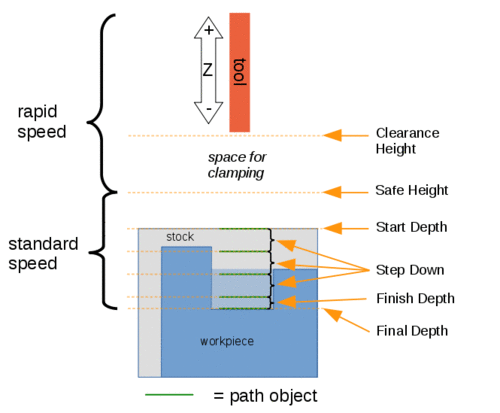
Visual reference for Depth properties (settings)
Commands
Some commands are experimental and not available by default. To enable them see CAM experimental.
Project Commands
 刀路作业:创建一个新的CNC作业。
 后置处理: 将一个项目导出为G-code。
 刀路错误: 检查选定作业中的缺失值
 导出模板: 将当前作业导出为模板。
Tool Commands
 G-Code检查器: 显示需要检查的G-code。
 刀路模拟: 展示铣削操作在机器上的运行。
 CAM Simulator: Enables the new, improved CAM simulator. introduced in 1.0
 收尾循环: 在选定的两个边上完成收尾循环。
 Toggle Operation: Activates or de-activates a path operation.
 ToolBit Library Manager: Opens an editor to manage ToolBit libraries.
 Add toolbit…: Opens the ToolBit Selector.
Basic Operations
 Profile: Creates a profile operation of the entire model, or from one or more selected faces or edges.
 开槽:创建选定的一个或多个选定挖槽的开槽操作。
 面铣削: 创建一个面铣削刀路
 螺旋: 创建螺旋刀路。
 Adaptive: Creates an adaptive clearing and profiling operation.
 Slot: Creates a slotting operation from selected features or custom points.
 钻孔: 执行钻孔循环

 雕刻:创建雕刻刀路
 Deburr: Creates a deburr path.
刀路修剪
3D Operations
 3D开槽:创建3D开槽刀路
 3D面: 创建3D面刀路
 Waterline: Creates a waterline path for a 3D surface. Experimental.
Path Dressup

 Axis Map: Remaps one axis to another.
 Boundary: Adds a boundary dressup modification to a selected path.
 避位角修剪: 在选定的刀路上添加避位角修剪。
 拖刀修剪: 在选定刀路上添加一个拖刀修剪。
 引入引出点修剪: 在选定道路上添加引入引出点。
 斜坡修剪: 在选定的刀路上添加斜坡修剪。
 夹持耳修剪 在选定刀路上添加一个夹持耳修剪。
 Z Depth Correction: Corrects the Z depth using Probe Map.
Supplemental Commands
 备注: 在刀路G-code中加入备注
 停止: 插入机器停止指令
 自定义: 插入自定义G-code
 Probe: Creates a Probing Grid from a job stock.
 从形状生成的Gcode: 从选定的零件对象创建刀路对象
刀路修改
 副本: 创建所选刀路对象的参数化副本。
 数组: 通过复制选定的刀路创建数组。
 简化副本: 创建选定刀路的非参数化副本。
Specialty Operations
 Thread Milling: Creates a CAM Thread Milling operation from features of a base object. Experimental.
Miscellaneous
 特征区域:为所选对象创建特征区域
 特征区域工作面: 创建一个特征区域工作面
Obsolete Commands
 夹具: 改变夹具位置
ToolBit architecture
Manage tools, bits, and the Tool Library. Based on the ToolBit architecture.
Other
刀路工作台与其他CAM软件包共享许多概念,但有其独特之处。 如果出现问题,这个特点可能是一个很好的排错起点。
首选项
 首选项...: 刀路工具中的首选项。
脚本编写
见 刀路脚本页。
Tutorials
- CAM Walkthrough for the Impatient: a quick tutorial to get familiar with CAM.
Videos
- FreeCAD Path: Custom paths with Python - Part 1 - 5: A playlist with a series of 5 videos in English by sliptonic. This series shows how to work with the CAM Workbench.
- FreeCAD CAM Path Workbench: A playlist with a series of 7 videos in English by CAD CAM Lessons.
- FreeCAD CAM CNC: A playlist with a series of 8 videos in English by CAD CAM Lessons.
- Also see the Computer-Aided Manufacturing (CAM) section of the Video tutorials wiki page.
Roadmap
- CAM Development Roadmap: Read this if you are a developer and want to contribute to CAM.