GuiCommand: Name: Sketcher RemoveAxesAlignment MenuLocation: Sketch , Sketcher tools , Remove axes alignment Workbenches: Sketcher_Workbench Shortcut: Z R Version: 0.20
Sketcher RemoveAxesAlignment
Description
The  Sketcher RemoveAxesAlignment tool removes the axes alignment of selected edges by replacing Horizontal and Vertical constraints with Parallel and Perpendicular constraints. The edges can then be rotated without losing their orthogonal relationship.
Usage
- Select two or more edges with Horizontal or Vertical constraints, for example a rectangle.
- There are several ways to invoke the tool:
- Press the Remove axes alignment button.
- Select the Sketch → Sketcher tools → Remove axes alignment option from the menu.
- Use the keyboard shortcut: Z then R.
- Press the
Example
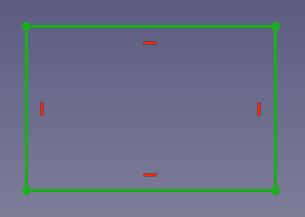 *A selected rectangle with horizontal and vertical constraints.*
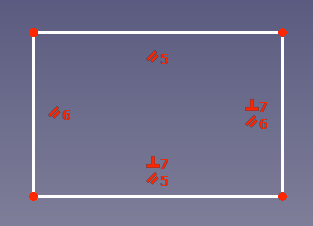 *The rectangle after using the tool.*
⏵ documentation index > Sketcher > Sketcher RemoveAxesAlignment
This page is retrieved from https://github.com/FreeCAD/FreeCAD-documentation/blob/main/wiki/Sketcher_RemoveAxesAlignment.md