GuiCommand: Name: SheetMetal BaseShape MenuLocation: SheetMetal , Add base shape Workbenches: SheetMetal_Workbench Version: 0.3.10 Shortcut: H
SheetMetal BaseShape
Description
The  SheetMetal BaseShape command creates a SheetMetal BaseShape object from parameters.
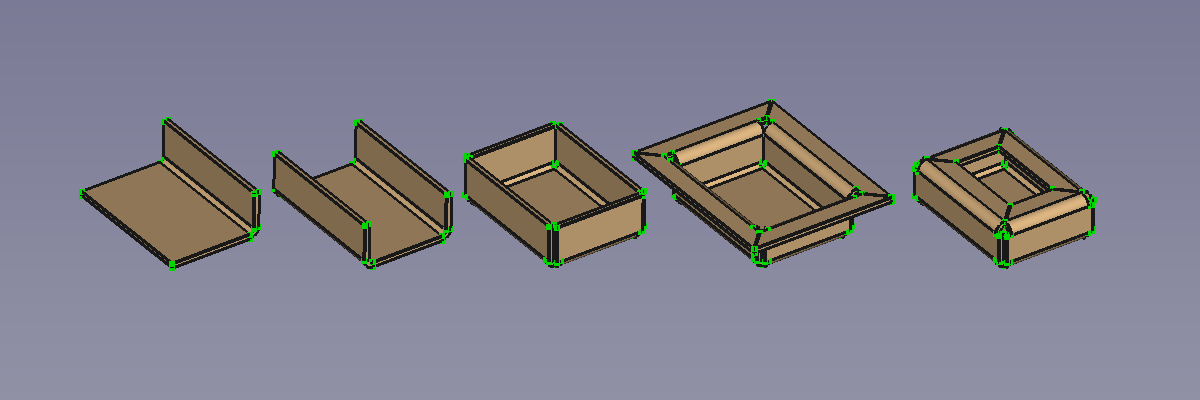
The five available BaseShapes: L-shape, U-shape, Tub, Hat, and Box
A rectangular sixth shape, called Flat, was introduced in v 0.4.10.
Usage
- There are several ways to invoke the command:
- Press the Add base shape button.
- Select the SheetMetal → Add base shape option from the menu.
- Right-click in the Tree view or the 3D view and select the SheetMetal → Add base shape option from the context menu.
- Use the keyboard shortcut: H.
- Press the
- The Generate Sheet Metal base shape Task panel opens.
- Select the desired shape from the Base shape type options.
- Select the position of the origin in the Location of part origin widget.
- Optionally adjust the parameters in the Task panel.
- Press the OK button to finish the command and close the Task panel.
- A BaseShape object will be created.
- Optionally adjust the parameters in the Property editor.
Properties
See also: Property editor.
A SheetMetal BaseShape object is derived from a Part Feature object or, if it is inside a PartDesign Body, from a PartDesign Feature object, and inherits all its properties. It also has the following additional properties:
Data
{{Properties_Title|Parameters}}
-
fill Gaps|Bool: Extends side and flanges to close all gaps. Default:
True. -
flangeWidth|Length: Width of top flange. Default: {{Value|5,00 mm}}.
-
height|Length: Shape height. Default: {{Value|10,00 mm}}.
-
length|Length: Shape length. Default: {{Value|30,00 mm}}.
-
origin Loc|Enumeration: Origin location.
:
    {{Value|-X,-Y}}

, {{Value|-X,0}}, {{Value|-X,+Y}}, {{Value|0,-Y}}, {{Value|0,0}} (default), {{Value|0,+Y}}, {{Value|+X,-Y}}, {{Value|+X,0}}, and {{Value|+X,+Y}}-
radius|Length: Bend Radius. Default: {{Value|1,00 mm}}.
-
shape Type|Enumeration: Base shape type.
:
    {{Value|Flat}}

(introduced in v 0.4.10), {{Value|L-Shape}} (default), {{Value|U-Shape}}, {{Value|Tub}}, {{Value|Hat}}, and {{Value|Box}}.-
thickness|Length: Thickness of sheetmetal. Default: {{Value|1,00 mm}}.
-
width|Length: Shape width. Default: {{Value|20,00 mm}}.
⏵ documentation index > SheetMetal > Addons > External Command Reference > SheetMetal BaseShape
This page is retrieved from https://github.com/FreeCAD/FreeCAD-documentation/blob/main/wiki/SheetMetal_BaseShape.md