GuiCommand: Name: Reinforcement LShapeRebar MenuLocation: 3D/BIM , Reinforcement tools , L-Shape Rebar Workbenches: Reinforcement_Workbench, BIM_Workbench Version: 0.17 SeeAlso:
Reinforcement LShapeRebar
Description
The Reinforcement LShapeRebar tool allows the user to create a set of L-shaped reinforcing bars inside an Arch Structure object.
This tool is part of the Reinforcement Workbench, an external workbench that can be installed with the  Addon Manager.
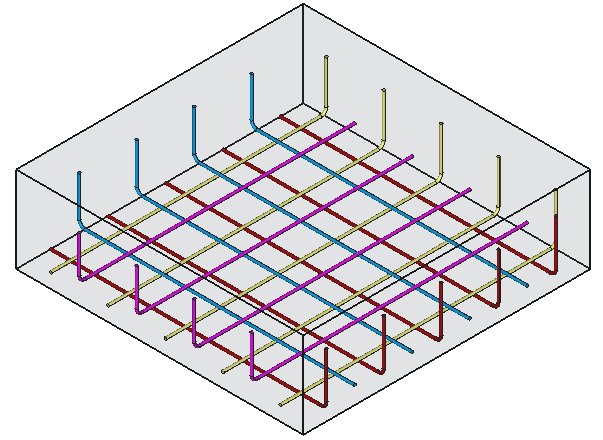 *Four sets of L-shaped reinforcement bars inside an [Arch Structure](wiki-test2.php?gitpage=Arch_Structure)*
Usage
-
Select any face of a previously created
 [[Arch Structure]] object.
 -
Then select
 L-Shape Rebar from the rebar tools.
 -
A task panel will pop-out on the left side of the screen as shown below.
-
Select the desired orientation.
-
Populate the inputs like \'Left Cover\', Right Cover, Top Cover, \'Bottom Cover\', \'Front Cover\', \'Bent Angle\', \'Bent Factor\', \'Rounding\' and \'Diameter\' of the rebar.
-
Select the mode of distribution either \'Amount\' or \'Spacing\'.
- If \'Spacing\' is selected, a user can also opt for custom spacing.
-
Pick Selected Faceis used to verify or change the face for rebar distribution.
-
Click OK or Apply to generate the rebars.
-
Click Cancel to exit the task panel.
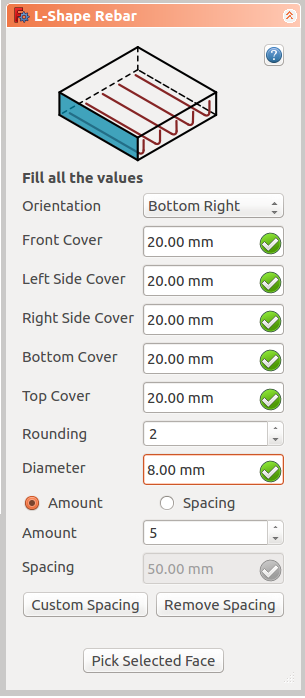 *Task panel for the tool*
Properties
-
Orientation: It decides the orientation of the rebar (like a bottom, top, right and left).
-
Front Cover: The distance between rebar and selected face.
-
Right Cover: The distance between the right end of the rebar to right face of the structure.
-
Left Cover: The distance between the left end of the rebar to the left face of the structure.
-
Bottom Cover: The distance between rebar from the bottom face of the structure.
-
Top Cover: The distance between rebar from the top face of the structure.
-
Rounding: A rounding value to be applied to the corners of the bars, expressed in times the diameter.
-
Amount: The amount of rebars.
-
Spacing: The distance between the axes of each bar.
Scripting
See also:
Arch API, Reinforcement API and FreeCAD Scripting Basics.
The Reinforcement LShapeRebar tool can be used in macros and from the Python console by using the following function:
Rebar = makeLShapeRebar(f_cover, b_cover, l_cover, r_cover,
                        diameter, t_cover, rounding, amount_spacing_check, amount_spacing_value, orientation="Bottom Left",
structure=None, facename=None):-
Creates a
Rebarobject from the givenstructure, which is an Arch Structure, andfacename, which is a face of that structure.- If no
structurenorfacenameare given, it will take the user selected face as input.
- If no
-
f_cover,b_cover,l_cover,r_cover, andt_coverare inner offset distances for the rebar elements with respect to the faces of the structure. They are respectively the front, bottom, left, right, and top offsets. -
diameteris the diameter of the reinforcement bars inside the structure. -
roundingis the parameter that determines the bending radius of the reinforcement bars. -
amount_spacing_checkif it is True it will create as many reinforcement bars as given by amount_spacing_value; if it is False it will create reinforcement bars separated by the numerical value of amount_spacing_value. -
amount_spacing_valuespecifies the number of reinforcement bars, or the value of the separation between them, depending on amount_spacing_check. -
orientationspecifies the orientation of the rebar; it can be"Bottom Right","Bottom Left","Top Right", or"Top Left".
Example
import FreeCAD, Arch, LShapeRebar

Structure = Arch.makeStructure(length=1000, width=1000, height=400)
Structure.ViewObject.Transparency = 80
FreeCAD.ActiveDocument.recompute()

Rebar = LShapeRebar.makeLShapeRebar(50, 20, 20, 20,
                                    8, 50, 4, True, 6, "Bottom Left", Structure, "Face4")
Rebar.ViewObject.ShapeColor = (0.9, 0.0, 0.0)

Rebar2 = LShapeRebar.makeLShapeRebar(50, 50, 20, 20,
                                     8, 50, 4, True, 6, "Bottom Left", Structure, "Face6")
Rebar2.ViewObject.ShapeColor = (0.0, 0.0, 0.9)
Edition of the rebar
You can change the properties of the rebar with the following function:
editLShapeRebar(Rebar, f_cover, b_cover, l_cover, r_cover,
                diameter, t_cover, rounding, amount_spacing_check, amount_spacing_value, orientation,
structure=None, facename=None)-
Rebaris a previously createdLShapeRebarobject. -
The other parameters are the same as required by the
makeLShapeRebar()function. -
structureandfacenamemay be omitted so that the rebar stays in the original structure.
import LShapeRebar

LShapeRebar.editLShapeRebar(Rebar, 50, 50, 20, 20,
                            12, 50, 6, True, 5, "Top Right")

LShapeRebar.editLShapeRebar(Rebar2, 50, 50, 20, 20,
                            12, 70, 6, True, 5, "Top Right")
⏵ documentation index > External_Command_Reference > Reinforcement > BIM > Reinforcement LShapeRebar
This page is retrieved from https://github.com/FreeCAD/FreeCAD-documentation/blob/main/wiki/Reinforcement_LShapeRebar.md