GuiCommand: Name: Reinforcement BeamRebars MenuLocation: 3D/BIM , Reinforcement tools , Beam Reinforcement Workbenches: Reinforcement_Workbench, BIM_Workbench Version: 0.19 SeeAlso:
Reinforcement BeamRebars
Description
The Reinforcement BeamRebars tool allows the user to create reinforcing bars inside a Beam Arch Structure object.
This tool is part of the Reinforcement Workbench, an external workbench that can be installed with the  Addon Manager.

Beam Reinforcement inside a Beam Arch Structure
Usage
1. Select right face of a previously created beam  Arch Structure object having length along x-axis. Or select front face of a previously created beam Arch Structure object having length along y-axis.
2. Then select  Beam Reinforcement from the rebar tools.
3. A dialog box will pop-out on screen as shown below.
: 
:
Dialog Box for the Reinforcement BeamRebars tool
4. Select the desired type of beam reinforcement.
5. Give inputs for data related to stirrups.
6. Click Next and the dialog box will be updated as shown below.
: 
:
Dialog Box for Top Rebars data
7. Set data for top rebars.
{{ColoredParagraph|#f8f9fa|
: To edit Number#Diameter@Offset value, click on the Edit button next to Number#Diameter@Offset label. A dialog box will pop-out as shown below.

: To edit Rebar Type value, click on the Edit button next to Rebar Type label. A dialog box will pop-out as shown below.
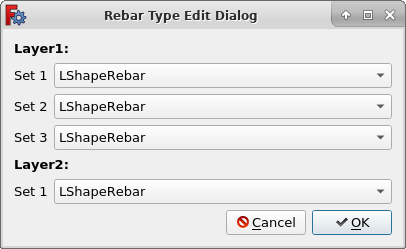
: To edit Hook Orientation value, click on the Edit button next to Hook Orientation label. A dialog box will pop-out as shown below.

: To edit Hook Extension value, click on the Edit button next to Hook Extension label. A dialog box will pop-out as shown below.

: To edit LRebar Rounding value, click on the Edit button next to Rounding label. A dialog box will pop-out as shown below.

: To edit Layer Spacing value, click on the Edit button next to Layer Spacing label. A dialog box will pop-out as shown below.
 }}
}}
8. Click Next and the dialog box will be updated as shown below.
: 
:
Dialog Box for Bottom Rebars data
9. Set data for bottom rebars similar to top rebars data.
10. Click Next and the dialog box will be updated as shown below.
: 
:
Dialog Box for Left Shear Rebars data
11. Set data for left shear rebars.
{{ColoredParagraph|#f8f9fa|
: To edit Number#Diameter@Offset value, click on the Edit button next to Number#Diameter@Offset label. A dialog box will pop-out as shown below.

: To edit Rebar Type value, click on the Edit button next to Rebar Type label. A dialog box will pop-out as shown below.
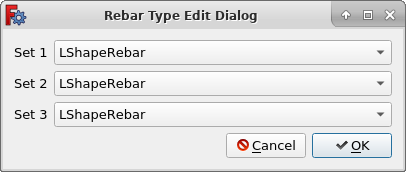
: To edit Hook Orientation value, click on the Edit button next to Hook Orientation label. A dialog box will pop-out as shown below.

: To edit Hook Extension value, click on the Edit button next to Hook Extension label. A dialog box will pop-out as shown below.

: To edit LRebar Rounding value, click on the Edit button next to Rounding label. A dialog box will pop-out as shown below.
 }}
}}
12. Click Next and the dialog box will be updated as shown below.
: 
:
Dialog Box for Right Shear Rebars data
13. Set data for right shear rebars similar to left shear rebars data.
14. Click OK or Apply to generate beam reinforcement.
15. Click Cancel to exit the dialog box.
Properties
Stirrups:
-
Left Cover: The distance between the left end of the stirrup to the left face of the structure.
-
Right Cover: The distance between the right end of the stirrup to right face of the structure.
-
Top Cover: The distance between stirrup from the top face of the structure.
-
Bottom Cover: The distance between stirrup from the bottom face of the structure.
-
Offset: The distance between stirrup from the selected/back face of the structure.
-
Diameter: Diameter of the stirrup.
-
Bent Angle: Bent angle defines the angle at the ends of a stirrup.
-
Extension Factor: Extension Factor defines length of end of stirrup, expressed in times the diameter.
-
Number: The number of stirrup.
-
Spacing: The distance between the axes of each stirrup.
Top/Bottom Reinforcement Rebars: Rebars present at top/bottom side of beam
-
NumberDiameterOffset: A tuple of Number#Diameter@Offset string. Each element of tuple represents reinforcement for each new layer.
-
Rebar Type: List of tuple of type of reinforcement bars.
-
Hook Orientation: List of tuple of orientation of LShaped hooks.
-
Hook Extension: List of tuple of length of hook of LShaped rebars.
-
Rounding: List of tuple of a rounding value to be applied to the corners of the LShape rebars, expressed in times the diameter.
-
Layer Spacing: List of spacing between two consecutive reinforcement layers.
Left/Right Reinforcement Rebars: Rebars present at left/right side of beam
-
NumberDiameterOffset: String of Number#Diameter@Offset set for reinforcement bars.
-
Rebar Type: List of type of reinforcement bars.
-
Hook Orientation: List of orientation of LShaped hooks.
-
Hook Extension: List of length of hook of LShaped rebars.
-
Rounding: List of a rounding value to be applied to the corners of the LShape rebars, expressed in times the diameter.
-
Rebar Spacing: Clear spacing between consecutive reinforcement bars.
Scripting
See also:
Arch API, Reinforcement API and FreeCAD Scripting Basics.
The Reinforcement BeamRebars tool can be used in macros and from the Python console by using the following function:
Create Two Legged Stirrups
RebarGroup = makeReinforcement(
    l_cover_of_stirrup,
    r_cover_of_stirrup,
    t_cover_of_stirrup,
    b_cover_of_stirrup,
    offset_of_stirrup,
    bent_angle,
    extension_factor,
    dia_of_stirrup,
    number_spacing_check,
    number_spacing_value,
    top_reinforcement_number_diameter_offset,
    top_reinforcement_rebar_type,
    top_reinforcement_layer_spacing,
    bottom_reinforcement_number_diameter_offset,
    bottom_reinforcement_rebar_type,
    bottom_reinforcement_layer_spacing,
    left_rebars_number_diameter_offset,
    left_rebars_type,
    left_rebars_spacing,
    right_rebars_number_diameter_offset,
    right_rebars_type,
    right_rebars_spacing,
    top_reinforcement_l_rebar_rounding=2,
    top_reinforcement_hook_extension=40,
    top_reinforcement_hook_orientation="Front Inside",
    bottom_reinforcement_l_rebar_rounding=2,
    bottom_reinforcement_hook_extension=40,
    bottom_reinforcement_hook_orientation="Front Inside",
    left_l_rebar_rounding=2,
    left_rebars_hook_extension=40,
    left_rebars_hook_orientation="Front Inside",
    right_l_rebar_rounding=2,
    right_rebars_hook_extension=40,
    right_rebars_hook_orientation="Front Inside",
    structure=None,
    facename=None,
)-
Creates a
RebarGroupobject from the givenstructure, which is an Arch Structure, andfacename, which is a face of that structure.- If no
structurenorfacenameare given, it will take the user selected face as input.
- If no
-
l_cover_of_stirrup,r_cover_of_stirrup,t_cover_of_stirrup,b_cover_of_stirrupandoffset_of_stirrupare inner offset distances for the stirrup elements with respect to the faces of the structure. They are respectively the left, right, top, bottom and front/rear offsets. -
bent_angledefine the angle of the tip of the reinforcement loop of stirrup. -
extension_factordefine the length of the tip of the reinforcement loop of stirrup, expressed in times the diameter. -
dia_of_stirrupis the diameter of the stirrup. -
number_spacing_checkif it isTrueit will create as many stirrup as given bynumber_spacing_value; if it isFalseit will create stirrup separated by the numerical value ofnumber_spacing_value. -
number_spacing_valuespecifies the number of stirrups, or the value of the separation between them, depending onnumber_spacing_check. -
top_reinforcement_number_diameter_offsetandbottom_reinforcement_number_diameter_offsetare tuple of number_diameter_offset string. Each element of tuple represents reinforcement for each new layer.
Syntax: ( "number1#diameter1@offset1+number2#diameter2@offset2+...", "number3#diameter3@offset3+number4#diameter4@offset4+...", ..., )
top_reinforcement_rebar_typeandbottom_reinforcement_rebar_typespecifies type of top/bottom reinforcement bars.
Possible values: 1. 'StraightRebar' or 'LShapeRebar' ', ...) and number of elements of tuple must be equal to number of reinforcement layers. 3. [ ', ...), ', ...), ..., ] each element of list is a tuple, which specifies rebar type of each reinforcement layer. And each element of tuple represents rabar_type for each set of rebars. 4. [ , ', ...), ..., ]
top_reinforcement_layer_spacingandbottom_reinforcement_layer_spacingis the spacing between two consecutive reinforcement layers.
Possible values:
, ...) and number of elements of tuple must be equal to one less than number of layers.
left_rebars_number_diameter_offsetandright_rebars_number_diameter_offsetare string of number_diameter_offset.
Syntax: "number1#diameter1@offset1+number2#diameter2@offset2+..."
left_rebars_typeandright_rebars_typespecifies type of left/right reinforcement bars.
Possible values: 1. 'StraightRebar' or 'LShapeRebar' ', ...) and each element of tuple represents rabar_type for each set of rebars.
-
left_rebars_spacingandright_rebars_spacingis clear spacing between consecutive reinforcement bars. -
top_reinforcement_l_rebar_roundingandbottom_reinforcement_l_rebar_roundingis the parameter that determines the bending radius of the LShaped top/bottom rebars, expressed as times the diameter. Possible syntax are similar to as discussed above fortop_reinforcement_rebar_type/bottom_reinforcement_rebar_type. -
top_reinforcement_hook_extensionandbottom_reinforcement_hook_extensionis the length of hook of LShaped rebars. Possible syntax are similar to as discussed above fortop_reinforcement_rebar_type/bottom_reinforcement_rebar_type. -
top_reinforcement_hook_orientationandbottom_reinforcement_hook_orientationspecifies the orientation of LShaped hook; it can be"Front Inside","Front Outside","Rear Inside"or"Rear Outside". Possible syntax are similar to as discussed above fortop_reinforcement_rebar_type/bottom_reinforcement_rebar_type. -
left_l_rebar_roundingandright_l_rebar_roundingis the parameter that determines the bending radius of the LShaped left/right rebars, expressed as times the diameter. Possible syntax are similar to as discussed above forleft_rebars_type/right_rebars_type. -
left_rebars_hook_extensionandright_rebars_hook_extensionis the length of hook of LShaped rebars. Possible syntax are similar to as discussed above forleft_rebars_type/right_rebars_type. -
left_rebars_hook_orientationandright_rebars_hook_orientationspecifies the orientation of LShaped hook; it can be"Front Inside","Front Outside","Rear Inside"or"Rear Outside". Possible syntax are similar to as discussed above forleft_rebars_type/right_rebars_type.
Example
import FreeCAD, Arch
from BeamReinforcement import TwoLeggedBeam

Structure = Arch.makeStructure(length=3000.0,width=200.0,height=400.0)
Structure.ViewObject.Transparency = 80
FreeCAD.ActiveDocument.recompute()

RebarGroup = TwoLeggedBeam.makeReinforcement(
    l_cover_of_stirrup=20,
    r_cover_of_stirrup=20,
    t_cover_of_stirrup=20,
    b_cover_of_stirrup=20,
    offset_of_stirrup=100,
    bent_angle=135,
    extension_factor=4,
    dia_of_stirrup=8,
    number_spacing_check=False,
    number_spacing_value=200,
    top_reinforcement_number_diameter_offset=("1#20@-60+2#16@-60+1#20@-60", "3#16@-100"),
    top_reinforcement_rebar_type="LShapeRebar",
    top_reinforcement_layer_spacing=30,
    bottom_reinforcement_number_diameter_offset=("1#20@-60+2#16@-60+1#20@-60", "3#16@-100"),
    bottom_reinforcement_rebar_type="LShapeRebar",
    bottom_reinforcement_layer_spacing=30,
    left_rebars_number_diameter_offset="1#16@-100+1#16@-100+1#16@-100",
    left_rebars_type="LShapeRebar",
    left_rebars_spacing=30,
    right_rebars_number_diameter_offset="1#16@-100+1#16@-100+1#16@-100",
    right_rebars_type="LShapeRebar",
    right_rebars_spacing=30,
    top_reinforcement_l_rebar_rounding=2,
    top_reinforcement_hook_extension=100,
    top_reinforcement_hook_orientation="Rear Outside",
    bottom_reinforcement_l_rebar_rounding=2,
    bottom_reinforcement_hook_extension=100,
    bottom_reinforcement_hook_orientation="Rear Outside",
    left_l_rebar_rounding=2,
    left_rebars_hook_extension=80,
    left_rebars_hook_orientation=("Rear Inside", "Front Inside", "Rear Inside"),
    right_l_rebar_rounding=2,
    right_rebars_hook_extension=80,
    right_rebars_hook_orientation=("Front Inside", "Rear Inside", "Front Inside"),
    structure=Structure,
    facename="Face6",
)
⏵ documentation index > External_Command_Reference > Reinforcement > BIM > Reinforcement BeamRebars
This page is retrieved from https://github.com/FreeCAD/FreeCAD-documentation/blob/main/wiki/Reinforcement_BeamRebars.md