


|
|
| Menu location |
|---|
| TechDraw → Format/Organize Dimensions → Vertical Chamfer Dimension |
| Workbenches |
| TechDraw |
| Default shortcut |
| None |
| Introduced in version |
| 0.20 |
| See also |
| TechDraw ExtensionCreateHorizChamferDimension |
Description
The TechDraw ExtensionCreateVertChamferDimension tool creates a vertical size and angle dimension for a chamfer.
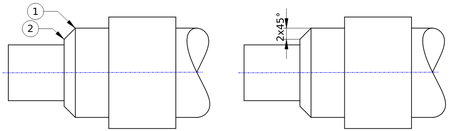
On the right the created dimension
Usage
- Select two vertices.
- There are several ways to invoke the tool:
- introduced in 1.0: If the Dimensioning tools preference is set to
Single tool(default): press the down arrow to the right of the
 button and select the
  Vertical Chamfer Dimension option from the dropdown.
 - If this preference has a different value (and in 0.21 and below): press the Vertical Chamfer Dimension button.
- Select the TechDraw → Format/Organize Dimensions → Vertical Chamfer Dimension option from the menu.
- introduced in 1.0: If the Dimensioning tools preference is set to
- A chamfer dimension is created.
This page is retrieved from https://wiki.freecad.org/TechDraw_ExtensionCreateVertChamferDimension