FreeCAD Logo FreeCAD 1.0
  • Engelska Afrikaans Arabiska Belarusian Katalanska Tjeckiska Tyska Grekiska Spanska Spanska Baskisk Finska Filippinska Franska Galiciska Kroatiska Ungerska Indonesiska Italienska Japanska Kabyliska Koreansk Litauiska Nederländska Norwegian Bokmal Polska Portugisiska Portugisiska Rumänska Ryska Slovakiska Slovenska Serbiska Svenska Turkiska Ukrainska Valencianska Vietnamesiska Kinesiska Kinesiska
  • Funktioner
  • Hämta
  • Blogg
  • Dokumentation
    Documentation index Kom igång Användardokumentation FreeCAD-manualen Dokumentation för arbetsytor Python coding documentation C++ coding documentation Övningar Frequently asked questions Privacy policy Om FreeCAD
  • Bidra
    Hur hjälper du till Sponsor Report a bug Make a pull request Jobs and funding Contribution guidelines Developers handbook Översättningar
  • Gemenskap
    Code of conduct Forum The FPA GitHub GitLab Codeberg Mastodon Matrix IRC IRC via Webchat Gitter Discord Reddit Twitter Facebook LinkedIn Calendar
  • ♥ Donate

Donate

$
SEPA Information
Ställ in din SEPA-banköverföring till:
Beneficiary: The FreeCAD project association
IBAN: BE04 0019 2896 4531
BIC/SWIFT: GEBABEBBXXX
Bankombud: BNP Paribas Fortis
Adress: Rue de la Station 64, 1360 Perwez, Belgium

While Stripe doesn't support monthly donations, you can still become a sponsor! Simply make a one-time donation equivalent to 12 months of support, and you'll gain access to the corresponding sponsoring tier. It's an easy and flexible way to contribute.

If you are not sure or not able to commit to a regular donation, but still want to help the project, you can do a one-time donation, of any amount.

Choose freely the amount you wish to donate one time only.

You can support FreeCAD by sponsoring it as an individual or organization through various platforms. Sponsorship provides a steady income for developers, allowing the FPA to plan ahead and enabling greater investment in FreeCAD. To encourage sponsorship, we offer different tiers, and unless you choose to remain anonymous, your name or company logo will be featured on our website accordingly.

from 1 USD / 1 EUR per month. You will not have your name displayed here, but you will have helped the project a lot anyway. Together, normal sponsors maintain the project on its feet as much as the bigger sponsors.

from 25 USD / 25 EUR per month. Your name or company name is displayed on this page.

from 100 USD / 100 EUR per month. Your name or company name is displayed on this page, with a link to your website, and a one-line description text.

from 200 USD / 200 EUR per month. Your name or company name and logo displayed on this page, with a link to your website and a custom description text. Companies that have helped FreeCAD early on also appear under Gold sponsors.

Instead of donating each month, you might find it more comfortable to make a one-time donation that, when divided by twelve, would give you right to enter a sponsoring tier. Don't hesitate to do so!

Choose freely the amount you wish to donate each month.

Please inform your forum name or twitter handle as a notein your transfer, or reach to us, so we can give you proper credits!

AxisCross
TextureMapping
Std View Menu

Std ToggleClipPlane

Menyplacering
View → Clipping plane‏‎
Arbetsbänkar
All
Standard genväg
Ingen
Introducerad i version
-
Se även
Ingen

Description

The Std ToggleClipPlane command temporarily hides objects and parts of objects on one side of up to three virtual planes in the active 3D View.
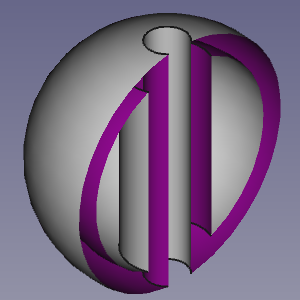
A clipped hollow object

The Clipping dialog box

Usage

  1. Select the View → Clipping View option from the menu.
  2. The Clipping dialog box opens.
  3. Do one of the following:
    • Check one or more of the Clipping X to Clipping Z checkboxes.
      • Optionally change the offset distance(s).
      • Optionally press the Flip button(s) to change the side of the clipping plane objects are hidden on.
    • Check the Custom Clipping Direction checkbox.
      • Optionally change the offset distance.
      • Do one of the following:
        • Press the View button to use the direction of the current view.
        • Check the Adjust to view direction checkbox for a direction that dynamically adepts to view changes.
        • Specify the direction by entering the X-, Y- and Z-coordinates of a normal vector.
  4. Optionally change the view to inspect the model.
  5. Press the Close button to close the task panel and finish the command.

Notes

  • To clearly distinguish the interior of partially clipped objects change their VyLighting property to One side. The color of the interior side of their faces will then depend on the backlight settings: Edit → Preferences → Display → Light Sources → Backlight. See Preferences Editor.


AxisCross
TextureMapping
Std View Menu

Denna sida hämtas från https://wiki.freecad.org/Std_ToggleClipPlane

Kontakta oss!
Forum GitHub Mastodon Matrix IRC Gitter.im Discord Reddit Twitter Facebook LinkedIn

© The FreeCAD Team. Homepage image credits (top to bottom): ppemawm, r-frank, epileftric, regis, rider_mortagnais, bejant.

This project is supported by: , KiCad Services Corp. och andra sponsorer

GitHubImprove this page on GitHub