FreeCAD Logo FreeCAD 1.0
  • Английский Африкаанс Арабский Белорусский Каталанский Чешский Немецкий Греческий Испанский Испанский Баскский Финский Филиппинский Французский Галисийский Хорватский Венгерский Индонезийский Итальянский Японский Кабильский Корейский Литовский Нидерландский Норвежская букмол Польский Португальский Португальский Румынский Русский Словацкий Словенский Сербский Шведский Турецкий Украинский Валенсианский Вьетнамский Китайский Китайский
  • Возможности
  • Скачать
  • Блог
  • Документация
    Индекс документации Приступая к работе Пользовательская документация Руководство по FreeCAD Документация верстаков Документация по кодированию на Python Документация по коду C++ Уроки Часто задаваемые вопросы Политика конфиденциальности О программе FreeCAD
  • Внести вклад
    Как помочь Sponsor Сообщить об ошибке Сделать запрос Задачи и финансирование Руководство по участию в разработке Руководство для разработчиков Переводы
  • Сообщество
    Кодекс поведения Форум The FPA GitHub GitLab Codeberg Mastodon Matrix IRC IRC via Webchat Gitter Discord Reddit Twitter Facebook LinkedIn Календарь
  • ♥ Donate

Donate

$
Информация о SEPA
Пожалуйста, настройте банковский перевод SEPA:
Beneficiary: The FreeCAD project association
IBAN: BE04 0019 2896 4531
BIC/SWIFT: GEBABEBBXXX
Банковское агентство: BNP Paribas Fortis
Адрес: Rue de la Station 64, 1360 Perwez, Belgium

While Stripe doesn't support monthly donations, you can still become a sponsor! Simply make a one-time donation equivalent to 12 months of support, and you'll gain access to the corresponding sponsoring tier. It's an easy and flexible way to contribute.

If you are not sure or not able to commit to a regular donation, but still want to help the project, you can do a one-time donation, of any amount.

Choose freely the amount you wish to donate one time only.

You can support FreeCAD by sponsoring it as an individual or organization through various platforms. Sponsorship provides a steady income for developers, allowing the FPA to plan ahead and enabling greater investment in FreeCAD. To encourage sponsorship, we offer different tiers, and unless you choose to remain anonymous, your name or company logo will be featured on our website accordingly.

from 1 USD / 1 EUR per month. You will not have your name displayed here, but you will have helped the project a lot anyway. Together, normal sponsors maintain the project on its feet as much as the bigger sponsors.

from 25 USD / 25 EUR per month. Your name or company name is displayed on this page.

from 100 USD / 100 EUR per month. Your name or company name is displayed on this page, with a link to your website, and a one-line description text.

from 200 USD / 200 EUR per month. Your name or company name and logo displayed on this page, with a link to your website and a custom description text. Companies that have helped FreeCAD early on also appear under Gold sponsors.

Instead of donating each month, you might find it more comfortable to make a one-time donation that, when divided by twelve, would give you right to enter a sponsoring tier. Don't hesitate to do so!

Choose freely the amount you wish to donate each month.

Please inform your forum name or twitter handle as a notein your transfer, or reach to us, so we can give you proper credits!

Меню "Положения камеры"
Команда "Габариты"
Меню "Вид"

Std DrawStyle

Расположение в меню
Вид → Стиль представления → ...
Верстаки
All
Быстрые клавиши
V 1 - V 7
Представлено в версии
-
См. также
Std SelBoundingBox

Описание

The Std DrawStyle command can override the effect of the ВидDisplay Mode property of objects in a 3D View.

Применение

  1. There are several ways to invoke the command:
    • Click on the down arrow to the right of the Draw Style button and select a style from the flyout.
    • In the menu go to View → Draw Style and select a style.
    • In the 3D View context menu go to Draw Style and select a style.
    • Use one of the keyboard shortcut: V then 1, 2, 3, 4, 5, 6 or 7.

Available draw styles

Как есть

The As Is style does not override the ВидDisplay Mode property of objects.
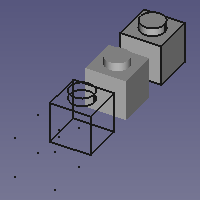
4 одинаковых объекта, с разными значениями переменной Display Mode (слева направо: 'Points', 'Wireframe', 'Shaded' и 'Flat lines') в режиме отображения 'Как есть'

Точки

The Points style overrides the ВидDisplay Mode property of objects. This style matches the 'Points' Display Mode. Vertices are displayed in solid colors. Edges and faces are not displayed.
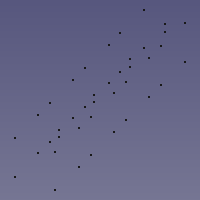
Внешний вид тех же самых объектов в режиме отображения 'Точки'

Каркас

The Wireframe style overrides the ВидDisplay Mode property of objects. This style matches the 'Wireframe' Display Mode. Vertices and edges are displayed in solid colors. Faces are not displayed.
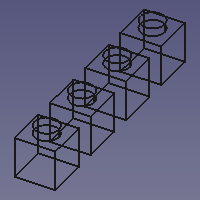
Внешний вид тех же самых объектов в режиме отображения 'Каркас'

Скрытые линии

The Hidden Line style overrides the ВидDisplay Mode property of objects. Objects are displayed as if converted to triangular meshes.
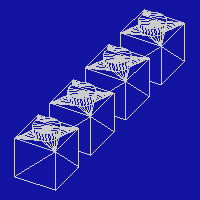
Внешний вид тех же самых объектов в режиме отображения 'Скрытые линии'

Без затенения

The No Shading style overrides the ВидDisplay Mode property of objects. Vertices, edges and faces are displayed in solid colors.
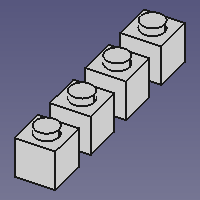
Внешний вид тех же самых объектов в режиме отображения 'Без затенения'

Только грани

The Shaded style overrides the ВидDisplay Mode property of objects. This style matches the 'Shaded' Display Mode. Vertices and edges are not displayed. Faces are illuminated depending on their orientation.
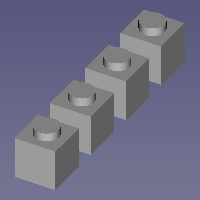
Внешний вид тех же самых объектов в режиме отображения 'Только грани'

Плоские линии

The Flat Lines style overrides the ВидDisplay Mode property of objects. This style matches the 'Flat Lines' Display Mode. Vertices and edges are displayed in solid colors. Faces are illuminated depending on their orientation.
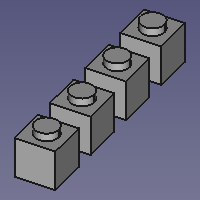
Внешний вид тех же самых объектов в режиме отображения 'Плоские линии'

Примечания

  • Objects in a 3D View also have a ВидDraw Style property. This property controls the linetype used for the edges. The Std DrawStyle command does not override this property.
  • For a macro to toggle between two draw styles see: Macro Toggle Drawstyle.


Меню "Положения камеры"
Команда "Габариты"
Меню "Вид"

Эта страница получена от https://wiki.freecad.org/Std_DrawStyle

Свяжитесь с нами!
Forum GitHub Mastodon Matrix IRC Gitter.im Discord Reddit Twitter Facebook LinkedIn

©Команда FreeCAD. Авторы изображений (сверху вниз): ppemawm, r-frank, epileftric, regis, regis, rider_mortagnais, bejant.

Этот проект поддерживается: , KiCad Services Corp. и другие спонсоры

GitHubУлучшить эту страницу на GitHub