


|
|
| Menu location |
|---|
| Sketch → Toggle Section View |
| Workbenches |
| Sketcher |
| Default shortcut |
| Q S |
| Introduced in version |
| 0.18 |
| See also |
| None |
Kuvaus
View section piilottaa luonnostason edessä olevan näkyvistä.
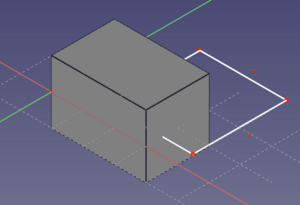
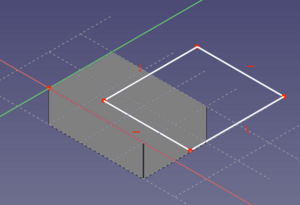
Vasemmalla luonnos näkyy vain osittain ja oikealla View section:in avulla kokonaan.
Usage
See also: Sketcher Preferences.
- This tool is only available if a sketch is in edit mode.
- There are several ways to invoke the tool:
- Press the
 Toggle Section View button.
 - Select the Sketch → Toggle Section View option from the menu.
- Right-click in the 3D View and select the Toggle Section View option from the context menu.
- Use the keyboard shortcut: Q then S.
- Press the
Tämä sivu on haettu https://wiki.freecad.org/Sketcher_ViewSection