


|
|
| Menu location |
|---|
| Sketch → Visual Helpers → Toggle Circular Helper for Arcs |
| Workbenches |
| Sketcher |
| Default shortcut |
| None |
| Introduced in version |
| 1.0 |
| See also |
| None |
Description
The  Sketcher ArcOverlay tool shows or hides the circular helpers (underlying virtual circles) for arcs in all sketches. When shown, they help recognize where constraints apply to arcs.
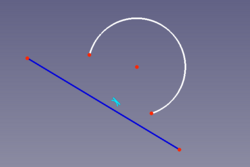
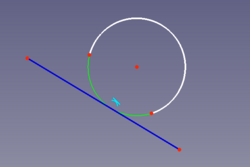
Left: Tangent constraint without visible connection. Right: Tangent constraint connected to the circular helper
Usage
- There are several ways to invoke the tool:
- Press the Toggle Circular Helper for Arcs button.
- Select the Sketch → Visual Helpers → Toggle Circular Helper for Arcs option from the menu.
- Press the
This page is retrieved from https://wiki.freecad.org/Sketcher_ArcOverlay