


|
|
| Menu location |
|---|
| Ship design → Hydrostatics |
| Workbenches |
| Ship |
| Default shortcut |
| None |
| Introduced in version |
| - |
| See also |
| None |
Description
Plot the ship hydrostatics.
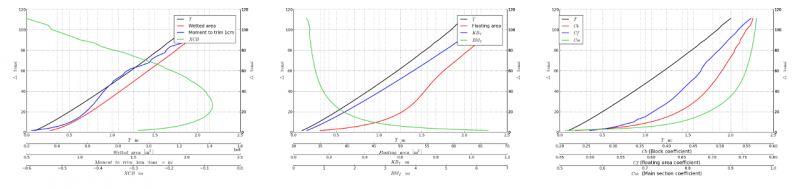
Hydrostatics curves example
Hydrostatics computation is a critical stage of a ship's design, it provides an understanding to the underlying principal stability hull parameters.
It is indeed mandatory data in order to get the ship certified by classification societies. Combined with the information of load conditions provides the most basic information about ship stability.
The Ship workbench plot the hydrostatics in 3 main groups. In all of them the Δ(T) curve (displacement-draft ratio) is depicted. Although many other hydrostatics can be eventually considered, they can be actually derived from the already provided ones, which are documented below.
Volume based hydrostatics
There are 3 hydrostatics (despite Δ(T)) included within this category:
- Wetted area (WSA).
- Moment to trim the ship 1 cm (MCT).
- Longitudinal position of the bouyance center (XCB).
As the amount of surface in contact with the water, WSA is heavily related with the ship dynamics, including both ship resistance and seakeeping. Moreover, WSA is part of the renormalization factor for many of the non-dimensional ship coefficients, like the drag coefficient:
with the drag force, the water density, the ship velocity and the WSA.
The MCT plays a mayor role in the load condition planning, since it gives information about the effect of displacing any load along the ship. The actual MCT is computed according the transversal gravity center to metacenter distance, GML, obviously requiring the gravity center position. However, as it is a common practice in naval architecture, the distance of such metacenter to the buoyancy center, BML, is considered similar to such GML (). Please note that is only valid for the longitudinal direction ().
Sometimes the BML is preferred to the MCT. If it is your case, you just need to apply
with the length in meters and the displacement.
The XCB is obviously indicating the trim angle that is expected to get the ship depending on the weight distribution.
Stability hydrostatics
These hydrostatics are more related with the ship transversal stability. The following hydrostatics are provided by the Ship workbench:
- Floating Area/Waterplane Area (WP).
- Distance between the keel and buoyance center (KB).
- Distance between the bouyance center and the metacenter (BMT)
The floating area is widely connected with the so-called hydrostatic stiffness, or in other words the resistance presented by the ship to any perturbation.
On the other hand, the KB and BMT are critical parameters to determine the transversal stability of the ship for small angles. Indeed when the gravity center is defined (it can be done with the Ship Weight, Ship Tank and Ship LoadCondition tools) the main stability parameter for small angles can be easily computed,
That parameter is indeed required to have a minimum value which depends on the ship type and size, and will be consequently queried by the classification societies.
Coefficients
There are some coefficients that are usually considered at the first stages of a ship design to assess the quality of the ship surface, or in other words, its hydrodynamic behavior.
- Block coefficient (Cb).
- Floating Coefficient (Cf).
- Main frame Coefficient (Cm).
Cb is the ration between the volume within the submerged part of the ship and the volume of its bound box, i.e. the smallest box which might hold the ship inside. Cm and Cf are its 2D counterpart, becoming the Cm ratio between the area of the main ship frame and its bounding box, and Cf the ratio between the waterplane area and its bounding box.
While large Cb values will inexorably result in inefficient ships, with more moderate Cb values it is required to combine the information with Cm and Cf. Larger Cf values indicates a large footprint in the water surface, which usually indicates a large ship resistance due to waves generation. On the contrary, the larger Cm is the larger volume of the ship body is concentrated on the center part, and thus thin shapes can be expected at the bow and stern, which is usually good for hydrodynamic purposes.
Usage
In order to compute the transversal areas curve, select a Ship instance (see Ship CreateShip), and invoke Ship design →  Hydrostatics.
The task panel is shown. You must select the trim angle as well as the range of drafts to be considered. You can also select the number of samples to be taken between the minimum and maximum draft. The larger the number of samples the longer will take the computation.
Press the Accept button when you are ready, so the Ship module will start the computation. During the computation FreeCAD will become almost irresponsive. It is however plotting the information in runtime, as well as a progress bar of the process. You can switch to a different plot tab, or stop the computation pressing the Cancel button. Just please be patient since those actions will be executed just after the next draft sample computation is finished.
Tutorials
Ta strona pochodzi z https://wiki.freecad.org/Ship_Hydrostatics