


|
|
| Menu location |
|---|
| 3D/BIM → Reinforcement Tools → Column Reinforcement |
| Workbenches |
| Reinforcement, BIM |
| Default shortcut |
| None |
| Introduced in version |
| 0.19 |
| See also |
| Reinforcement ColumnRebars, Reinforcement ColumnRebars TwoTiesSixRebars |
Описание
The Reinforcement ColumnRebars tool allows the user to create reinforcing bars inside a Column Arch Structure object. This page shows an additional usage example for the tool.
This tool is part of the Reinforcement Workbench, an external workbench that can be installed with the  Addon Manager.
Three usage examples are available:

Circular reinforcement inside a column
Применение
1. Select top face of a previously created  Structure object.
2. Then select  Column Reinforcement from the rebar tools.
3. A dialog box will pop-out on screen as shown below.
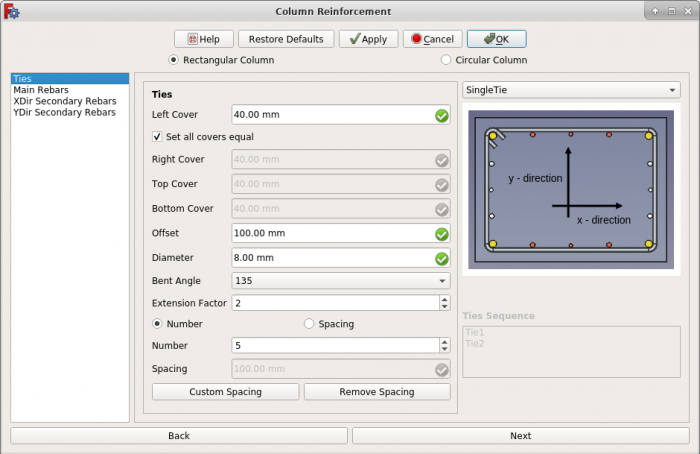
Dialog Box for the Arch Rebar ColumnReinforcement tool
4. Select the Circular Column radio button in column reinforcement dialog.

Dialog Box for Circular Column Reinforcement
5. Give inputs for data related to circular column reinforcement.
6. Click OK or Apply to generate circular column reinforcement.
7. Click Cancel to exit the dialog box.
Свойства
Helical Rebars:
- ДанныеSide Cover: The distance between rebar to the curved face.
- ДанныеTop Cover: The distance between rebar from the top face of the structure.
- ДанныеBottom Cover: The distance between rebar from the bottom face of the structure.
- ДанныеPitch: The pitch of a helix is the height of one complete helix turn, measured parallel to the axis of the helix.
- ДанныеDiameter: Diameter of the rebar.
Main Rebars:
- ДанныеTop Offset: The distance between rebars from the top face of the structure.
- ДанныеBottom Offset: The distance between rebars from the bottom face of the structure.
- ДанныеDiameter: Diameter of the main rebars.
- ДанныеNumber: The number of main rebars.
- ДанныеAngle: The angular distance between ties.
Программирование
See also: Arch API, Reinforcement API and FreeCAD Scripting Basics.
The Reinforcement ColumnRebars_Circular tool can be used in macros and from the Python console by using the following function:
Create Circular Column Reinforcement
RebarGroup = CircularColumn.makeReinforcement(
    s_cover,
    helical_rebar_t_offset,
    helical_rebar_b_offset,
    pitch,
    dia_of_helical_rebar,
    main_rebars_t_offset,
    main_rebars_b_offset,
    dia_of_main_rebars,
    number_angle_check,
    number_angle_value,
    structure=None,
    facename=None,
)
- Creates a
RebarGroupobject from the givenstructure, which is an Arch Structure, andfacename, which is a face of that structure.- If no
structurenorfacenameare given, it will take the user selected face as input.
- If no
s_cover,helical_rebar_t_offset, andhelical_rebar_b_offsetare inner offset distances for the helical rebar with respect to the faces of the structure. They are respectively the side, top and bottom offsets.pitchis the parameter that determines how close or far apart each helical loop is to each other.dia_of_helical_rebaris the diameter of the helical rebar inside the structure.main_rebars_t_offsetandmain_rebars_b_offsetare inner offset distances for the main rebars with respect to the top and bottom faces of the structure, respectively.dia_of_main_rebarsis the diameter of the main rebars.number_angle_checkif it isTrueit will create as many main rebars as given bynumber_angle_value; if it isFalseit will create main rebars at an angle ofnumber_spacing_value, specified in degrees.number_angle_valuespecifies the number of main rebars, or the value of the angle between the main rebars, depending onnumber_angle_check.
Пример
import FreeCAD, Draft, Arch
from ColumnReinforcement import CircularColumn

Circle = Draft.makeCircle(radius=250)
Structure = Arch.makeStructure(Circle)
Structure.ViewObject.Transparency = 80
FreeCAD.ActiveDocument.recompute()

RebarGroup = CircularColumn.makeReinforcement(
    s_cover=20,
    helical_rebar_t_offset=40,
    helical_rebar_b_offset=40,
    pitch=50,
    dia_of_helical_rebar=8,
    main_rebars_t_offset=20,
    main_rebars_b_offset=20,
    dia_of_main_rebars=16,
    number_angle_check=True,
    number_angle_value=6,
    structure=Structure,
    facename="Face3",
).rebar_group
Edition of Circular Column Reinforcement
You can change the properties of the helical and main rebars with the following function:
rebar_group = editReinforcement(
    rebar_group,
    s_cover,
    helical_rebar_t_offset,
    helical_rebar_b_offset,
    pitch,
    dia_of_helical_rebar,
    main_rebars_t_offset,
    main_rebars_b_offset,
    dia_of_main_rebars,
    number_angle_check,
    number_angle_value,
    structure=None,
    facename=None,
)
rebar_groupis a previously createdColumnReinforcementgroup object.- The other parameters are the same as required by the
makeSingleTieFourRebars()function. structureandfacenamemay be omitted so that the rebar stays in the original structure.
Пример
from ColumnReinforcement import CircularColumn

rebar_group = CircularColumn.editReinforcement(
    rebar_group,
    s_cover=30,
    helical_rebar_t_offset=30,
    helical_rebar_b_offset=30,
    pitch=60,
    dia_of_helical_rebar=10,
    main_rebars_t_offset=-30,
    main_rebars_b_offset=-30,
    dia_of_main_rebars=18,
    number_angle_check=False,
    number_angle_value=45,
    structure=Structure,
    facename="Face3",
)
Эта страница получена от https://wiki.freecad.org/Reinforcement_ColumnRebars_Circular