


|
|
| Menyplacering |
|---|
| Part → Chamfer |
| Arbetsbänkar |
| Part, Complete |
| Standard genväg |
| Ingen |
| Introducerad i version |
| - |
| Se även |
| Ingen |
Description
The  Part Chamfer command chamfers the selected edge(s) of an object. A dialog allows you to choose which edges to work on as well as modify various chamfer parameters.

Plate with chamfered corners
Usage
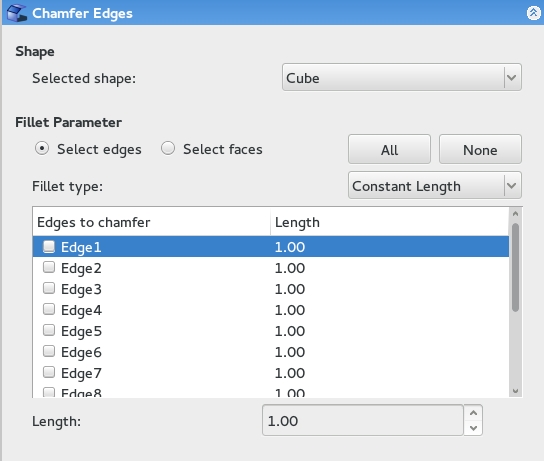
Options
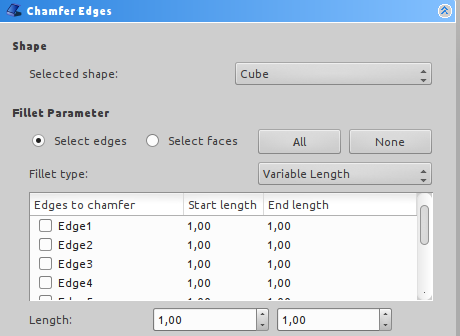
- When selecting edges on the model, you have the option to select by edge or by face. Selecting by face will select all bordering edges of that face.
- Equal distance chamfer or two distances chamfer.
- An equal distance chamfer will create a chamfer with edges equidistant to the original edge at the distance specified.
- A two distance chamfer will have edges that may be set to different distances from the original edge, allowing you to create a chamfer at a variable angle.
Properties
Base
- DataBase: The shape onto which the chamfer is to be applied.
- DataPlacement: Specifies the orientation and position of the shape in the 3D space.
- DataLabel: Label given to the object. Change to suit your needs.
Limitations
Chamfer might do nothing if the result would touch or cross the next adjacent edge. So if you do not get the expected result, try with a smaller value. This is the same for  Part Fillet.
Scripting
The Chamfer command can by used in macros and from the Python Console by adding a Chamfer object to the document.
Example Script:
import Part
cube = FreeCAD.ActiveDocument.addObject("Part::Feature", "myCube")
cube.Shape = Part.makeBox(5, 5, 5)
chmfr = FreeCAD.ActiveDocument.addObject("Part::Chamfer", "myChamfer")
chmfr.Base = FreeCAD.ActiveDocument.myCube
myEdges = []
myEdges.append((1, 1.5, 1.25)) # (edge number, chamfer start length, chamfer end length)
myEdges.append((2, 1.5, 1.25))
myEdges.append((3, 1.5, 1.25))
myEdges.append((4, 1.5, 1.25))
myEdges.append((5, 1.5, 1.25))
myEdges.append((6, 1.5, 1.25))
myEdges.append((7, 1.5, 1.25))
myEdges.append((8, 1.5, 1.25))
myEdges.append((9, 1.5, 1.25))
myEdges.append((10, 1.5, 1.25))
myEdges.append((11, 1.5, 1.25))
myEdges.append((12, 1.5, 1.25))
chmfr.Edges = myEdges
FreeCADGui.ActiveDocument.myCube.Visibility = False
FreeCAD.ActiveDocument.recompute()
Example Script Explanation:
import Part
cube = FreeCAD.ActiveDocument.addObject("Part::Feature", "myCube")
cube.Shape = Part.makeBox(5, 5, 5)
- Creates a 5 mm cube for us to apply chamfered edges to. See Part_API for an explanation of the makeBox method.
chmfr = FreeCAD.ActiveDocument.addObject("Part::Chamfer", "myChamfer")
- Adds a new object to the document of type Chamfer (from the Part module) with label "myChamfer".
chmfr.Base = FreeCAD.ActiveDocument.myCube
- Specifies that the base shape of the chamfer object should be "myCube".
myEdges = []
myEdges.append((1, 1.5, 1.25)) # (edge number, chamfer start length, chamfer end length)
myEdges.append((2, 1.5, 1.25))
myEdges.append((3, 1.5, 1.25))
myEdges.append((4, 1.5, 1.25))
myEdges.append((5, 1.5, 1.25))
myEdges.append((6, 1.5, 1.25))
myEdges.append((7, 1.5, 1.25))
myEdges.append((8, 1.5, 1.25))
myEdges.append((9, 1.5, 1.25))
myEdges.append((10, 1.5, 1.25))
myEdges.append((11, 1.5, 1.25))
myEdges.append((12, 1.5, 1.25))
- Creates an empty array "myEdges" and then appends the array with each edge's chamfer parameters.
- Syntax for each item should be (edge#, chamfer start length, chamfer end length)
chmfr.Edges = myEdges
- Sets the Edges attribute of our Chamfer object equal to the array we just created.
FreeCADGui.ActiveDocument.myCube.Visibility = False
- This line simply hides "myCube" so that our newly created "myChamfer" object is the only one visible.
FreeCAD.ActiveDocument.recompute()
- Recomputes all altered components on the screen and refreshes the display.
Denna sida hämtas från https://wiki.freecad.org/Part_Chamfer