


|
|
| Menu location |
|---|
| Part → Split → Boolean Fragments |
| Workbenches |
| Part |
| Default shortcut |
| None |
| Introduced in version |
| 0.17 |
| See also |
| Part Slice, Part XOR, Part JoinFeatures, Part Boolean |
Description
The  Part BooleanFragments command computes all fragments that can result from applying Boolean operations between input shapes. For example, for two intersecting spheres, three non-overlapping but touching solids are generated.
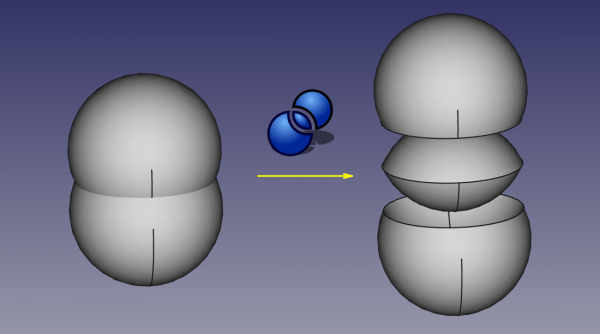
In the image above, the pieces were moved apart manually afterwards, to reveal the slicing.
The output shape is always a compound. The content of the compound depends on input shape types and operation mode. That means, you don't immediately get access to individual pieces of the result - the pieces remain grouped together. The individual pieces can be extracted by exploding the compound (Draft Downgrade).
The command has three modes: "Standard", "Split", and "CompSolid".
"Standard" and "Split" differ by the action of the command on wires, shells and compsolids. If "Split", those are separated. If "Standard", they are kept together (get extra segments).
Compounding structure in "Standard" and "Split" modes follows the compounding structure of inputs. That is, if you feed in two compounds, each containing a sphere like on example above, the result will also contain two compounds, each containing the pieces of the originally contained sphere. That means, the common piece will be repeated twice in the result. Only if the input spheres are both not in compounds, the result will contain the common piece once.
In "CompSolid" mode, the solids are joined into a compsolid (compsolid is a set of solids connected by faces; they are related to solids like wires are related to edges, and shells are related to faces; the name is probably a shortened phrase "composite solid"). The output is a non-nested compound of compsolids.
Usage
- Select objects to be intersected. The order of selection is not important, since the action of the command is symmetric. It is enough to select one sub-shape of each object (e.g. faces). You can also select a compound containing all shapes to be connected, e.g. a Draft OrthoArray.
- There are several ways to invoke the command:
- Press the Boolean Fragments button.
- Select the Part → Split → Boolean Fragments option from the menu.
- Press the
- A Boolean Fragments parametric object is created. Original objects are hidden, and the result of intersection is shown in the 3D View.
Properties
Boolean Fragments
- DataObjects: List of objects to be intersected. Generally, at least two objects are needed, but a single compound containing the shapes to intersect will do as well.
- DataMode: "Standard", "Split", or "CompSolid". "Standard" is default. Standard and Split differ by the action of the command on aggregation type shapes: if Split, those are separated; otherwise they are kept together (get extra segments).
- DataTolerance: "fuzziness" value. This is an extra tolerance to apply when searching for intersections, in addition to tolerances stored in the input shapes.
Implementation details
Boolean Fragments command in "Standard mode" is OpenCascade's General Fuse Operator (GFA). It accepts a combination of probably all shape types, and the logic of output is quite convoluted. See OpenCascade user guide: Boolean operations.
For "Split" and "CompSolid" modes, extra post-processing is done by FreeCAD.
Scripting
The command can by used in macros and from the python console by using the following function:
BOPTools.SplitFeatures.makeBooleanFragments(name)
- Creates an empty BooleanFragments feature. The 'Objects' property must be assigned explicitly, afterwards.
- Returns the newly created object.
BooleanFragments can also be applied to plain shapes, without the need to have a document object, via:
import BOPTools.SplitAPI
BOPTools.SplitAPI.booleanFragments(list_of_shapes, mode, tolerance = 0.0)

# OR, for Standard mode:

list_of_shapes = [App.ActiveDocument.Sphere.Shape, App.ActiveDocument.Sphere001.Shape]
pieces, map = list_of_shapes[0].generalFuse(list_of_shapes[1:], tolerance)
# pieces receives a compound of shapes; map receives a list of lists of shapes, defining list_of_shapes <--> pieces correspondence
This can be useful for making custom Python scripted features.
Example:
import BOPTools.SplitFeatures
j = BOPTools.SplitFeatures.makeBooleanFragments(name= 'BooleanFragments')
j.Objects = FreeCADGui.Selection.getSelection()
The command itself is implemented in Python, see /Mod/Part/BOPTools/SplitFeatures.py under where FreeCAD is installed.
This page is retrieved from https://wiki.freecad.org/Part_BooleanFragments