Введение

A Mesh Feature object, or formally a Mesh::Feature, is a simple element with an associated mesh object that can be displayed in the 3D View.
A Mesh Feature is similar conceptually to a Part Feature; the former is the base object for elements with "mesh" information, while the latter is the base object for elements with "geometrical shape" information.
Please note that the FEM Workbench also uses meshes, but it uses a different object, called FEM FemMeshObject (Fem::FemMeshObject class). This object is not derived from the Mesh Feature and has different properties.
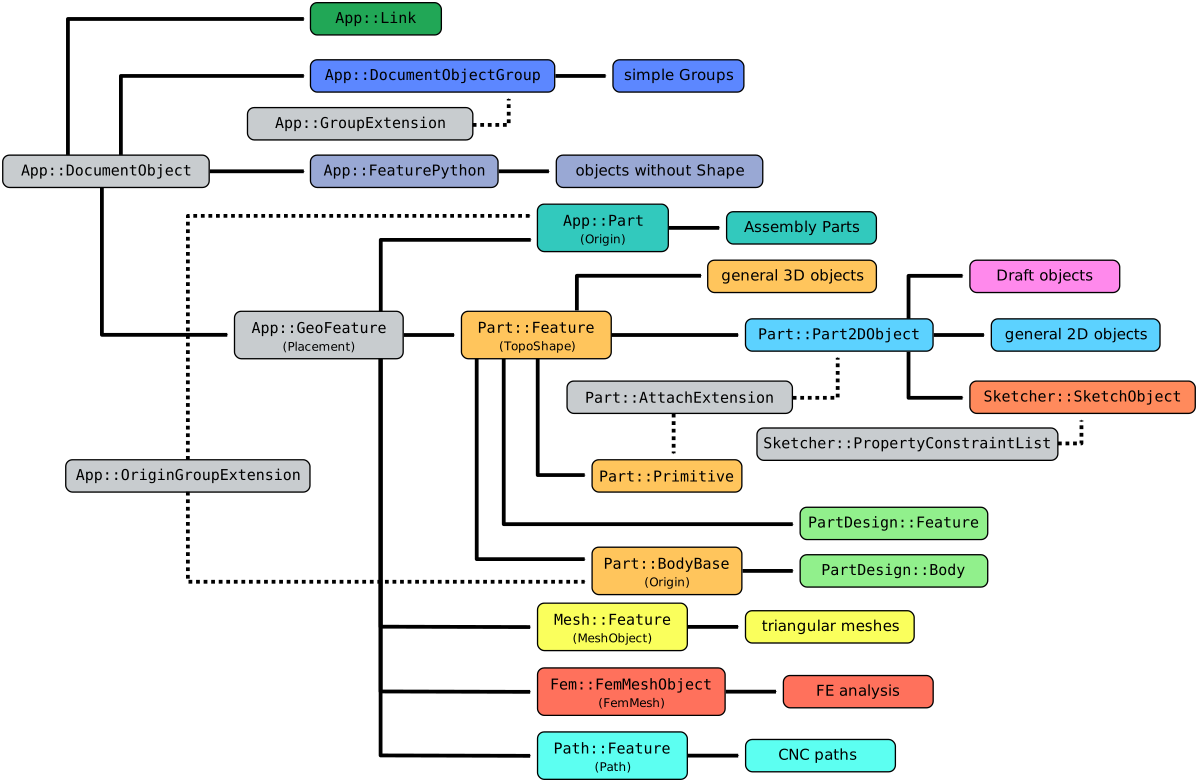
Simplified diagram of the relationships between the core objects in FreeCAD
Usage
Almost all mesh objects created by the commands available in the Mesh Workbench are Mesh Features. The parametric mesh objects created by the Mesh BuildRegularSolid command are the only exception. A Mesh Feature can also be created from the Python console as described in the Scripting section.
The Mesh::Feature is defined in the Mesh Workbench but can be used as the base class for scripted objects in all workbenches that produce 2D and 3D meshes.
A Mesh::Feature has simple properties like a placement, and visual properties to define the appearance of its edges and faces.
Properties
See Property for all property types that scripted objects can have.
The Mesh Feature (Mesh::Feature class) is derived from the basic App GeoFeature (App::GeoFeature class) and inherits all its properties. It also has several additional properties. Notably a ДанныеMesh property, which stores its Mesh MeshObject. This is the geometry that is shown in the 3D View.
These are the properties available in the Property View. Hidden properties can be shown by using the Show hidden command in the context menu of the Property View.
See Part Feature for an explanation of some of the properties listed below.
Data
Base
- Данные (Hidden)Proxy (
PythonObject) - ДанныеMesh (
MeshKernel): the Mesh MeshObject associated with this object. - ДанныеPlacement (
Placement) - Данные (Hidden)_ Element Map Version (
String) - ДанныеLabel (
String) - Данные (Hidden)Label2 (
String) - Данные (Hidden)Expression Engine (
ExpressionEngine) - Данные (Hidden)Visibility (
Bool)
View
Base
- Вид (Hidden)Proxy (
PythonObject) - Вид (Hidden)Transform Origin (
Placement)
Display Options
- ВидBounding Box (
Bool) - ВидDisplay Mode (
Enumeration) - ВидShow In Tree (
Bool) - ВидVisibility (
Bool)
Object Style
- Вид (Hidden)Coloring (
Bool): TBD. - ВидCrease Angle (
FloatConstraint): TBD. - ВидLighting (
Enumeration) - ВидLine Color (
Color) - ВидLine Transparency (
Percent): an integer from0to100that determines the level of transparency of the edges. A value of100indicates completely invisible edges; the edges are invisible but they can still be picked as long as ВидSelectable istrue. - ВидLine Width (
FloatConstraint) - ВидOpen Edges (
Bool): TBD. - ВидPoint Size (
FloatConstraint) - ВидShape Appearance (
MaterialList) - ВидTransparency (
Percent)
Selection
- ВидOn Top When Selected (
Enumeration) - ВидSelectable (
Bool) - ВидSelection Style (
Enumeration)
Scripting
See also: FreeCAD Scripting Basics and scripted objects.
See Part Feature for the general information on adding objects to the document.
A Mesh Feature is created with the addObject() method of the document.
import FreeCAD as App

doc = App.newDocument()
obj = App.ActiveDocument.addObject("Mesh::Feature", "Name")
obj.Label = "Custom label"
For Python subclassing you should create the Mesh::FeaturePython object.
import FreeCAD as App

doc = App.newDocument()
obj = App.ActiveDocument.addObject("Mesh::FeaturePython", "Name")
obj.Label = "Custom label"
Эта страница получена от https://wiki.freecad.org/Mesh_Feature