


Introdução
Macros são uma forma conveniente de reproduzir tarefas complexas no FreeCAD. Simplesmente grava uma sequência de acções à medida que as executa, depois grava essa sequência com um nome, e já pode repetir a sequência quando quiser. Uma vez que Macros são realmente uma sequência de comandos Python, pode editá-los, e criar scripts muito complexos.
Uma vez que os scripts Python normalmente têm uma extensão de ficheiro .py, as Macros FreeCAD devem ter a extensão .FCMacro. Uma colecção de Macros escrita por utilizadoes experientes encontra-se na página Receitas de Macros.
See the Power users hub to learn more about the Python programming language, and about writing macros. In particular, you should start with these pages:
How it works
Enable the console output in the menu Edit → Preferences → Python → Macro → Show scripts commands in python console. You will see that in FreeCAD, every action you do, such as pressing a button, outputs a Python command. Those commands are what can be recorded in a macro. The main tool for making macros is the macros toolbar:  . On it you have 4 buttons: Record, stop recording, edit and play the current macro.
It is very simple to use: Press the record button, you will be asked to give a name to your macro, then perform some actions. When you are done, click the stop recording button, and your actions will be saved. You can now access the macro dialog with the edit button.
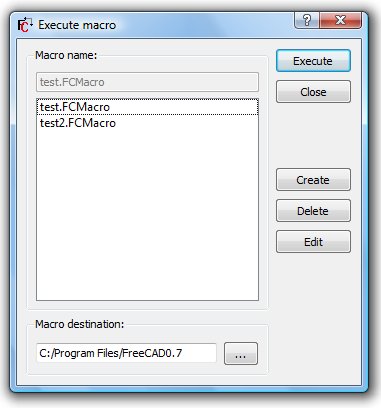
There you can manage your macros, delete, edit, duplicate, install or create new ones from scratch. If you edit a macro, it will be opened in an editor window where you can make changes to its code. New macros can be installed using the Addons... button, which links to the Addon Manager.
Example
Press the record button, give a name, let's say "cylinder 10x10", then, in the Part Workbench, create a cylinder with radius = 10 and height = 10. Then, press the "stop recording" button. In the edit macros dialog, you can see the python code that has been recorded, and, if you want, make alterations to it. To execute your macro, simply press the execute button on the toolbar while your macro is in the editor. You macro is always saved to disk, so any change you make, or any new macro you create, will always be available next time you start FreeCAD.
Customizing
Of course it is not practical to load a macro in the editor in order to use it. FreeCAD provides much better ways to use your macro, such as assigning a keyboard shortcut to it or putting an entry in the menu. Once your macro is created, all this can be done via the Tools → Customize menu.

This way you can make your macro become a real tool, just like any standard FreeCAD tool. This, added to the power of python scripting within FreeCAD, makes it possible to easily add your own tools to the interface.
See Customize Toolbars for a more detailed description.
Creating macros without recording
You can also directly copy/paste python code into a macro, without recording GUI action. Simply create a new macro, edit it, and paste your code. You can then save your macro the same way as you save a FreeCAD document. Next time you start FreeCAD, the macro will appear under the "Installed Macros" item of the Macro menu.
See How to install macros for a more detailed description.
Macro repositories
There are two main places for macros. The first one is the official peer-reviewed macro repository on GitHub. The second one is the Macros recipes page from which you can pick some useful macros to add to your FreeCAD installation. Macros from both repositories can be installed via the Addon Manager directly from FreeCAD.
Additional information
Tutorials
You can manually install extensions, however, it is much simpler to just use the Addon Manager.
Esta página foi obtida de https://wiki.freecad.org/Macros