FreeCAD Logo FreeCAD 1.0
  • Englisch Afrikaans Arabisch Weißrussisch Katalanisch Tschechisch Deutsch Griechisch Spanisch Spanisch Baskisch Finnisch Philippinisch Französisch Galicisch Kroatisch Ungarisch Indonesisch Italienisch Japanisch Kabylisch Koreanisch Litauisch Niederländisch Norwegisches Bokmål Polnisch Portugiesisch Portugiesisch Rumänisch Russisch Slowakisch Slowenisch Serbisch Schwedisch Türkisch Ukrainisch Valencianisch Vietnamesisch Chinesisch Chinesisch
  • Funktionen
  • Herunterladen
  • Blog
  • Dokumentation
    Inhaltsverzeichnis Erste Schritte Benutzerdokumentation Das FreeCAD-Handbuch Dokumentation der Arbeitsbereiche Python-Dokumentation Dokumentation der C++ Programmierung Anleitungen Häufig gestellte Fragen Datenschutzrichtlinie Über FreeCAD
  • Mitwirken
    Wie kann ich helfen Sponsor Einen Fehler melden Einen Pull Request durchführen Jobs und Finanzierung Richtlinien für Beiträge Entwicklerhandbuch Übersetzungen
  • Community
    Verhaltenskodex Forum The FPA GitHub GitLab Codeberg Mastodon Matrix IRC IRC via Webchat Gitter Discord Reddit Twitter Facebook LinkedIn Kalender
  • ♥ Donate

Donate

$
SEPA-Informationen
Bitte richten Sie Ihre SEPA-Überweisung an:
Beneficiary: The FreeCAD project association
IBAN: BE04 0019 2896 4531
BIC/SWIFT: GEBABEBBXXX
Kreditinstitut: BNP Paribas Fortis
Adresse: Rue de la Station 64, 1360 Perwez, Belgium

While Stripe doesn't support monthly donations, you can still become a sponsor! Simply make a one-time donation equivalent to 12 months of support, and you'll gain access to the corresponding sponsoring tier. It's an easy and flexible way to contribute.

If you are not sure or not able to commit to a regular donation, but still want to help the project, you can do a one-time donation, of any amount.

Choose freely the amount you wish to donate one time only.

You can support FreeCAD by sponsoring it as an individual or organization through various platforms. Sponsorship provides a steady income for developers, allowing the FPA to plan ahead and enabling greater investment in FreeCAD. To encourage sponsorship, we offer different tiers, and unless you choose to remain anonymous, your name or company logo will be featured on our website accordingly.

from 1 USD / 1 EUR per month. You will not have your name displayed here, but you will have helped the project a lot anyway. Together, normal sponsors maintain the project on its feet as much as the bigger sponsors.

from 25 USD / 25 EUR per month. Your name or company name is displayed on this page.

from 100 USD / 100 EUR per month. Your name or company name is displayed on this page, with a link to your website, and a one-line description text.

from 200 USD / 200 EUR per month. Your name or company name and logo displayed on this page, with a link to your website and a custom description text. Companies that have helped FreeCAD early on also appear under Gold sponsors.

Instead of donating each month, you might find it more comfortable to make a one-time donation that, when divided by twelve, would give you right to enter a sponsoring tier. Don't hesitate to do so!

Choose freely the amount you wish to donate each month.

Please inform your forum name or twitter handle as a notein your transfer, or reach to us, so we can give you proper credits!

Simuliert Scharnierbewegung

Beschreibung
Scharnier Simulation.

Versionsmakro : 1.0
Datum der letzten Änderung : 2014-09-09
FreeCAD version : Alle
Herunterladen : Die Datei 20140908b_Hinge-1.fcstd
ToolBar Symbol
Autor: Mario52
Autor
Mario52
Herunterladen
Die Datei 20140908b_Hinge-1.fcstd
ToolBar Symbol
Links
Makros Rezepte
Wie man Makros installiert
Symbolleisten anpassen
Macro-Version
1.0
Datum der letzten Änderung
2014-09-09
FreeCAD-Version(s)
Alle
Standardverknüpfung
None
Siehe auch
None

Beschreibung

Simuliert Scharnierbewegung
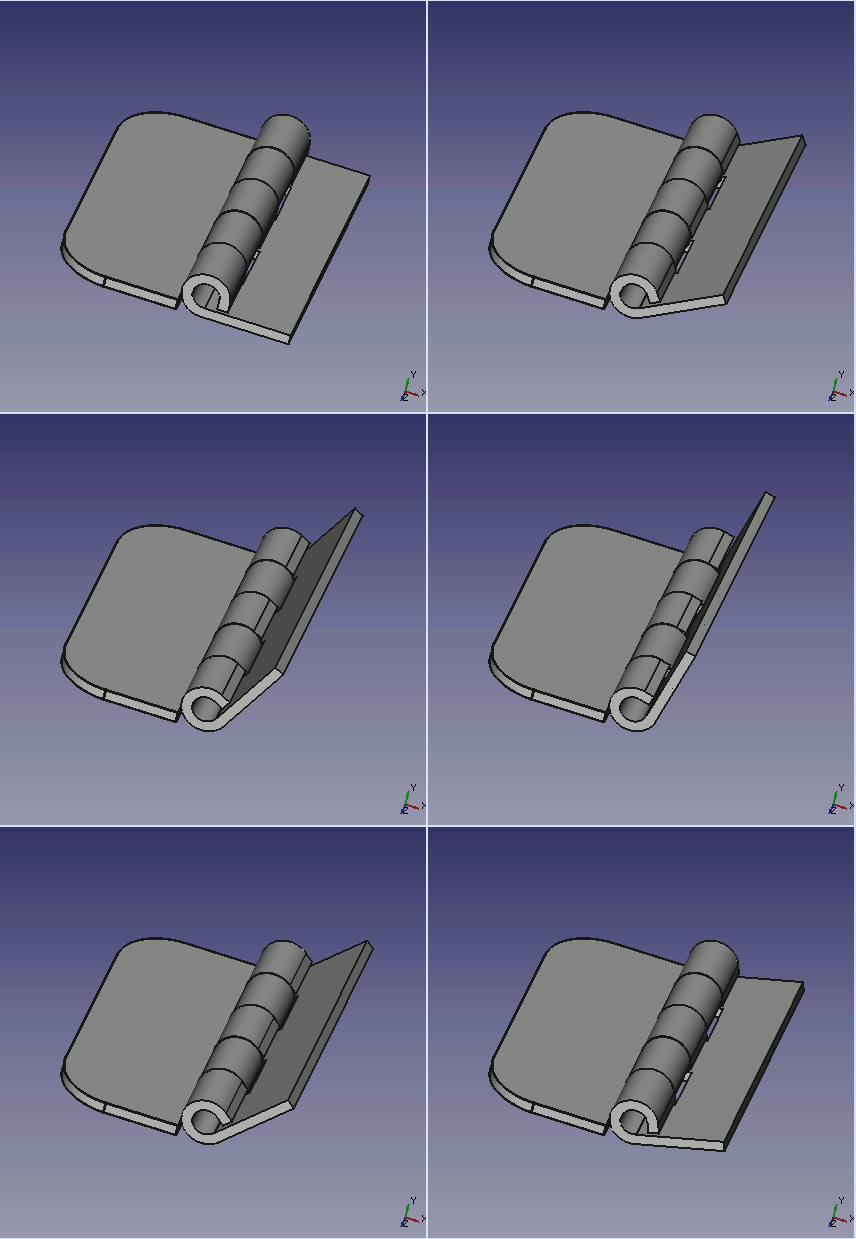
Verwendet

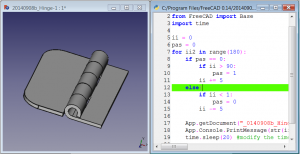
Öffne die 2 Dateien (20140908b_Hinge-1.FCMacro und 20140908b_Hinge-1.FCStd) in FreeCAD mit 2 Bildschirmen (Menü: Fenster > Kacheln) und klicke in das Fenster und das Makro und klicke F6 (Makro debuggen), um das Makro auszuführen oder führe das Makro mit aus

Die Datei

20140908b_Hinge-1.fcstd

Skript

ToolBar Icon

20140908b_Hinge-1.FCMacro

import FreeCAD, FreeCADGui, Draft, Part
from FreeCAD import Base
import time

ii = 0
pas = 0
for ii2 in range(180):
    if pas == 0:
        if ii > 90:
            pas = 1
        ii += 5
    else:
        if ii < 1:
            pas = 0
        ii -= 5
   
    App.getDocument("_0140908b_Hinge_1").Fusion.Placement=App.Placement(App.Vector(0,0,0), App.Rotation(App.Vector(0,0,1),ii), App.Vector(44.4,6.9,0))
    App.Console.PrintMessage(str(ii2)+"  " + str(ii)+"  " + str(pas) +"\n")
    Gui.updateGui()
    time.sleep(0) #modify the time here


Verweis

Die Diskussionsseite Probleme mit LinearMustern (wiederholt)

Diese Seite wird abgerufen von https://wiki.freecad.org/Macro_hinge

Kontaktiere uns!
Forum GitHub Mastodon Matrix IRC Gitter.im Discord Reddit Twitter Facebook LinkedIn

© Das FreeCAD-Team. Bildnachweis (von oben nach unten): ppemawm, r-frank, epileftric, regis, rider_mortagnais, bejant.

Dieses Projekt wird unterstützt von: , KiCad Services Corp. und andere Sponsoren

GitHubDiese Seite auf GitHub verbessern