|
|
| Opis |
|---|
| Makro za prikaz presjeka objekata u sceni: ravnina poprečnog presjeka može se pomicati pomoću klizne trake. Makronaredba verzije : 0.09 Datum zadnje izmjene : 2019-08-31 Verzija FreeCAD : 0.15 and above Preuzimanje datoteka : ToolBar Icon Autor : aleph0 |
| Autor |
| aleph0 |
| Preuzimanje datoteka |
| ToolBar Icon |
| Linkovi |
| Makro recepti Kako instalirati makronaredbe Kako prilagoditi alatne trake |
| Verzija |
| 0.09 |
| Datum zadnje izmjene |
| 2019-08-31 |
| Verzije FreeCAD-a |
| 0.15 and above |
| Zadani prečac |
| None |
| Vidi također |
| None |


Opis
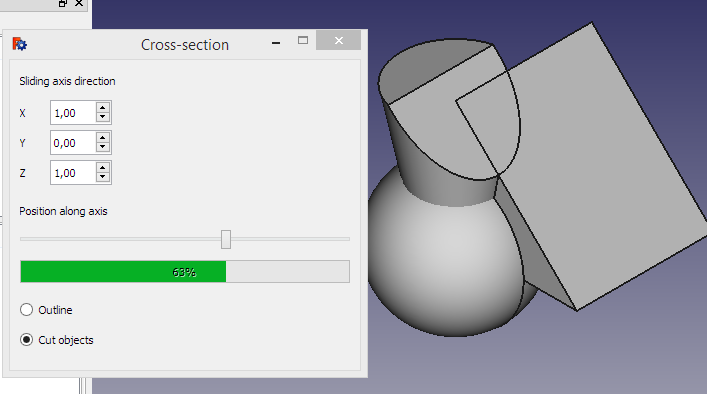
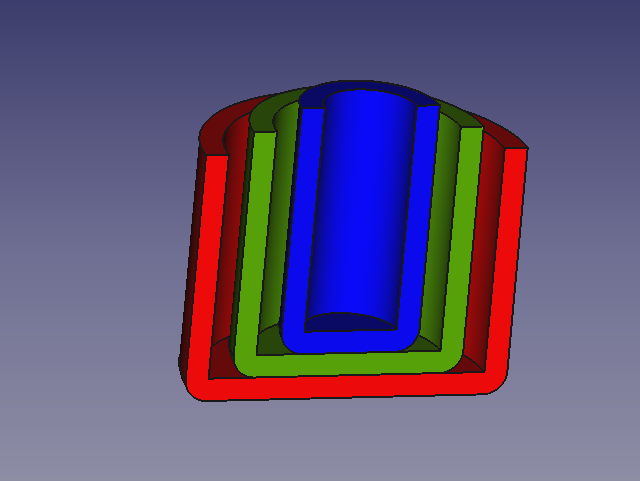
Makro za prikaz presjeka objekata u sceni: ravnina poprečnog presjeka može se pomicati pomoću klizne trake.
Koristiti
- Da biste pokrenuli makronaredbu, najprije ga preuzmite s ove web-lokacije i instalirajte u direktorij makronaredbi,
- zatim koristite izbornik za pozivanje popisa makronaredbi i dvaput kliknite na ovaj.
- Prikazat će se standardni presjek i pojavit će se prozor koji će vam omogućiti postavljanje parametara presjeka.
- Zatvaranje skočnog prozora vratit će scenu u prethodno stanje prije pokretanja makronaredbe.
LINKOVI
Vidjeti forum

Pogledajte dolje desno: "Zadrži presjek"
Skripta
Changes by Mario52 include.
Changes by Sam include.
Changes by Gift include.
Changes by duke24 include.
Changes by g.becu include.
Changes by Chris_G include.
ToolBar Icon 
Macro cross section.FCMacro
# -*- coding: utf-8 -*-
"""
***************************************************************************
* *
* This widget makes an interactively moveable cross-section of the *
* currently visible objects in the currently active document. The *
* cross-sectioning plane is specified by its normal, and the cross- *
* section can be moved along that normal using a slider bar. It can *
* show the cross-section either as an outline or a view of the sliced *
* objects. To run the macro, first download it from this site and *
* install it in your macros directory, then use the menu to call up *
* your list of macros and double-click on this one. It will display *
* a default cross-section and pop up a window to enable you to set *
* the cross-sectioning parameters. Closing the pop-up window will *
* restore the scene to its previous state before the macro was *
* started. *
* *
***************************************************************************
* Copyright (c) 2016 Richard P. Parkins, M. A. *
* *
* This file is a supplement to the FreeCAD CAx development system. *
* *
* This program is free software; you can redistribute it and/or modify *
* it under the terms of the GNU Lesser General Public License (LGPL) *
* as published by the Free Software Foundation; either version 2 of *
* the License, or (at your option) any later version. *
* for detail see the LICENCE text file. *
* *
* This software is distributed in the hope that it will be useful, *
* but WITHOUT ANY WARRANTY; without even the implied warranty of *
* MERCHANTABILITY or FITNESS FOR A PARTICULAR PURPOSE. See the *
* GNU Library General Public License for more details. *
* *
* You should have received a copy of the GNU Library General Public *
* License along with this macro; if not, write to the Free Software *
* Foundation, Inc., 59 Temple Place, Suite 330, Boston, MA 02111-1307 *
* USA *
***************************************************************************
"""
__title__ = "Cross-Section"
__author__ = "Aleph0"
__version__ = "00.10"
__date__ = "19/12/2020"
# "29/01/2016" "10/06/2016" "29/09/2016 * 2" "17/08/2017" "06/09/2017" "17/09/2017" "04/07/2019" "31/08/2019" "19/12/2020"
# Upgrade:
# 17/08/2017 by Sam #https://forum.freecad.org/viewtopic.php?f=28&t=15084&start=10#p187030
# 06/09/2017 17/09/2017 by Gift #https://forum.freecad.org/viewtopic.php?f=13&t=24130
# 04/07/2019 by duke24 replace tab to space #https://forum.freecad.org/viewtopic.php?f=13&t=37449
# 31/08/2019 by g.becu adding line 334 #https://forum.freecad.org/viewtopic.php?f=28&t=15084&start=20#p330351
# 19/12/2020 by Chris_G : exlude App.Part from the list of input objects + many code style fixes (PEP8)
# See forum : https://forum.freecad.org/viewtopic.php?f=22&t=53423
__Comment__ = "Dynamic cross section viewer"
__Wiki__ = "https://wiki.freecad.org/index.php?title=Macro_cross_section"
__Help__ = "see first few lines of macro text"
__Status__ = "stable"
__Requires__ = "freecad 0.15"
# OS: Ubuntu 14.04.3 LTS # OS: Windows 10
# Word size of OS: 64-bit # Word size of OS: 64-bit
# Word size of FreeCAD: 64-bit # Word size of FreeCAD: 64-bit
# Version: 0.15.4671 (Git) # Version: 0.19.17171 (Git)
# Branch: releases/FreeCAD-0-15 # Build type: Release
# Hash: 244b3aef360841646cbfe80a1b225c8b39c8380c# Branch: master
# Python version: 2.7.6 # Hash: d19470a9711ea604f3ca6c93e46afadf64d5bb87
# Qt version: 4.8.6 # Python version: 3.6.6
# Coin version: 4.0.0a # Qt version: 5.6.2
# OCC version: 6.8.0.oce-0.17 # Coin version: 4.0.0a
# # OCC version: 7.3.0
import PySide
from PySide import QtCore, QtGui
import FreeCAD as App
import FreeCADGui
import Part
import Draft
from FreeCAD import Base
try:
_fromUtf8 = QtCore.QString.fromUtf8
except AttributeError:
def _fromUtf8(s):
return s
try:
_encoding = QtGui.QApplication.UnicodeUTF8
def _translate(context, text, disambig):
return QtGui.QApplication.translate(context, text, disambig, _encoding)
except AttributeError:
def _translate(context, text, disambig):
return QtGui.QApplication.translate(context, text, disambig)
width = 350 # width of our window
height = 310 # height of our window
global FreeCADRootWindow # main window before we start
# This is the interactive window that the macro creates
# Its main function is to have a close box and tidy up when closed
class CrossSectionWindow(PySide.QtGui.QMainWindow):
# automagically called when the window is created
def __init__(self):
super(CrossSectionWindow, self).__init__()
self.setWindowFlags(PySide.QtCore.Qt.WindowStaysOnTopHint)
self.setWindowTitle(_translate(
"MainWindow", "Cross-section", None))
# Create and set the window's widget, which does all the work
self.child = CrossSection(self)
self.setCentralWidget(self.child)
self.child.initUI(self)
if self.child.startup_failed:
self.destroy()
else:
# Position our window relative to the FreeCAD root
self.setPosition(FreeCADRootWindow)
self.child.show()
self.show()
# User closed the window, tidy up
def closeEvent(self, event):
self.child.restoreObjects()
# Set a sensible default position for the window
# With FreeCAD's default layout, this will be over the docking area
# so it will not obscure the 3D view
def setPosition(self, parent):
geom = parent.geometry()
xpos = geom.left() + 50
ypos = geom.center().y() - height / 2
self.setGeometry(xpos, ypos, width, height)
self.setFixedSize(width, height)
# This is the widget which does almost all of the work
# Widgets don't have close boxes, so closing is dealt with in CrossSectionWindow
class CrossSection(PySide.QtGui.QWidget):
# Lay out the interactive elements
def initUI(self, parent):
self.parent = parent
font = QtGui.QFont()
font.setFamily("Times New Roman")
font.setPointSize(10)
font.setWeight(10)
font.setBold(True)
self.hideObjects()
margin = 10
alw = 20 # axis label width
sbp = margin + alw + margin # spin boxes to right of axis labels
slw = width - 2 * margin # width of slider and progress bar
ypos = margin
self.setObjectName(_fromUtf8("CrossSection"))
# The cross-section plane is defined by its normal
# The length of the normal is immaterial as long as it is nonzero
self.label_1 = QtGui.QLabel(self)
self.label_1.setGeometry(QtCore.QRect(margin, ypos, slw, 22))
self.label_1.setObjectName(_fromUtf8("label_1"))
self.label_1.setText(_translate(
"MainWindow", "Sliding axis direction", None))
self.label_1.setToolTip(_translate(
"MainWindow",
"Cross-section is taken perpendicular to this axis", None))
ypos = ypos + 30
self.label_2 = QtGui.QLabel(self)
self.label_2.setGeometry(QtCore.QRect(margin, ypos, alw, 25))
self.label_2.setObjectName(_fromUtf8("label_2"))
self.label_2.setText(_translate("MainWindow", "X", None))
self.doubleSpinBox_X = QtGui.QDoubleSpinBox(self)
self.doubleSpinBox_X.setGeometry(QtCore.QRect(sbp, ypos, 62, 25))
self.doubleSpinBox_X.setMinimum(-10000.0)
self.doubleSpinBox_X.setMaximum(10000.0)
self.doubleSpinBox_X.setValue(0.0)
self.doubleSpinBox_X.setSingleStep(1)
self.doubleSpinBox_X.setObjectName(_fromUtf8("doubleSpinBox_X"))
self.doubleSpinBox_X.valueChanged.connect(
self.on_doubleSpinBox_X_valueChanged)
self.doubleSpinBox_X.setToolTip(_translate(
"MainWindow", "Sliding axis X", None))
ypos = ypos + 30
self.label_3 = QtGui.QLabel(self)
self.label_3.setGeometry(QtCore.QRect(margin, ypos, alw, 25))
self.label_3.setObjectName(_fromUtf8("label_3"))
self.label_3.setText(_translate("MainWindow", "Y", None))
self.doubleSpinBox_Y = QtGui.QDoubleSpinBox(self)
self.doubleSpinBox_Y.setGeometry(QtCore.QRect(sbp, ypos, 62, 25))
self.doubleSpinBox_Y.setMinimum(-10000.0)
self.doubleSpinBox_Y.setMaximum(10000.0)
self.doubleSpinBox_Y.setValue(0.0)
self.doubleSpinBox_Y.setSingleStep(1)
self.doubleSpinBox_Y.setObjectName(_fromUtf8("doubleSpinBox_Y"))
self.doubleSpinBox_Y.valueChanged.connect(
self.on_doubleSpinBox_Y_valueChanged)
self.doubleSpinBox_Y.setToolTip(_translate(
"MainWindow", "Sliding axis Y", None))
ypos = ypos + 30
self.label_4 = QtGui.QLabel(self)
self.label_4.setGeometry(QtCore.QRect(margin, ypos, alw, 25))
self.label_4.setObjectName(_fromUtf8("label_4"))
self.label_4.setText(_translate("MainWindow", "Z", None))
self.doubleSpinBox_Z = QtGui.QDoubleSpinBox(self)
self.doubleSpinBox_Z.setGeometry(QtCore.QRect(sbp, ypos, 62, 25))
self.doubleSpinBox_Z.setMinimum(-10000.0)
self.doubleSpinBox_Z.setMaximum(10000.0)
self.doubleSpinBox_Z.setValue(1.0)
self.doubleSpinBox_Z.setSingleStep(1)
self.doubleSpinBox_Z.setObjectName(_fromUtf8("doubleSpinBox_Z"))
self.doubleSpinBox_Z.valueChanged.connect(
self.on_doubleSpinBox_Z_valueChanged)
self.doubleSpinBox_Z.setToolTip(
_translate("MainWindow", "Sliding axis Z", None))
ypos = ypos + 40
# Make the interactive slider control
# As you move this slider with the mouse, the cross-section slides
# through the model
self.label_5 = QtGui.QLabel(self)
self.label_5.setGeometry(QtCore.QRect(margin, ypos, slw, 22))
self.label_5.setObjectName(_fromUtf8("label_5"))
self.label_5.setText(_translate(
"MainWindow", "Position along axis", None))
ypos = ypos + 30
self.horizontalSlider = QtGui.QSlider(self)
self.horizontalSlider.setGeometry(QtCore.QRect(margin, ypos, slw - 50, 20))
self.horizontalSlider.setOrientation(QtCore.Qt.Horizontal)
self.horizontalSlider.setInvertedAppearance(False)
self.horizontalSlider.setObjectName(_fromUtf8("horizontalSlider"))
self.horizontalSlider.setRange(0, 100)
self.horizontalSlider.setValue(int(self.fraction * 100.0))
self.horizontalSlider.setToolTip(_translate(
"MainWindow", "Slide to move cross-section along axis", None))
# must be called after setValue()
self.horizontalSlider.valueChanged.connect(self.on_horizontal_slider)
ypos = ypos + 30
self.progressBar_1 = QtGui.QProgressBar(self)
self.progressBar_1.setGeometry(QtCore.QRect(margin, ypos, slw - 50, 23))
self.progressBar_1.setValue(int(self.fraction * 100.0))
self.progressBar_1.setOrientation(QtCore.Qt.Horizontal)
self.progressBar_1.setAlignment(QtCore.Qt.AlignCenter)
self.progressBar_1.setObjectName(_fromUtf8("progressBar_1"))
self.progressBar_1.setToolTip(_translate(
"MainWindow", "Percent position of cross-section", None))
ypos = ypos + 40
################################## add
self.SpinBox_PBar = QtGui.QSpinBox(self)
self.SpinBox_PBar.setGeometry(QtCore.QRect(sbp+255, ypos - 40, 45, 23))
self.SpinBox_PBar.setMinimum(0.0)
self.SpinBox_PBar.setMaximum(100.0)
self.SpinBox_PBar.setValue(int(self.fraction * 100.0))
self.SpinBox_PBar.setSingleStep(1)
self.SpinBox_PBar.setObjectName(_fromUtf8("SpinBox_PBar"))
self.SpinBox_PBar.valueChanged.connect(self.on_SpinBox_PBar_valueChanged)
self.SpinBox_PBar.setToolTip(_translate(
"MainWindow", "Sliding percent", None))
################################# add
# Select the display format for the cross-section
# This button shows a wire line in the cross-section plane
self.radioButton_1 = QtGui.QRadioButton(self)
self.radioButton_1.setGeometry(QtCore.QRect(margin, ypos, slw, 20))
self.radioButton_1.setText(_fromUtf8("Outline"))
self.radioButton_1.setChecked(True)
self.radioButton_1.toggled.connect(self.onRadioButton)
self.radioButton_1.setObjectName(_fromUtf8("radioButton_1"))
self.radioButton_1.setToolTip(_translate(
"MainWindow", "Make cross-section as wire outline", None))
ypos = ypos + 30
# Select the display format for the cross-section
# This button shows a normal 3D display with everything above the
# cross-section plane cut away
self.radioButton_2 = QtGui.QRadioButton(self)
self.radioButton_2.setGeometry(QtCore.QRect(margin, ypos, slw, 20))
self.radioButton_2.setText(_fromUtf8("Cut objects"))
self.radioButton_2.setChecked(False)
self.radioButton_2.toggled.connect(self.onRadioButton)
self.radioButton_2.setObjectName(_fromUtf8("radioButton_2"))
self.radioButton_2.setToolTip(_translate(
"MainWindow", "Make cross-section as cut objects", None))
##################################
# Keep the sectional view
self.CB_00 = QtGui.QCheckBox(self)
self.CB_00.setText(_fromUtf8("Keep the sectional view"))
self.CB_00.setGeometry(QtCore.QRect(margin+168, ypos-30, slw, 20))
self.CB_00.setObjectName(_fromUtf8("CB_00"))
self.CB_00.setChecked(False)
self.CB_00.setToolTip(_translate(
"MainWindow", "Keep the sectional view or erase", None))
##################################
# Called at macro start up by initUI()
def hideObjects(self):
# Initialise the cross-section state variables
self.startup_failed = False
self.fraction = 0.5
self.axisX = 0.0
self.axisY = 0.0
self.axisZ = 1.0
self.cross_section_type = 1
# We must have something to do a cross-section on
if App.ActiveDocument is None:
QtGui.QMessageBox.warning(None, _translate("MainWindow",
"Cross-section", None),
_translate("MainWindow", "There is no Active Document\n" +
"Create one and run this macro again.", None),
QtGui.QMessageBox.Cancel,
QtGui.QMessageBox.Cancel)
self.startup_failed = True
self.parent.destroy() # This will close the window
else:
# Make a list of the user's objects
# WARNING!!
# This list is persistent. We'll get confused if the user deletes or
# adds objects while the macro is active
self.oblist = [] # App.ActiveDocument.Objects
for obj in App.ActiveDocument.Objects:
try:
obj.getPropertyByName("Shape")
self.oblist.append(obj)
except AttributeError:
pass
# self.oblist = [obj for obj in self.oblist if hasattr(obj,"Shape")]
# Create the cross-section object
self.cs = App.ActiveDocument.addObject("Part::Feature", "Generated__cross-section")
self.OriginalVisibilities = list()
self.xmin = 1000.0
self.xmax = -1000.0
self.ymin = 1000.0
self.ymax = -1000.0
self.zmin = 1000.0
self.zmax = -1000.0
# n = 0
# for p in self.oblist: # stupid Python list has no length function
# n = n + 1
############################# Skip the <group object> ########################
b0 = []
for x0 in self.oblist:
if str(x0) != "<group object>":
b0.append(x0)
self.oblist = b0
n = len(self.oblist)
###############################################################################
# Make a list of the visible objects and make them invisible while
# the macro is active
# Also we compute the bounding box of the model
for i in range(n):
vis = self.oblist[i].ViewObject.Visibility
self.OriginalVisibilities.append(vis)
if vis:
if self.oblist[i].TypeId != str("Drawing::FeatureViewPython"): # add
self.oblist[i].ViewObject.Visibility = False
b = self.oblist[i].Shape.BoundBox
if b.XMin < self.xmin:
self.xmin = b.XMin
if b.XMax > self.xmax:
self.xmax = b.XMax
if b.YMin < self.ymin:
self.ymin = b.YMin
if b.YMax > self.ymax:
self.ymax = b.YMax
if b.ZMin < self.zmin:
self.zmin = b.ZMin
if b.ZMax > self.zmax:
self.zmax = b.ZMax
# Moan and give up if there is nothing to cross-section
if self.xmax <= self.xmin \
or self.ymax <= self.ymin \
or self.zmax <= self.zmin:
QtGui.QMessageBox.warning(None, _translate("MainWindow",
"Cross-section", None),
_translate("MainWindow",
"There are no visible solid objects\n" +
"Create some and run this macro again.", None),
QtGui.QMessageBox.Cancel,
QtGui.QMessageBox.Cancel)
self.restoreObjects()
self.startup_failed = True
App.ActiveDocument.removeObject("Generated__cross_section")
self.parent.destroy() # This will close the window
else:
# Trigger initial display
self.updateAxis()
# Called when macro is closed
# Restore the original visibility of the user's objects
# and destroy our cross-section object
def restoreObjects(self):
n = 0
for p in self.oblist: # stupid Python list has no length function
n = n + 1
for i in range(n):
self.oblist[i].ViewObject.Visibility = self.OriginalVisibilities[i]
try:
if self.CB_00.isChecked() is False:
App.ActiveDocument.removeObject("Generated__cross_section")
except Exception:
None
# Something has changed, recalculate the cross-section
def updateGui(self):
# default to no visible cross-ection
self.cs.ViewObject.Visibility = False
# check if the sliding axis is invalid
if self.xdir == 0.0 and self.ydir == 0.0 and self.zdir == 0.0 :
QtGui.QMessageBox.warning(None, _translate("MainWindow",
"Cross-section", None),
_translate("MainWindow", "The sliding axis has zero length\n" +
"Please set a valid axis.", None),
QtGui.QMessageBox.Ok,
QtGui.QMessageBox.Ok)
else:
# First we compute the 0% and 100% positions on the sliding axis
if self.xdir < 0.0:
x = self.xmax + self.fraction * self.xdir
else:
x = self.xmin + self.fraction * self.xdir
if self.ydir < 0.0:
y = self.ymax + self.fraction * self.ydir
else:
y = self.ymin + self.fraction * self.ydir
if self.zdir < 0.0:
z = self.zmax + self.fraction * self.zdir
else:
z = self.zmin + self.fraction * self.zdir
r = 2 * max(self.xmax - self.xmin, self.ymax - self.ymin,
self.zmax - self.xmin)
# Display the dimensions
dimDep = "X " + str(x) + " mm , Y " + str(y) + " mm , Z " + str(z) + " mm"
App.Console.PrintMessage(dimDep + "\n")
# Create a big enough disc in the cross-section plane
c = Part.makeCircle(r, Base.Vector(x, y, z),
Base.Vector(self.xdir, self.ydir, self.zdir))
f = Part.Face(Part.Wire(c))
part_list = list() # list for cross-section parts
n = 0
for p in self.oblist: # stupid Python list has no length function
n = n + 1
something = 0
if self.cross_section_type == 1:
# wire line cross-section
for i in range(n):
if self.oblist[i].TypeId != str("Drawing::FeatureViewPython"): # add
if self.OriginalVisibilities[i]:
ob = self.oblist[i].Shape.section(f)
# check for valid section part
if ob.BoundBox.XMin <= ob.BoundBox.XMax:
part_list.append(ob)
something = 1
else:
# cut shape cross-section
# extrude our cross-ection disc into a cylinder
cyl = f.extrude(Base.Vector(self.xdir, self.ydir, self.zdir))
doc = App.ActiveDocument
for i in range(n):
if self.oblist[i].TypeId != str("Drawing::FeatureViewPython"): # add
if self.OriginalVisibilities[i]:
if (self.oblist[i].Shape.Volume <= 0.0):
continue
acut = doc.addObject("Part::Cut", "Cut")
abase = Draft.clone(self.oblist[i])
abase.ViewObject.DiffuseColor = self.oblist[i].ViewObject.DiffuseColor
abase.ViewObject.Transparency = self.oblist[i].ViewObject.Transparency
doc.recompute()
atool = doc.addObject("Part::Feature")
atool.Shape = cyl
atool.ViewObject.ShapeColor = self.oblist[i].ViewObject.ShapeColor # (0.25,0.57,0.35)
atool.ViewObject.Transparency = self.oblist[i].ViewObject.Transparency
doc.recompute()
acut.Base = abase
acut.Tool = atool
acut.ViewObject.DiffuseColor = abase.ViewObject.DiffuseColor
doc.recompute()
if acut.Shape.isValid() and acut.Shape.Volume > 0.0:
ob = doc.addObject("Part::Feature")
ob.Shape = acut.Shape
ob.ViewObject.DiffuseColor = acut.ViewObject.DiffuseColor
doc.recompute()
part_list.append(ob)
something = 2
doc.removeObject(acut.Name)
doc.recompute()
doc.removeObject(abase.Name)
doc.recompute()
doc.removeObject(atool.Name)
doc.recompute()
if something == 1:
s = Part.makeCompound(part_list)
if s.isValid():
self.cs.Shape = s
self.cs.ViewObject.Visibility = True
if something == 2:
feature = App.ActiveDocument.addObject("Part::Compound", "Compound")
feature.Links = part_list
App.ActiveDocument.recompute()
if feature.Shape.isValid():
self.cs.Shape = feature.Shape.copy()
self.cs.ViewObject.DiffuseColor = feature.ViewObject.DiffuseColor
self.cs.ViewObject.Visibility = True
App.ActiveDocument.recompute()
for od in part_list:
App.ActiveDocument.removeObject(od.Name)
App.ActiveDocument.recompute()
App.ActiveDocument.removeObject(feature.Name)
FreeCADGui.updateGui()
# User changed axis vector
# Compute a new axis vector whose length just covers the model
def updateAxis(self):
ldir = 0.0
if self.axisX != 0.0:
ldir = (self.xmax - self.xmin) / abs(self.axisX)
if self.axisY != 0.0:
ldir = max(ldir, (self.ymax - self.ymin) / abs(self.axisY))
if self.axisZ != 0.0:
ldir = max(ldir, (self.zmax - self.zmin) / abs(self.axisZ))
self.xdir = self.axisX * ldir
self.ydir = self.axisY * ldir
self.zdir = self.axisZ * ldir
self.updateGui() # recalculate the cross-section
def on_horizontal_slider(self, val):
self.fraction = val / 100.0
self.progressBar_1.setValue(val)
self.SpinBox_PBar.setValue(val)
self.updateGui()
def on_doubleSpinBox_X_valueChanged(self, val):
self.axisX = val
self.updateAxis()
def on_doubleSpinBox_Y_valueChanged(self, val):
self.axisY = val
self.updateAxis()
def on_doubleSpinBox_Z_valueChanged(self, val):
self.axisZ = val
self.updateAxis()
def on_SpinBox_PBar_valueChanged(self, val):
self.progressBar_1.setValue(val)
self.horizontalSlider.setValue(int(val))
self.updateGui()
def onRadioButton(self, wasChecked):
if self.radioButton_1.isChecked():
self.cross_section_type = 1
else:
self.cross_section_type = 2
self.updateGui()
#######################################
# Find FreeCAD's root window
FreeCADRootWindow = FreeCADGui.getMainWindow()
# Create the window and start it
myWidget = CrossSectionWindow()
# The CrossSectionWindow will do all the work
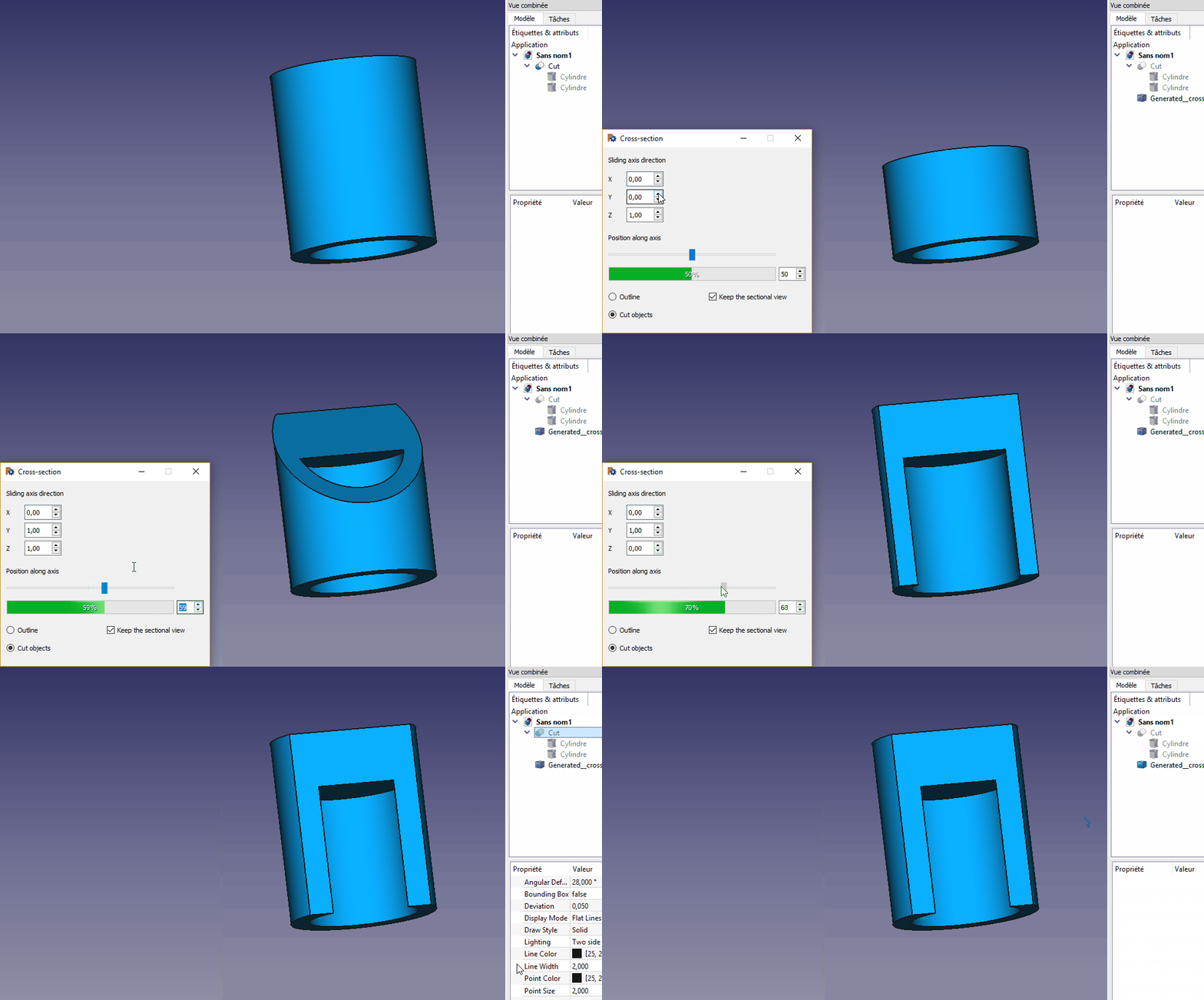
Primjer
Linkovi
Rasprava na forumu Posting a new macro
Verzija
ver 00.10 19/12/2020 : upgrade by Chris_G fix to exclude App.Part from input objects, see cross section macro does not work on bodies within a part container
ver 00.09 31/08/2019 : upgrade by g.becu adding line 334 #Sezione Dinamica
ver 00.08 04/07/2019 : upgrade replace Tab to Space by duke24 Macro cross_section update
ver 00.07 17/09/2017 : upgrade multiple objects with different colors by Gift
ver 00.06 06/09/2017 : upgrade by Gift see Optischer Schnitt durch Baugruppe, z.B. für Ventilgehäuse accept the multiple objects with different colors
ver 00.05 17/08/2017 : upgrade for 0.17 FreeCAD version by Sam see Sezione Dinamica
Ova stranica je preuzeta s https://wiki.freecad.org/Macro_cross_section