|
|
| Description |
|---|
| This macro generates an ASCII art representation of the tree of selected object(s) Macro version: 0.6 Last modified: 2020-03-23 FreeCAD version: 0.17+ Author: OpenBrain |
| Author |
| OpenBrain |
| Download |
| None |
| Links |
| Macros recipes How to install macros How to customize toolbars |
| Macro Version |
| 0.6 |
| Date last modified |
| 2020-03-23 |
| FreeCAD Version(s) |
| 0.17+ |
| Default shortcut |
| None |
| See also |
| None |

Description
This macro has been written mainly aiming at documenting the model construction. It generates an ASCII art representation of the construction tree of selected object(s).
Usage
Just select the object(s) you want to print the tree and run the macro. It will display the tree of each object in a dialog. All selected objects will be considered as being at the same hierarchy level at the top of the tree (even if they aren't in the real model). Once dialog is open, you can change style and/or pattern and re-generate the ASCII tree.
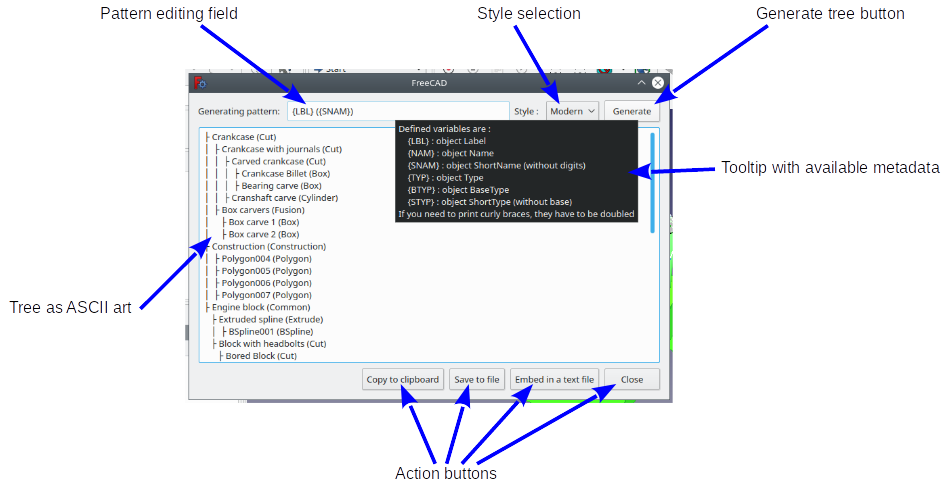
Several styles are provided, at this time mainly to support systems that can encounter problems with Unicode encoding :
- Modern : (default) uses Unicode characters to display forks and branches
- Baroque : another Unicode style with larger indentation
- ASCII : pure ASCII representation of forks and branches
Creating your own style should not be too difficult by editing the macro and changing/adding a style to 'STYLES' variable. Selected style choice is saved in FreeCAD parameters.
Line pattern is can be customized. It supports different defined metadata :
- {LBL} : object Label (displayed label)
- {NAM} : object Name (internal name) eg. 'Box001'
- {SNAM} : object ShortName (without digits) eg. 'Box001' will be displayed as 'Box'
- {TYP} : object Type eg. 'Part::MultiFuse'
- {BTYP} : object BaseType eg. 'Part::MultiFuse' will be displayed as 'Part'
- {STYP} : object ShortType (without base) eg. 'Part::MultiFuse' will be displayed as 'MultiFuse'
Default pattern is '{LBL} ({SNAM})', which means eg. object 'Box001' labeled 'myCube' will be displayed as 'myCube (Box001)'. Notice virtually all characters are allowed. If you want to print curly braces, they need to be doubled. Eg. with same example object, pattern '{LBL} (SNAME) {{{TYP}}} =>' will print 'myCube (Box) {Part::Box} =>'. Available metadata are available in the tooltip of the pattern editing field so you don't need to remember it. Line pattern is saved in FreeCAD parameters.
Once dialog is open, several actions are available :
- Copy to clipboard : copies the whole tree to your clipboard
- Save to file : saves the whole tree to an arbitrary file on your system
- Embed in text file : stores the whole tree in a text file embedded in the document (available since FC 0.18.4)
- Of course you can copy any part of the tree by selecting it and using standard copy commands
Installation
The macro is available through Addon Manager. Code is provided on this page for convenience in case user system doesn't have git-python. Though it should be up-to-date, latest release is always available at FreeCAD-macro repository
For more detailed explanations, see the How to install macros page.
Script
Forum discussion
For any feedback (bug, feature request, comments, ...), please use this forum thread : https://forum.freecad.org/viewtopic.php?f=22&t=43504
Code
Macro_FCTree2Ascii.FCMacro
#!/usr/bin/python
#####################################
# Copyright (c) openBrain 2020
# Licensed under LGPL v2
#
# This FreeCAD macro prints the Tree of selected object(s) as ASCII art.
# Several styles are available. Tree branch pattern is customizable.
# It can export to clipboard, file or embedded text document.
# This mainly aims at documenting the model.
#
# Version history :
# *0.6 : introduce last fork string definition, add new style
# *0.5 : beta release
#
#####################################

# -*- coding: utf-8 -*-

__Name__ = 'TreeToAscii'
__Comment__ = 'Prints the Tree of selected object(s) as ASCII art'
__Author__ = 'openBrain'
__Version__ = '0.6'
__Date__ = '2020-03-23'
__License__ = 'LGPL v2'
__Web__ = 'https://wiki.freecad.org/Macro_TreeToAscii'
__Wiki__ = 'https://wiki.freecad.org/Macro_TreeToAscii'
__Icon__ = ''
__Help__ = 'Select object(s) you want to print the tree then run'
__Status__ = 'Beta'
__Requires__ = 'FreeCAD >= 0.17'
__Communication__ = 'https://forum.freecad.org/viewtopic.php?f=22&t=43504'

import FreeCAD as App
import FreeCADGui as Gui
from PySide import QtGui, QtCore  # Special FreeCAD's PySide, which may be PySide2!

PREF_PATH = 'User parameter:BaseApp/Preferences/Mod/TreeToAscii'
PREF_PATTERN = 'TreePattern'
PREF_STYLE = 'TreeStyle'
STYLES = {  # defines styles as NAME : [ branch str, fork str, opt:last fork str]
    'Modern' : [' │ ', ' ├ ', ' └ '],  # Unicode U+251C, Unicode U+2502
    'Baroque' : [' │  ', ' ├─ ',  ' └─ '],
    'ASCII' : [' | ', ' \\_']
    }
DEF_PATTERN = '{LBL} ({SNAM})'
DEF_STYLE = list(STYLES.keys())[0]

g_ascii_tree=""

def printChildren(objs=None, level=0, baseline=''):
    """Build ASCII tree by recursive call"""
    global g_ascii_tree
    for cnt, obj in enumerate(objs,1):
        data = {
            "LBL" : obj.Label,
            "NAM" : obj.Name,
            "SNAM" : "".join(filter(str.isalpha, obj.Name)),
            "TYP" : obj.TypeId,
            "BTYP" : obj.TypeId.partition('::')[0],
            "STYP" : obj.TypeId.rpartition('::')[-1]
        }
        branch_str = STYLES[gen_style.currentText()][0]
        fork_str = STYLES[gen_style.currentText()][1]
        last_fork_str = STYLES[gen_style.currentText()][-1]
        if cnt == len(objs):
            g_ascii_tree += baseline + last_fork_str
        else:
            g_ascii_tree += baseline + fork_str
        try:
            g_ascii_tree += gen_pattern.text().format(**data)
        except (ValueError, IndexError, KeyError):
            g_ascii_tree = 'Error in generating pattern'
            return
        g_ascii_tree += '\n'
        if cnt == len(objs):
            baselinechi = baseline + ' '*len(branch_str)
        else:
            baselinechi = baseline + branch_str
        printChildren(obj.ViewObject.claimChildren(), level + 1, baselinechi)

def copyToClip():
    """Copies ASCII tree to clipboard"""
    tree_view.selectAll()
    tree_view.copy()
    tree_view.setPlainText("Copied to clipboard")
    QtCore.QTimer.singleShot(3000, lambda:tree_view.setPlainText(g_ascii_tree))

def saveToFile():
    """Saves ASCII tree to user system file"""
    _path = QtGui.QFileDialog.getSaveFileName()
    if _path[0]:
        save_file = QtCore.QFile(_path[0])
        if save_file.open(QtCore.QFile.ReadWrite):
            save_fileContent = QtCore.QTextStream(save_file)
            save_fileContent << g_ascii_tree
            save_file.flush()
            save_file.close()
            tree_view.setPlainText("Saved to file : " + _path[0])
        else:
            tree_view.setPlainText("ERROR : Can't open file : " + _path[0])
        QtCore.QTimer.singleShot(3000, lambda:tree_view.setPlainText(g_ascii_tree))

def embedToText():
    """Stores ASCII tree into an embedded document"""
    text_doc = None
    try:
        text_doc = App.ActiveDocument.addObject("App::TextDocument","ModelTree")
    except:
        tree_view.setPlainText("ERROR : can't create Text document. Maybe your version is too old")
    if text_doc:
        text_doc.Text = g_ascii_tree
        tree_view.setPlainText("Embedded to text document : " + text_doc.Label)
    QtCore.QTimer.singleShot(3000, lambda:tree_view.setPlainText(g_ascii_tree))

def updateTxt():
    """Updates ASCII tree"""
    global g_ascii_tree
    g_ascii_tree=""
    printChildren(Gui.Selection.getSelection())
    tree_view.setPlainText(g_ascii_tree)


def onGenerate():
    """Called when updating ASCII tree"""
    p.SetString(PREF_PATTERN, gen_pattern.text())
    p.SetString(PREF_STYLE, gen_style.currentText())
    updateTxt()

# Get saved parameters or use defaults.
p = App.ParamGet(PREF_PATH)
g_name_pattern = p.GetString(PREF_PATTERN, DEF_PATTERN)
g_tree_style = p.GetString(PREF_STYLE, DEF_STYLE)
if g_tree_style not in STYLES:
    g_tree_style = DEF_STYLE

# Build UI and show
dlg = QtGui.QDialog(Gui.getMainWindow(), QtCore.Qt.Tool)
dlg_layout = QtGui.QVBoxLayout(dlg)
gen_layout = QtGui.QHBoxLayout()
gen_pattern = QtGui.QLineEdit(g_name_pattern, dlg)
gen_pattern.setToolTip("""Defined variables are :
    {LBL} : object Label
    {NAM} : object Name
    {SNAM} : object ShortName (without digits)
    {TYP} : object Type
    {BTYP} : object BaseType
    {STYP} : object ShortType (without base)
If you need to print curly braces, they have to be doubled""")
gen_run = QtGui.QPushButton("Generate",dlg)
gen_run.clicked.connect(onGenerate)
gen_style = QtGui.QComboBox(dlg)
gen_style.addItems(list(STYLES.keys()))
gen_style.setCurrentIndex(list(STYLES.keys()).index(g_tree_style))
gen_layout.addWidget(QtGui.QLabel("Generating pattern: "))
gen_layout.addWidget(gen_pattern)
gen_layout.addWidget(QtGui.QLabel("Style : "))
gen_layout.addWidget(gen_style)
gen_layout.addWidget(gen_run)
tree_view = QtGui.QPlainTextEdit(g_ascii_tree)
tree_view.setReadOnly(True)
tree_view.setMinimumWidth(Gui.getMainWindow().width()/2)
tree_view.setMinimumHeight(Gui.getMainWindow().height()/2)
tree_view.setLineWrapMode(QtGui.QPlainTextEdit.NoWrap)
button_box = QtGui.QDialogButtonBox()
copy_clip_but = QtGui.QPushButton("Copy to clipboard", button_box)
button_box.addButton(copy_clip_but, QtGui.QDialogButtonBox.ActionRole)
copy_clip_but.clicked.connect(copyToClip)
_but = QtGui.QPushButton("Save to file", button_box)
button_box.addButton(_but, QtGui.QDialogButtonBox.ActionRole)
_but.clicked.connect(saveToFile)
store_embed_but = QtGui.QPushButton("Embed in a text file", button_box)
button_box.addButton(store_embed_but, QtGui.QDialogButtonBox.ActionRole)
store_embed_but.clicked.connect(embedToText)
close_dlg_but = QtGui.QPushButton("Close", button_box)
button_box.addButton(close_dlg_but, QtGui.QDialogButtonBox.RejectRole)
button_box.rejected.connect(dlg.reject)
dlg_layout.insertLayout(0,gen_layout)
dlg_layout.addWidget(tree_view)
dlg_layout.addWidget(button_box)
updateTxt()
dlg.exec_()
This page is retrieved from https://wiki.freecad.org/Macro_TreeToAscii