|
|
| Description |
|---|
| Tworzy helisę schodów. Utwórz swój nosek schodowy, wybierz obiekt i uruchom makro Macro version: 00.05 Last modified: 2023-08-11 FreeCAD version: Wszystkie Download: Ikonka paska narzędzi Author: Mario52 |
| Author |
| Mario52 |
| Download |
| Ikonka paska narzędzi |
| Links |
| Macros recipes How to install macros How to customize toolbars |
| Macro Version |
| 00.05 |
| Date last modified |
| 2023-08-11 |
| FreeCAD Version(s) |
| Wszystkie |
| Default shortcut |
| None |
| See also |
| None |

Opis
Utwórz eliptyczne schody
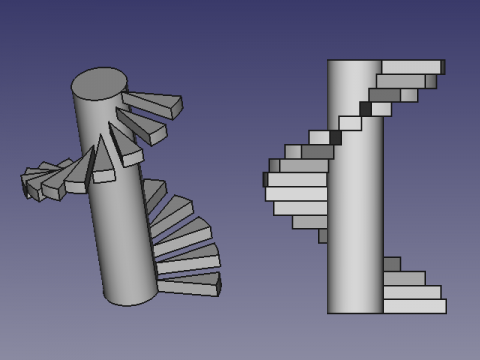
Użycie
Utwórz swój nosek schodowy, wybierz obiekt i uruchom makro.
- Hmarche : head marche
- nombre : liczba obiektów na 1 obrót
- rayon : promień (oś do obiektu)
- tours : skok liczby obrotów
- cloner : 1=utwórz klon 0=utwórz kopię
- cylindre : 1=utwórz walec 0=nie walec
- degres : 360 # liczba stopni obrotu (domyślnie 360)
Skrypt
Ikonka paska narzędzi 
Macro_Stairs.FCMacro
# Select your object(s) give :
#     head marche
#     number objects for 1 turn
#     radius (axe to object)
#     number turns
# the original object is not modify
# Macro_Stairs.FCMacro
#
#01/03/2015 2019/07/24
import FreeCAD, Draft, Part

__title__   = "CircularStair"
__author__  = "Mario52"
__date__    = "2023/08/11"
__url__     = "https://freecad.org/index-fr.html"
__wiki__    = "https://wiki.freecad.org/Macro_Stairs"
__version__ = "00.05"

############## Modify here ####################
Hmarche  = 5  # head marche
nombre   = 5  # number objects for 1 turn
rayon    = 20  # radius (axe to object)
tours    = 2  # nomber turns pitch
cloner   = 1   # 1=clone    0=copy
cylindre = 1   # 1=create cylinder  0=not cylinder
degres   = 360  # number of degrees  (default 360)
###############################################


try:
    sel = FreeCADGui.Selection.getSelection()[0]

    vecligne=[FreeCAD.Vector(0.0,0.0,0.0),FreeCAD.Vector(rayon,0.0,0.0)]   # vector for line directrice
    ligne = Draft.makeWire(vecligne,closed=False,face=False,support=None)  # creation de la ligne de base
    FreeCAD.ActiveDocument.openTransaction("Stair: Line")    # memorise les actions (avec annuler restore)

    coor_X = coor_Y = coor_Z = 0.0
    for i0 in range(tours):
        for i in range(0,degres,(int(degres/nombre))):                                  # boucle principale 0 to 360 degrees
            FreeCAD.ActiveDocument.openTransaction("Stair:" + str(i0) + "/" + str(i))    # memorise les actions (avec annuler restore)

            FreeCAD.ActiveDocument.getObject(ligne.Name).Placement=App.Placement(App.Vector(0,0,coor_Z), App.Rotation(App.Vector(0,0,1),i), App.Vector(0,0,0))
            try:
                a = ligne.Shape.Edges[0].Vertexes[1]       # fin de la ligne
                coor_X = (a.Point.x)
                coor_Y = (a.Point.y)
            except Exception:
                a = ligne.End
                coor_X = (ligne.End.x)                      # fin de la ligne X
                coor_Y = (ligne.End.y)                      # fin de la ligne Y

            if cloner == 1:
                obj=Draft.clone(sel)
            else:
                obj = Draft.scale(sel,delta=App.Vector(1, 1, 1),center=App.Vector(),copy=True,legacy=True)
            try:
                for io in range(len(obj)):
                    obj[io].Placement=App.Placement(App.Vector(coor_X,coor_Y,coor_Z), App.Rotation(i,0,0), App.Vector(0,0,0))
            except Exception:
                obj.Placement=App.Placement(App.Vector(coor_X,coor_Y,coor_Z), App.Rotation(i,0,0), App.Vector(0,0,0))

            coor_Z += Hmarche
    App.ActiveDocument.removeObject(ligne.Name)                            # remove ligne de base directrice

    # create cylinder
    if cylindre == 1:
        FreeCAD.ActiveDocument.openTransaction("Stair: Cylinder")    # memorise les actions (avec annuler restore)
        App.ActiveDocument.addObject("Part::Cylinder","Cylinder")
        App.ActiveDocument.ActiveObject.Label = "Cylindre"
        FreeCAD.ActiveDocument.ActiveObject.Height = (Hmarche * nombre * tours)    # heigth of cylinder
        FreeCAD.ActiveDocument.ActiveObject.Radius = (rayon)                       # radius of cylinder

    FreeCAD.ActiveDocument.recompute()
except Exception:
    App.Console.PrintError(u"Select the stair treads")
Łącza
Dyskusja na forum Newbie question - spiral stairs reloaded
Ta strona pochodzi z https://wiki.freecad.org/Macro_Stairs