|
|
| Description |
|---|
| This macro resets a sketch placement to an absolute one, eventually creating a datum plane. This macro has been written mainly to circumvent Topological Naming Issue that can break a model when a sketch has been directly or indirectly attached to a face or any other topological item. To prevent breakage, macro shall be applied when the model is still right. It can't "repair" a broken model. If you just break your model, undo the last change(s) back to a good situation, apply the macro to the unstable sketch(es) then redo the previous operation. |
| Author |
| OpenBrain |
| Download |
| ToolBar Icon |
| Links |
| Macros recipes How to install macros How to customize toolbars |
| Macro Version |
| 0.6.2 |
| Date last modified |
| 2019-06-14 |
| FreeCAD Version(s) |
| 0.17 and above |
| Default shortcut |
| None |
| See also |
| None |
Description
Context
This macro has been written mainly to circumvent Topological Naming Issue that can break a model when a sketch has been directly or indirectly attached to a face or any other topological item. To prevent breakage, macro shall be applied when the model is still right. It can't "repair" a broken model. If you just break your model, undo the last change(s) back to a good situation, apply the macro to the unstable sketch(es) then redo the previous operation.
Usage
Functionally, the macro will remove the current mapping of the sketch on which it is applied, then apply to it an absolute placement so it is immune to mapping support change.
To do so, the macro will basically propose 3 options (if your sketch isn't in a PartDesign Body, only first option is available and will be applied automatically) :
- "Raw" mode => the sketch placement is made absolute in the body referential, nothing more
- "DP@Face mode" => a datum plane is created where the mapping face is, then the sketch is attached to it respecting its attachment offset
- "DP@Sketch" mode => a datum place is created where the sketch is (including attachment offset), then the sketch is attached to its origin
To use the macro, just select the target sketch (eg. in the tree view) then run the macro. That's it !
Installation
The macro is available through Addon Manager. Code is provided on this page for convenience in case user system doesn't have git-python. Though it should be up-to-date, latest release is always available at FreeCAD-macro repository
For more detailed explanations, see the How to install macros page.
Details
For better understanding, below is an example : Let's suppose a simple cube whose top (yellow) face has been drafted. A cylinder is created with a padded circle whose sketch has been mapped (Flat face) to the drafted face and offset to match needs (Attachment offset) :

Now for some reason, you need to revert the pull direction of the draft (of course without the cylinder to move). Here is what basically happen :
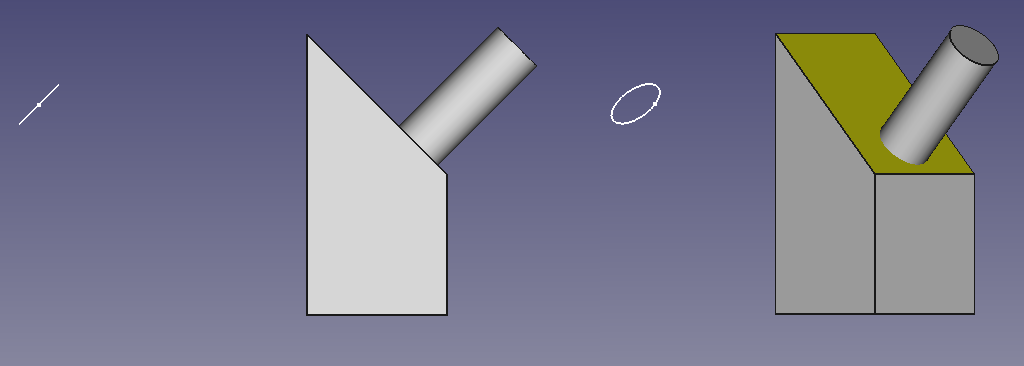
The treeview shows an error, the 3D view isn't updated, and the circle sketch is floating in the middle of nowhere...
Now comes the job of the macro (that you need to run before changing the reference face, when the sketch is still at its right place). Select the sketch and run it. If your sketch is in a body, a message box will ask to choose among the 3 different options (if your sketch is out of a body, it will automatically apply the 1st one) :
- "Raw" mode
- "DP@Face mode"
- "DP@Sketch" mode
Which in term of picture gives the following :
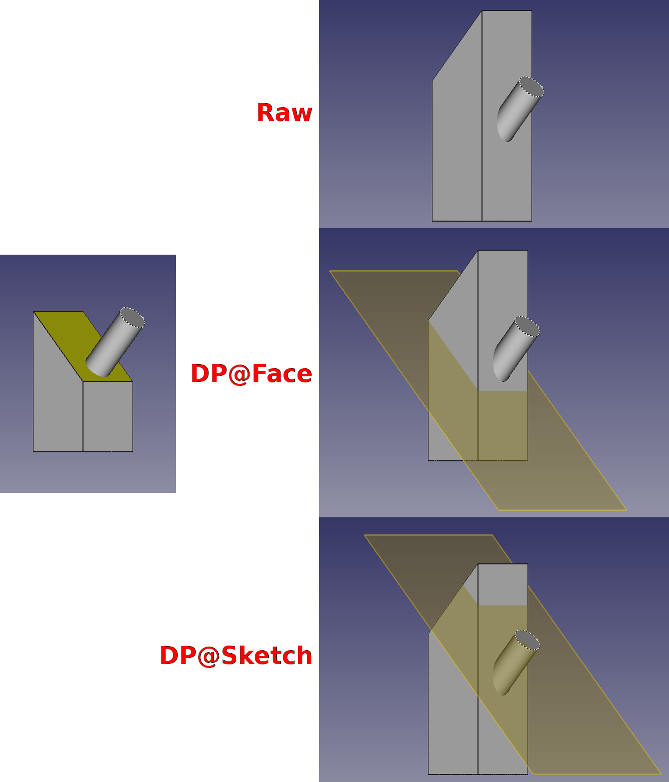
Script
ToolBar Icon 
Macro_SketchUnmap.FCMacro
#!/usr/bin/python
#####################################
# Copyright (c) openBrain 2019
# Licensed under LGPL v2
#
# This FreeCAD macro will unmap a sketch from eg. a face and make its placement absolute in the body. It proposes 3 options (forcely the first if sketch not in a body) :
# * "Raw" mode => the sketch placement is made absolute in the body referential, nothing more
# * "DP@Face mode" => a datum plane is created where the mapping face is, then the sketch is attached to it respecting its attachment offset
# * "DP@Sketch" mode => a datum place is created where the sketch is (including attachment offset), then the sketch is attached to its origin
#
# Main use of the macro is to make design more robust to topological naming issue
#
# Version history :
# *0.6.2 : add icon (metadata)
# *0.6.1 : minor changes after PR review
# *0.6 : some typo improvement + commenting for official PR
# *0.5 : beta release
#
#####################################

__Name__ = 'SketchUnmap'
__Comment__ = 'Unmap a sketch & makes its placement absolute"'
__Author__ = 'openBrain'
__Version__ = '0.6.2'
__Date__ = '2019-06-14'
__License__ = 'LGPL v2'
__Web__ = 'https://wiki.freecad.org/Macro_SketchUnmap'
__Wiki__ = 'https://wiki.freecad.org/Macro_SketchUnmap'
__Icon__ = 'https://wiki.freecad.org/images/3/34/SketchUnmap.svg'
__Help__ = 'Select the sketch to unmap (eg. in the tree view) then run the macro'
__Status__ = 'Beta'
__Requires__ = 'FreeCAD >= 0.17'
__Communication__ = 'https://forum.freecad.org/viewtopic.php?f=22&t=36078'
#    __Files__ = ''

__dbg__ = False  #True for debugging

from PySide import QtGui

def cslM(msg): #Print message in console
    FreeCAD.Console.PrintMessage('\n')
    FreeCAD.Console.PrintMessage(msg)

def cslW(msg): #Print warning in console
    FreeCAD.Console.PrintMessage('\n')
    FreeCAD.Console.PrintWarning(msg)

def cslE(msg): #Print error in console
    FreeCAD.Console.PrintMessage('\n')
    FreeCAD.Console.PrintError(msg)

def cslD(msg): #Print debug message in console
    if __dbg__:
        FreeCAD.Console.PrintMessage('\n')
        FreeCAD.Console.PrintMessage("Debug : " + str(msg))

_0Vec_ = FreeCAD.Vector(0, 0, 0) #Shortener for null vector
_ZVec_ = FreeCAD.Vector(0, 0, 1) #Shortener for Z axis

if __dbg__:  ##Clear report view in debug mode
    FreeCADGui.getMainWindow().findChild(QtGui.QTextEdit, "Report view").clear()

cslM("Starting SketchUnmap macro")
cslD("Checking selection")

##If selection is wrong, print error message and exit
if (len(Gui.Selection.getSelection()) != 1 or str(Gui.Selection.getSelection()[0]) != '<Sketcher::SketchObject>'):
    cslE("You must select a sketch that you want to unmap (and only one) ... Exiting")
else:
    cslD("Selection OK")
    App.ActiveDocument.openTransaction("SketchUnmap") #Open transaction for undo management
    sk = Gui.Selection.getSelection()[0] #Get target sketch
    skNatPl = sk.Placement #Store placement
    skNatAO = sk.AttachmentOffset #Store attachment offset
    skInBody = False
    for obj in sk.InList: ##Check if sketch is inside a Body
        if obj.TypeId == 'PartDesign::Body':
            skInBody = True
            skBody = obj
    cslD("Sketch in a body : " + str(skInBody))
    msgb = QtGui.QMessageBox() ##Prepare the message box to choose option
    msgb.setWindowTitle("Unmap Sketch : Mode selection")
    msgb.setText("""Choose which unmapping mode you want to apply :
    Raw => the sketch placement is made absolute in the body referential, nothing more
    DP@Face => a datum plane is created where the mapping face is, then the sketch is attached to it respecting its attachment offset
    DP@Sketch => a datum place is created where the sketch is (including attachment offset), then the sketch is attached to its origin
        Click 'Cancel' to cancel operation""")
    msgb.setIcon(QtGui.QMessageBox.Question)
    rbut = msgb.addButton("Raw", QtGui.QMessageBox.AcceptRole)
    fbut = msgb.addButton("DP@Face", QtGui.QMessageBox.AcceptRole)
    sbut = msgb.addButton("DP@Sketch", QtGui.QMessageBox.AcceptRole)
    cbut = msgb.addButton("Cancel", QtGui.QMessageBox.RejectRole)
    if skInBody: #If sketch in a Body
        msgb.exec_() ##Show message box and get user choice
        msgbRep = msgb.clickedButton()
    else:
        msgbRep = rbut #Else apply raw mode automatically
    if msgbRep == rbut: #If raw mode
        sk.Support = None ##Just unmap the sketch so its placement is absolute
        sk.MapMode = 'Deactivated'
    elif msgbRep == fbut: #If DP@Face mode
        newDP = skBody.newObject('PartDesign::Plane','DP' + sk.Name) #Create a datum plane
        if sk.Label != sk.Name: ##Eventually clarify its label
            newDP.Label = 'DP' + sk.Label
        newDP.Support = None ##Plane is placed absolute
        newDP.MapMode = 'Deactivated'
        newDP.Placement = skNatPl.multiply(skNatAO.inverse()) #Plane placement is set to former face one
        sk.Support = [(newDP,'')] #Sketch is mapped to plane keeping its attachment offset
    elif  msgbRep == sbut: #If DP@Sketch mode
        newDP = skBody.newObject('PartDesign::Plane','DP' + sk.Name) #Create a datum plane
        if sk.Label != sk.Name: ##Eventually clarify its label
            newDP.Label = 'DP' + sk.Label
        newDP.Support = None ##Plane is placed absolute
        newDP.MapMode = 'Deactivated'
        newDP.Placement = skNatPl #Plane placement is set to former sketch one
        sk.Support = [(newDP,'')] ##Sketch is mapped to plane resetting its attachment offset
        sk.AttachmentOffset = App.Placement(_0Vec_, App.Rotation(_ZVec_, 0))
    App.ActiveDocument.commitTransaction() #Commit transaction for undo management
    cslM("SketchUnmap Macro ended correctly")
Limitations
- Only process one sketch at a time
- Only work on sketch objects
Forum discussion
For any feedback (bug, feature request, comments, ...), please use this forum thread : (FR) macro to remap sketch to different reference
Ta strona pochodzi z https://wiki.freecad.org/Macro_SketchUnmap