|
|
| Descrizione |
|---|
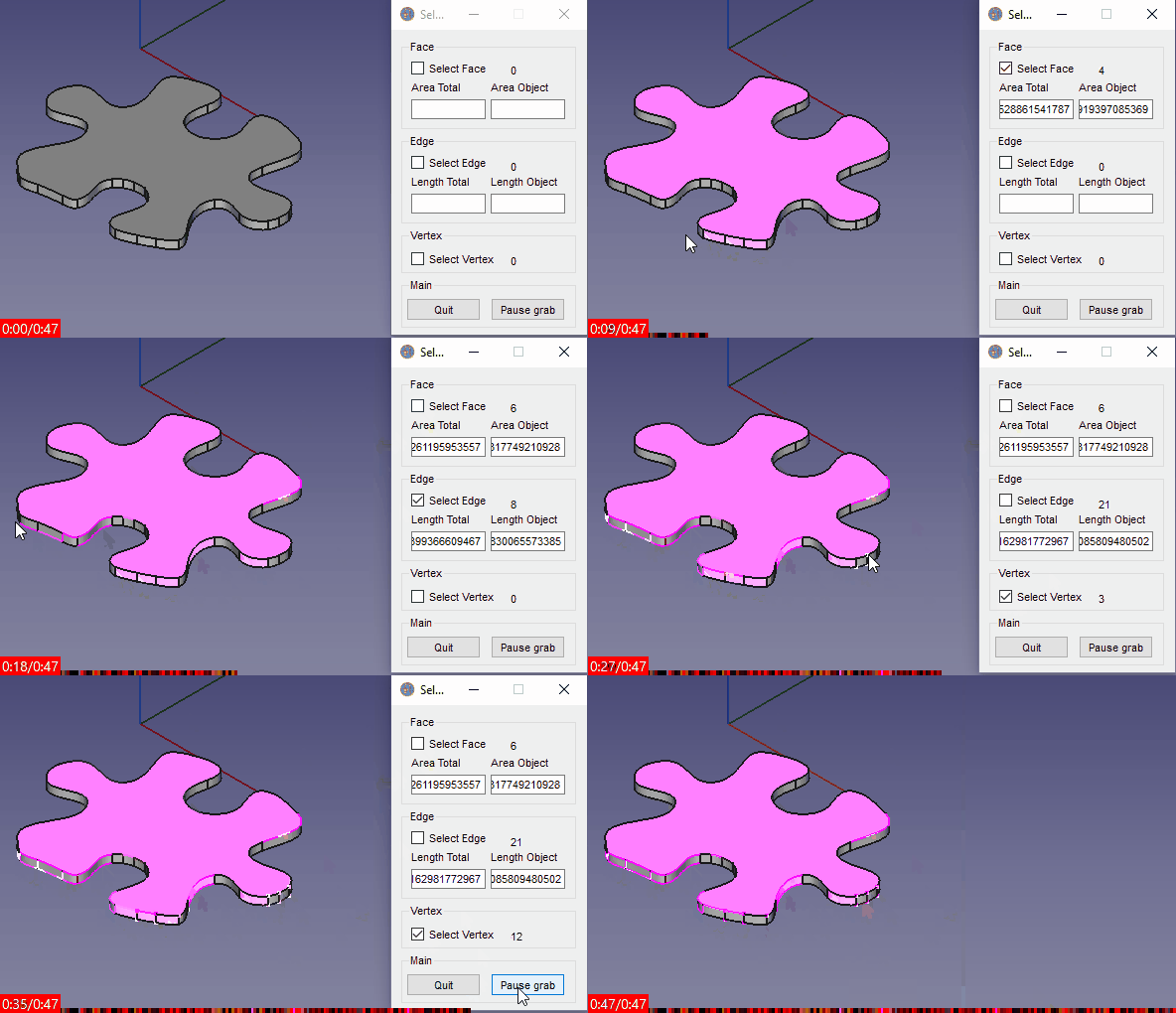
| Questa macro seleziona a scelta una Faccia, Bordo, Vertice passando il mouse. PS: Per deselezionare una faccia (o altro) cliccare Pause grab e usare la procedura standard: CTRL + Click Versione macro: 00.03b Ultima modifica: 2020-10-28 Versione FreeCAD: All Download: ToolBar Icon Autore: Mario52 |
| Autore |
| Mario52 |
| Download |
| ToolBar Icon |
| Link |
| Raccolta di macro Come installare le macro Personalizzare la toolbar |
| Versione macro |
| 00.03b |
| Data ultima modifica |
| 2020-10-28 |
| Versioni di FreeCAD |
| All |
| Scorciatoia |
| Nessuna |
| Vedere anche |
| Nessuno |

Descrizione
Questa macro seleziona a scelta una Faccia, Bordo, Vertice passando sopra con il mouse
Temporary code for external macro link. Do not use this code. This code is used exclusively by Addon Manager. Link for optional manual installation: Macro
# This code is copied instead of the original macro code
# to guide the user to the online download page.
# Use it if the code of the macro is larger than 64 KB and cannot be included in the wiki
# or if the RAW code URL is somewhere else in the wiki.

from PySide import QtGui, QtCore

diag = QtGui.QMessageBox(QtGui.QMessageBox.Information,
    "Information",
    "This macro must be downloaded from this link\n"
    "\n"
    "https://gist.githubusercontent.com/mario52a/7ebe6b3fd047441114d9d0e08ceddd63/raw/f228687c4514159a5acb9920bf2366a81cb4908b/Macro%2520Select%2520Hovering.FCMacro" + "\n"
    "\n"
    "Quit this window to access the download page")

diag.setWindowFlags(QtCore.Qt.WindowStaysOnTopHint)
diag.setWindowModality(QtCore.Qt.ApplicationModal)
diag.exec_()

import webbrowser
webbrowser.open("https://gist.githubusercontent.com/mario52a/7ebe6b3fd047441114d9d0e08ceddd63/raw/f228687c4514159a5acb9920bf2366a81cb4908b/Macro%2520Select%2520Hovering.FCMacro")
PS: Per deselezionare una faccia (o altro) cliccare Pause grab e usare la procedura standard: CTRL + Click
Utilizzo
Passare sopra agli elementi con il mouse
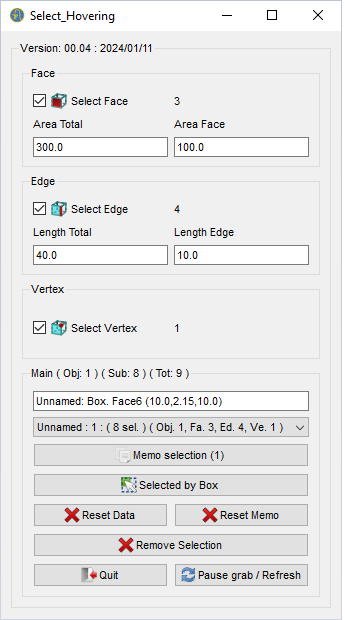
Section Face
 Selezionare faccia → 3 numero di facce
300.0 area totale delle selezioni
100.0 area della selezione più recente
Selezionare faccia → 3 numero di facce
300.0 area totale delle selezioni
100.0 area della selezione più recente
Section Edge
Selezionare bordo → 4 numero di bordi
40.0 lunghezza totale delle selezioni
10.0 lunghezza dell'ultima selezione
Section Vertex
Selezionare vertice → 1 numero di vertici
Section Main
Il titolo mostra informazioni su :
- ( Obj: 1 ) : numero di oggetti selezionati
- ( Sub: 8 ) : numero di sotto-oggetti selezionati
- ( Tot: 9 ) : Somme Obj + Sub
Unnamed: Box. Face6 (1.34,2.64,10.0)
- visualizza brevi informazioni e quello che è sotto il cursore del mouse
Unnamed: 1 : (8 sel.) (Obj. 1, Fa. 3, Ed. 4, Ve. 1) 
- Nome del documento
- 8 selezioni
- Obj. 1 oggetto
- Fa. 3 facce
- Ed. 4 spigoli
- Ve. 1 vertice
- Se si utilizzano più documenti, la macro ripristina solo la selezione nel documento aperto (per funzionare)
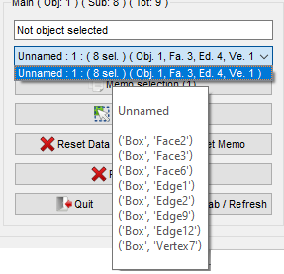
- Il tooltip visualizza l'elenco del documento selezionato, nome e sotto-oggetto
Selected by Box
- Se si seleziona tramite la Box selection, questo pulsante seleziona tutti gli oggetti scelti.
- In alternativa, se si seleziona l'opzione "Vertici" e si desidera selezionare tutti i vertici dell'oggetto, fare clic su questo pulsante.
Reset Data
- Reimposta tutti i dati nella macro (non nel memo)
Reset Memo
- Resetta il memo
Remove selection
- Rimuove le selezioni nel documento corrente
(P.S.: se più documenti sono aperti facendo clic con il mouse nella vista 3D, rimuove tutte le selezioni in tutti i documenti)
Quit
- Esce dalla macro
Pause grab/Refresh
- Mette in pausa la macro, ad esempio: deseleziona uno o più oggetti.
- Dopo la pausa, fare clic per tornare alla macro e aggiornare tutte le informazioni al suo interno.
- Può essere utilizzato per aggiornare le selezioni nella macro (in qualsiasi momento).
- Esempio: molti oggetti sono selezionati prima dell'esecuzione della macro.
- La macro si adatta e rileva tutte le modifiche al documento.
Icone
L'icona deve essere copiata nella stessa directory della macro
Icona barra degli strumenti 
Script
Macro_Select_Hovering.FCMacro


Versioni
ver 00.04b (30/06/2025) : tornato a PySide e adattato il codice
ver 00.04 (11/01/2024): aggiunte:
- Informazioni LineEdit,
- Selezione ComboBox memo,
- Selezione pulsante memo,
- Pulsante Selected by body
- Pulsante Reset Data
- Pulsante Reset Memo
- Pulsante Remove Selection
ver 00.03b (28/10/2020) : add print() for Python 3
ver 00.03 (26/12/2017) : replace test with (FreeCAD.ActiveDocument.getObject(obj), sub) == False)
ver 00.02 (26/12/2017) :
ver 00.01 (25/12/2017) :
Vincolo
Questa pagina è recuperata da https://wiki.freecad.org/Macro_Select_Hovering