(parametrico!)
|
|
| Descrizione |
|---|
| Implementazione alternativa di Sezione (parametrica) Versione macro: 1.1 Ultima modifica: 2018-04-28 Versione FreeCAD: All Download: ToolBar Icon Autore: DeepSOIC |
| Autore |
| DeepSOIC |
| Download |
| ToolBar Icon |
| Link |
| Raccolta di macro Come installare le macro Personalizzare la toolbar |
| Versione macro |
| 1.1 |
| Data ultima modifica |
| 2018-04-28 |
| Versioni di FreeCAD |
| All |
| Scorciatoia |
| Nessuna |
| Vedere anche |
| Nessuno |
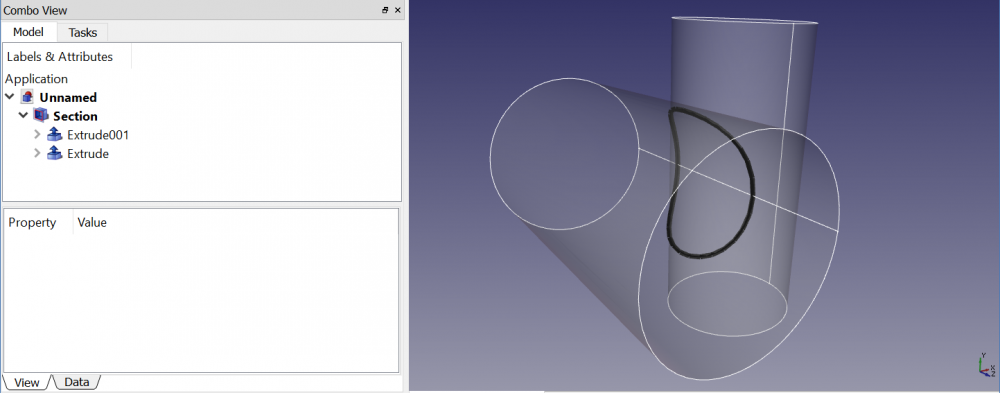
Lo strumento Part Sezione produce dei bordi discontinui e gran numero di segmenti (nodi), e questo non è molto adatto per il percorso di Sweep.
Questa macro fa la stessa cosa estraendo i bordi della sezione dal risultato di una fusione generale (GFA). Il risultato è più continuo e ha meno nodi. Non è ancora perfetto per lo sweep, ma il risultato è più soddisfacente che utilizzando semplicemente la Sezione di Part.
Richiede FreeCAD v0.17+ built against OCC no less than 6.9.0 (testato con 7.0.0).
Installazione
Scaricare questo file e salvarlo nella cartella delle macro:
https://github.com/DeepSOIC/FreeCAD-Macros/raw/master/Section/MacroSection.py
Utilizzo
- Selezionare due forme
- Nel menu di FreeCAD: Macro → Macro... → fare doppio clic su MacroSection.FCMacro . Viene creato un nuovo oggetto.
Dopo aver eseguito la macro una volta, puoi aggiungere un pulsante della barra degli strumenti. Vai su Strumenti → Personalizza, Barre degli strumenti, seleziona MacroSelezione nell'elenco a discesa a sinistra e aggiungi il comando a una qualsiasi delle tue barre degli strumenti personalizzate.
Script
Icona barra degli strumenti 
MacroSection.py
#***************************************************************************
#*                                                                         *
#*   Copyright (c) 2016 - Victor Titov (DeepSOIC)                          *
#*                                               <vv.titov@gmail.com>      *
#*                                                                         *
#*   This program is free software; you can redistribute it and/or modify  *
#*   it under the terms of the GNU Lesser General Public License (LGPL)    *
#*   as published by the Free Software Foundation; either version 2 of     *
#*   the License, or (at your option) any later version.                   *
#*   for detail see the LICENCE text file.                                 *
#*                                                                         *
#*   This program is distributed in the hope that it will be useful,       *
#*   but WITHOUT ANY WARRANTY; without even the implied warranty of        *
#*   MERCHANTABILITY or FITNESS FOR A PARTICULAR PURPOSE.  See the         *
#*   GNU Library General Public License for more details.                  *
#*                                                                         *
#*   You should have received a copy of the GNU Library General Public     *
#*   License along with this program; if not, write to the Free Software   *
#*   Foundation, Inc., 59 Temple Place, Suite 330, Boston, MA  02111-1307  *
#*   USA                                                                   *
#*                                                                         *
#***************************************************************************

__title__="Macro Section"
__author__ = "DeepSOIC"
__doc__ = '''
Macro Section.
Alternative implementation of Part Section tool.
Requires FreeCAD v0.17+ and OCC 6.9.0+

Instructions:
First of all, save this macro as MacroSection.py, into a location from where it can be imported. FC's standard macro location is the best place to do that.

Select two shapes to compute section between.
Then, in Py console:

import MacroSection
MacroSection.run()

OR

just run this file as a macro.

Parametric Section object is created.
'''
if __name__ == "__main__": #being run as a macro
    import MacroSection
    MacroSection.run()

import FreeCAD as App
if App.GuiUp:
    import FreeCADGui as Gui
import Part

def makeSectionFeature():
    '''makeSectionFeature(): makes a Section parametric feature object. Returns the new object.'''
    selfobj = App.ActiveDocument.addObject("Part::FeaturePython","Section")
    Section(selfobj)
    ViewProviderSection(selfobj.ViewObject)
    return selfobj

class Section:
    "The Section feature object"
    def __init__(self,selfobj):
        selfobj.addProperty("App::PropertyLink","Base","Section","Input shape")
        selfobj.addProperty("App::PropertyLink","Tool","Section","Input shape")
        selfobj.Proxy = self

    def execute(self,selfobj):
        import BOPTools
        import BOPTools.ShapeMerge
        from BOPTools.Utils import HashableShape

        if len(selfobj.Base.Shape.Faces) == 0 or len(selfobj.Tool.Shape.Faces) == 0:
            raise ValueError("Shapes must have at least one face each.")
        sh1 = Part.Compound(selfobj.Base.Shape.Faces)
        sh2 = Part.Compound(selfobj.Tool.Shape.Faces)
        pieces, map = sh1.generalFuse([sh2])
        pieces = pieces.childShapes()
        assert(len(pieces) == 2)

        edges1 = set([HashableShape(edge) for edge in pieces[0].Edges])
        edges2 = set([HashableShape(edge) for edge in pieces[1].Edges])
        edges_to_return = list(set.intersection(edges1, edges2))
        edges_to_return = [edge.Shape for edge in edges_to_return] #convert hashable shapes back to plain shapes
        print("returning {num} edges of total {tot}".format(num= len(edges_to_return), tot= len(edges1)+len(edges2)))

        selfobj.Shape = BOPTools.ShapeMerge.mergeWires(edges_to_return)

class ViewProviderSection:
    def __init__(self,vobj):
        vobj.Proxy = self

    def getIcon(self):
        return ":/icons/Part_Section.svg"

    def attach(self, vobj):
        self.ViewObject = vobj
        self.Object = vobj.Object

    def __getstate__(self):
        return None

    def __setstate__(self,state):
        return None

    def claimChildren(self):
        return [self.Object.Base, self.Object.Tool]

    def onDelete(self, feature, subelements): # subelements is a tuple of strings
        try:
            self.Object.Base.ViewObject.show()
            self.Object.Tool.ViewObject.show()
        except Exception as err:
            App.Console.PrintError("Error in onDelete: " + err.message)
        return True

class CommandMacroSection:
    "Command to create Section feature"
    def GetResources(self):
        return {'Pixmap'  : ":/icons/Part_Section.svg",
                'MenuText': "Section",
                'Accel': "",
                'ToolTip': "Macro_Section: alternative implementation of Part Section tool"}

    def Activated(self):
        run()
    def IsActive(self):
        if App.ActiveDocument:
            return True
        else:
            return False

if App.GuiUp:
    Gui.addCommand("Macro_Section", CommandMacroSection())

def run():
    sel = Gui.Selection.getSelectionEx()
    try:
        if len(sel) != 2:
            raise Exception("Select two shapes to compute section between, first! Then run this macro.")
        try:
            App.ActiveDocument.openTransaction("Macro Section")
            selfobj = makeSectionFeature()
            selfobj.Base = sel[0].Object
            selfobj.Tool = sel[1].Object
            selfobj.Base.ViewObject.hide()
            selfobj.Tool.ViewObject.hide()

            selfobj.Proxy.execute(selfobj)
        finally:
            App.ActiveDocument.commitTransaction()
    except Exception as err:
        from PySide import QtGui
        mb = QtGui.QMessageBox()
        mb.setIcon(mb.Icon.Warning)
        mb.setText(err.message)
        mb.setWindowTitle("Macro Section")
        mb.exec_()
Questa pagina è recuperata da https://wiki.freecad.org/Macro_Section